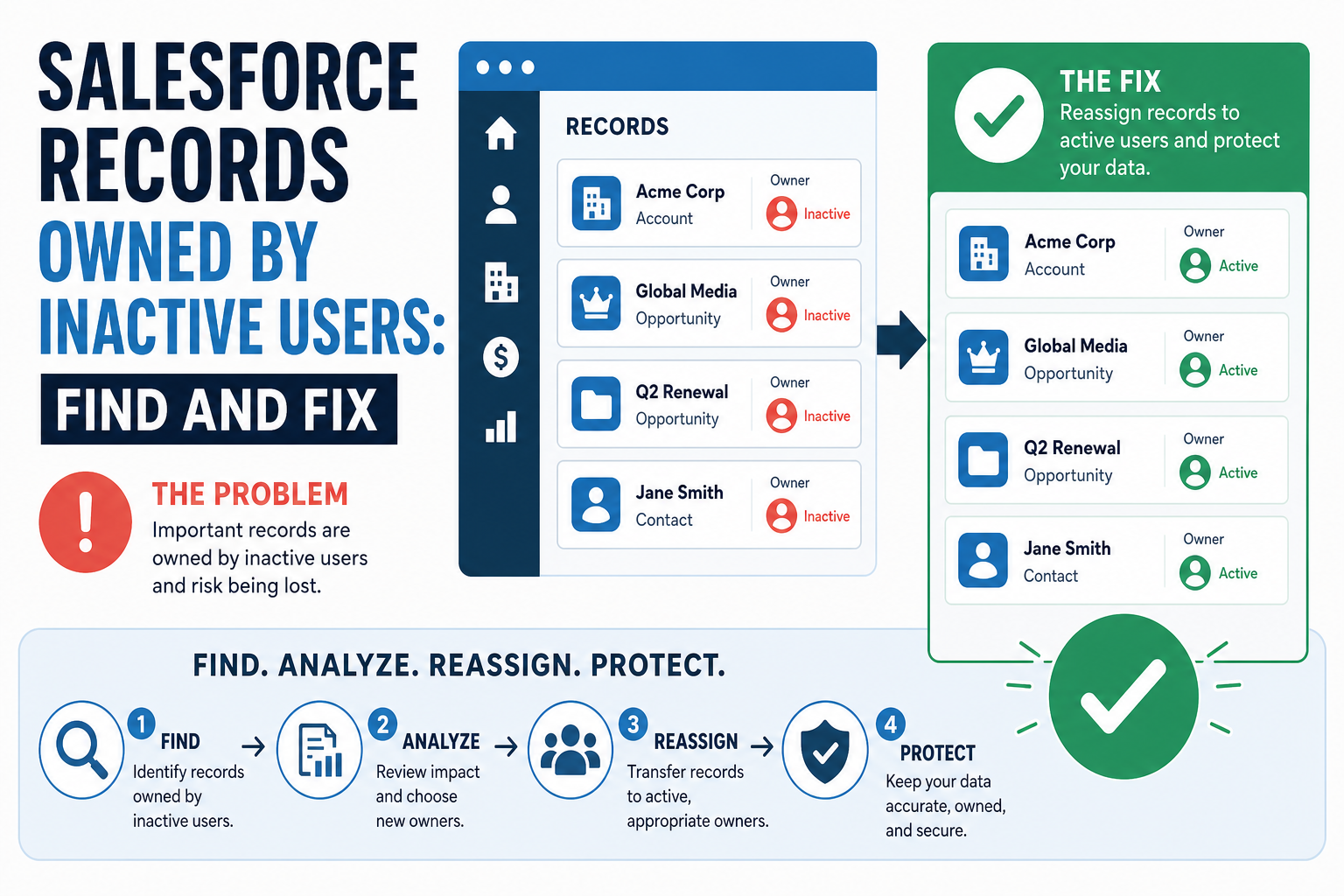
A teammate leaves. You deactivate their Salesforce user, reassign their open opportunities, and move on. Months later an integration job fails with a cryptic error, and the trail leads to a queue of tasks and events still owned by the deactivated account — records that nobody reassigned, that resist being edited, and that have been quietly blocking updates ever since.
Salesforce never reassigns records automatically when a user is deactivated. Ownership simply stays put, and the cleanup is entirely on the admin. This guide covers what actually breaks, how to find every record an inactive user still owns, and the three ways to fix them — including the permission most orgs have never switched on.
Quick Answer
When a Salesforce user is deactivated, every record they own stays owned by them — nothing is reassigned automatically. Those records can block edits, integration updates, and automation until you act. The fix has three parts: find the records (SOQL filtering Owner.IsActive = false, or reports on key objects), unlock them (enable the "Update Records with Inactive Owners" permission via Setup → User Interface, then assign it to admins), and reassign (Mass Transfer Records in Setup for most objects; API updates or parent-record transfers for activities). Vantage Point handles ownership cleanup as part of its Salesforce consulting work.
TL;DR
- The default: deactivating a user changes nothing about record ownership — their accounts, tasks, and events stay put.
- The symptom: edits and integration updates against those records fail, often with privilege-style errors.
- The unlock: the "Update Records with Inactive Owners" user permission (enabled first in Setup → User Interface) lets designated users edit those records.
- The fix: Mass Transfer Records for standard objects; parent-record transfer or API OwnerId updates for activities.
- How Vantage Point helps: our Salesforce team runs ownership sweeps and builds offboarding checklists that prevent recurrence.
What Actually Breaks When Owners Go Inactive?
Deactivation freezes the user, not their footprint. The record-level consequences show up in a specific order:
- Edits get blocked. Other users — sometimes even admins — hit errors updating records owned by an inactive user, most notoriously on activities. The data looks normal; it just resists change.
- Integrations fail. Middleware and connected apps running under normal permissions cannot update those records either, so sync jobs start throwing errors on the exact records that most need maintenance.
- Automation misfires. Flows, assignment rules, and approval steps that reference the departed user keep pointing at a dead account.
- Reporting skews. Pipeline and activity reports keep crediting a user who no longer exists, distorting both history and hygiene metrics.
How Do You Find Records Owned by Inactive Users?
There is no single "show me everything" button, so combine three approaches:
- SOQL for precision. In Developer Console or Workbench, query each object with the owner's active flag, e.g.
SELECT Id, Subject, OwnerId FROM Task WHERE Owner.IsActive = false. Repeat for Event, Account, Contact, Lead, Opportunity, Case, and any custom objects with ownership. - Reports for the big objects. Build reports on accounts, opportunities, and cases, and filter or bucket on the owner — inactive users surface quickly when you group by owner and compare against your active user list.
- The user record itself. A deactivated user's related lists still enumerate what they own, which is useful for spot-checking one departure.
Run this sweep org-wide, not just for the person who left last week — most orgs discover inactive-owner residue going back years.
What Is the "Update Records with Inactive Owners" Permission?
Salesforce added a user permission specifically for this problem, but it arrives switched off. To use it:
- Go to Setup → User Interface and enable the setting that turns on the "Set Audit Fields upon Record Creation" and "Update Records with Inactive Owners" user permissions.
- Assign Update Records with Inactive Owners to the admins or integration users who need it, via a profile or permission set.
- From that point, those users can edit records owned by inactive users — which unblocks both manual cleanup and failing integration jobs.
Think of it as the tourniquet: it stops the bleeding immediately, but it does not fix the underlying problem. Ownership still needs to move to active users.
How Do You Reassign the Records?
| Record type | Reassignment method | Notes |
|---|---|---|
| Accounts, leads, opportunities, cases, custom objects | Mass Transfer Records in Setup | Object-by-object; transferring an account can optionally carry open activities and related records with it |
| Open tasks and events | Parent-record transfer, or API update of OwnerId | Activities have no standalone mass-transfer tool; the account transfer option or a data load is the practical route |
| Closed/historical activities | Usually leave in place | They are history; reassigning them rewrites who did the work |
| Reports, dashboards, list views, flows | Manual review of the user's assets | Dashboards running as the departed user fail; reassign the running user |
For large volumes, a scripted API update (set OwnerId to the correct active user, in batches, with the inactive-owner permission in place) is faster and more auditable than clicking through the UI.
How Do You Stop This From Recurring?
- Freeze first, deactivate second. Freezing blocks login instantly while you complete an ownership review; deactivate only after the sweep is done.
- Make an ownership sweep a mandatory offboarding step — same ticket, same checklist, every departure.
- Schedule a recurring report that surfaces records owned by inactive users, so drift gets caught quarterly instead of discovered during an incident.
- Keep the permission assigned to integration users so sync jobs degrade gracefully if a record slips through.
How Vantage Point Helps
Vantage Point is a boutique, senior-led Salesforce and HubSpot partner and is employee-owned. Ownership hygiene is a standard workstream in our Salesforce engagements: we run the org-wide sweep, enable and assign the right permissions, reassign records with audit trails, and build the offboarding checklist that keeps the problem from coming back. Senior consultants only — no junior handoffs; the experts you meet are the experts who deliver. For orgs that want this watched continuously, our managed services team runs recurring hygiene sweeps as an ongoing practice.
Integration errors pointing at departed users?
A focused cleanup engagement finds every inactive-owned record, unblocks your updates, and installs the offboarding process that prevents round two. Talk to Vantage Point.
Frequently Asked Questions
What happens to records when a Salesforce user is deactivated?
Nothing automatic. Deactivating a user freezes their access but leaves every record they own — accounts, opportunities, tasks, events, custom objects — assigned to the inactive account until an admin reassigns them.
Why can't I edit a record owned by an inactive user?
Salesforce restricts updates to records owned by inactive users unless the "Update Records with Inactive Owners" permission is enabled in Setup (under User Interface) and assigned to you via a profile or permission set. Without it, edits and integration updates to those records can fail.
How do I find all records owned by inactive users?
The most precise method is SOQL — query each object filtering on Owner.IsActive = false, e.g. SELECT Id FROM Task WHERE Owner.IsActive = false. For key objects like accounts and opportunities, reports grouped by owner also surface the problem quickly.
Can I mass transfer tasks and events from an inactive user?
Not directly — the Mass Transfer Records tool works per object for accounts, leads, and similar records, and transferring an account can carry its open activities along. Standalone activity reassignment is usually done by updating OwnerId through the API, with the inactive-owner permission enabled.
Should I reassign historical, closed activities too?
Generally no. Closed tasks and events are a historical record of who did the work; reassigning them distorts reporting. Focus reassignment on open activities and forward-looking records, and leave history intact.
Is it better to freeze or deactivate a departing user first?
Freeze first. Freezing immediately blocks login while preserving everything, giving you time to complete the ownership sweep, reassign records, and re-point automation. Deactivate only after the checklist is done.