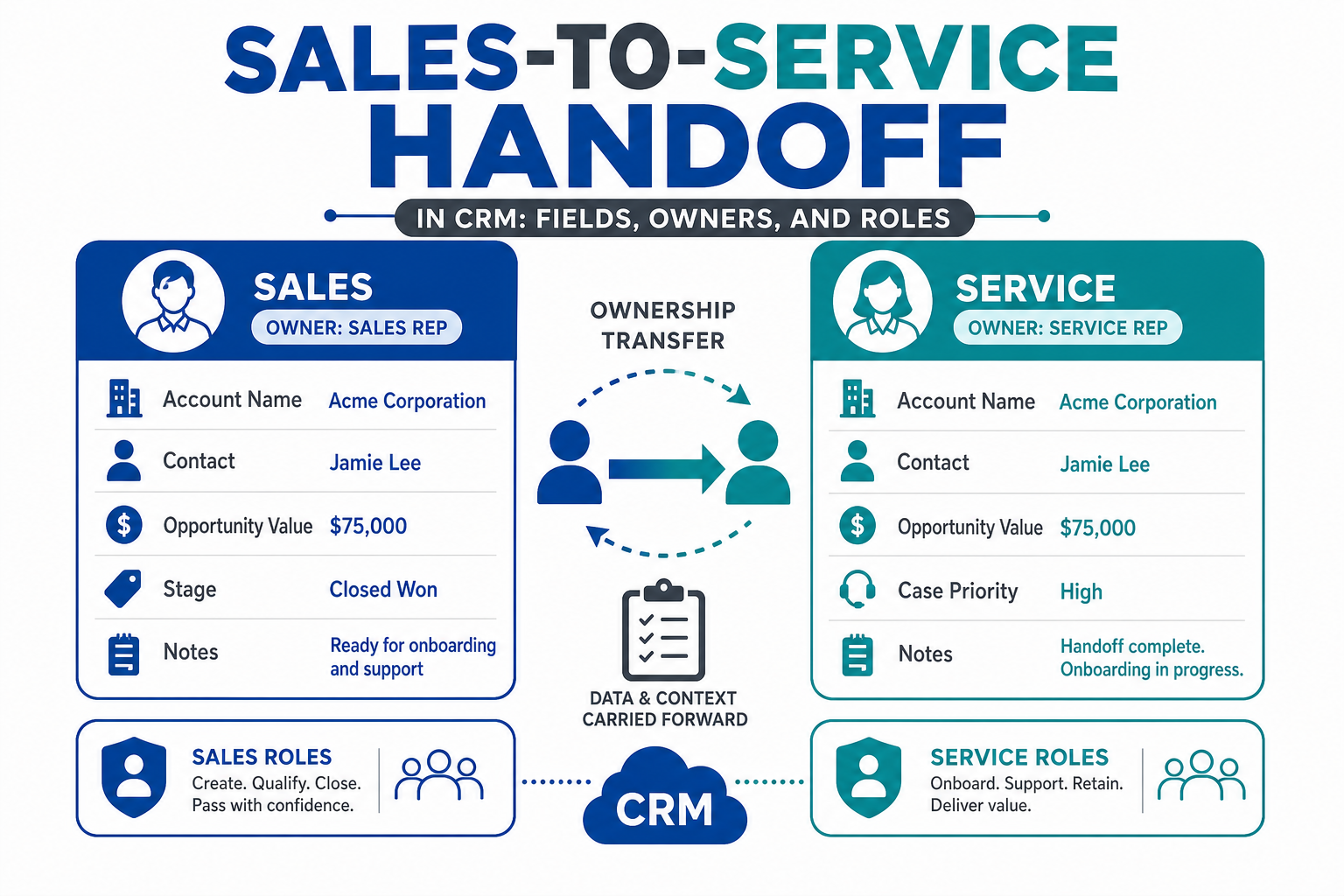
The moment a customer signs is the moment many CRM processes get fuzzy. Sales has the context: what was promised, who the decision-makers are, what the customer is worried about. Service has to deliver on it. If that context lives in a salesperson's head or a scattered email thread, the customer ends up repeating themselves and service starts with guesswork.
A good sales-to-service handoff is mostly a data design problem. This guide covers which fields should carry over, why the salesperson and the service owner should be recorded separately, and how to build the handoff in Salesforce or HubSpot.
Quick Answer
A sales-to-service handoff in CRM moves a newly signed customer from the sales team to the team that serves them, with the context they need. Carry over what was sold, the committed values at signing, key contacts and their roles, promises and risks, and open items. Record the salesperson in their own field instead of making them the service owner, so sales credit, account ownership and service responsibility stay clear. Trigger the handoff automatically at signing. Vantage Point builds these processes through its Salesforce and HubSpot implementation services.
Key Takeaways (TL;DR)
- Handoffs fail on missing context, not missing effort. Decide which fields must be complete before a deal can close.
- Separate the roles: the person who sold the deal isn't automatically the person who owns the relationship afterward.
- Freeze what was sold: keep at-signing values alongside the live values service will update.
- Automate the trigger: create the onboarding case, project or ticket when the deal closes.
- Close the loop: service should be able to flag gaps back to sales.
What Is a Sales-to-Service Handoff?
A sales-to-service handoff is the transfer of a customer, and everything known about them, from the people who won the business to the people who deliver it. Depending on your business, service might mean onboarding, account management, support, operations or a delivery team.
In a CRM, the handoff usually happens when a deal or opportunity is marked closed-won. At that point, a record for the service side is created or updated, an owner is assigned, and the relevant details are copied or linked.
Why Do Handoffs Break Down?
Most handoff problems come from a few predictable gaps:
- Context lives outside the CRM. Promises made on calls never get written down.
- Fields are optional. Deals close with blank or vague handoff information.
- Ownership is overloaded. The salesperson stays as account owner because nobody changed it, or the service owner replaces them and sales credit disappears.
- Values keep moving. Service updates amounts or items, and nobody can see what was originally sold.
- Nothing triggers the next step. Service finds out about a new customer from a hallway conversation.
Which Fields Should Carry Over From Sales to Service?
Keep the list short enough that salespeople will complete it. A practical core set:
| Field group | Examples | Why service needs it |
|---|---|---|
| What was sold | Products, services, scope, term | Defines what service must deliver |
| Values at signing | Contract value, quantities, committed amounts | Preserves the agreed baseline |
| People and roles | Decision-maker, day-to-day contact, billing contact | Service knows who to call for what |
| Promises and expectations | Timelines, special terms, success criteria | Prevents surprises in the first weeks |
| Risks and sensitivities | Concerns raised, past issues, competitors displaced | Helps service start on the right foot |
| Open items | Documents pending, approvals needed, next steps | Keeps momentum after signing |
Make the most important of these required at the closed-won stage. A validation rule in Salesforce or required properties on a HubSpot deal stage stops deals from closing with the handoff incomplete.
Why Should the Salesperson and the Service Owner Be Separate Fields?
This is the design choice teams most often get wrong. The person who sold the deal and the person responsible for the relationship afterward are different roles, even when they're the same person on some accounts.
If one owner field does both jobs, you lose something either way. Keep the salesperson as owner, and service work is assigned to someone who isn't doing it. Reassign the owner to service, and reports can no longer show who sold what.
The fix is to record both explicitly:
- Record owner for the person or team accountable for the account going forward.
- A "sold by" or originating rep field that captures the salesperson and doesn't change.
- Additional role fields for any other parties, such as an advisor, partner or referral source, instead of overloading ownership.
In Salesforce, account teams can also list several people and their roles on one account. In HubSpot, a property using the HubSpot user field type can hold the salesperson alongside the record owner.
How Do You Keep What Was Sold Separate From What Changes?
Once service starts working, amounts, items and dates change. That's normal. But service, finance and sales still need to know what the customer originally agreed to.
Capture key values in "at signing" fields when the deal closes, and let the live fields change freely afterward. This matters most when fees, commissions or commitments are calculated from the original numbers. Showing original and current values side by side on the service record makes changes obvious.
How Do You Build the Handoff in Salesforce?
- Add the handoff fields to the opportunity and make the critical ones required at closed-won.
- Add a "sold by" user lookup that's set automatically from the opportunity owner at close.
- Use a record-triggered flow at closed-won to create the onboarding case, project or service record and assign it to the right queue or owner.
- Copy at-signing values to the service record, or link it back to the opportunity for reference.
- Notify the service owner and give them a checklist of first steps.
How Do You Build the Handoff in HubSpot?
- Create the handoff properties on the deal and make them required when moving to the closed-won stage.
- Add a "sold by" HubSpot user property and copy the deal owner into it with a workflow at close.
- Use a deal-based workflow to create the onboarding ticket or project, associate it with the company and contacts, and assign the service owner.
- Copy key values into at-signing properties on the deal or service record.
- Send an internal notification with the handoff summary.
For the broader onboarding journey, see our guide to client onboarding automation with CRM.
What Should Happen in the First Week After the Handoff?
The CRM handoff is only half of it. The customer should feel the transition as continuity, not a restart. A short, consistent first-week routine helps:
- Internal review. The service owner reads the handoff record and asks sales any questions within a day or two, while the details are fresh.
- Warm introduction. The salesperson introduces the service owner to the customer, ideally on a short call rather than a forwarded email.
- Confirm expectations. Service restates what was agreed, including timelines and success criteria, so any misunderstanding surfaces early.
- Collect open items. Pending documents, approvals and access requests are tracked on the service record, not in someone's inbox.
- Log the kickoff. Record the first meeting and next steps as activities, so anyone can see where the account stands.
Build these steps into the onboarding case, ticket or project as a checklist, so they happen the same way every time.
How Do You Know the Handoff Is Working?
- Completeness: the share of closed deals with every required handoff field filled in.
- Speed: time from closed-won to the first service action.
- Rework: how often service has to go back to sales or the customer for information that should have been captured.
- Feedback: a simple way for service to flag an incomplete handoff, reviewed regularly with sales leadership.
Handoff quality also shows up later, in renewals. Teams that lose context at signing often struggle to find it again at renewal time, which is why the same fields should stay visible on the account long after onboarding ends.
How Vantage Point Helps
Vantage Point designs sales-to-service processes that keep context, ownership and commitments clear. Our Salesforce implementation and advisory team and HubSpot implementation team define the handoff fields, separate sales and service roles, and automate the transition at signing. Senior consultants only. No junior handoffs; the experts you meet are the experts who deliver.
Losing Context After the Deal Closes?
A clean handoff starts with the right fields and roles. Vantage Point can review your closed-won process and build a handoff your service team can rely on. Talk to Vantage Point about your sales-to-service process.
Frequently Asked Questions
What is a sales-to-service handoff?
It's the transfer of a newly signed customer, and everything known about them, from the sales team to the team that delivers or supports the service. In a CRM, it usually happens when a deal is marked closed-won.
What information should sales hand off to service?
What was sold, the values at signing, key contacts and their roles, promises and expectations, risks raised during the sale, and open items. Make the most critical fields required before a deal can close.
Should the salesperson remain the account owner after the deal closes?
Not by default. The account owner should be whoever is accountable for the relationship going forward. Record the salesperson in a separate field so sales credit and reporting stay accurate.
How do you track who sold a deal after ownership changes?
Add a "sold by" user field and set it automatically from the deal owner at close. It stays unchanged even when the record owner is reassigned to service.
How do you automate the handoff in Salesforce?
Use a record-triggered flow on the opportunity at closed-won to create the onboarding case or project, assign the service owner, copy at-signing values and notify the team.
How do you automate the handoff in HubSpot?
Use a deal-based workflow at the closed-won stage to create an onboarding ticket or project, associate it with the company and contacts, assign the service owner and send a notification.
How do you measure handoff quality?
Track the share of closed deals with complete handoff fields, the time from close to the first service action, and how often service must go back for missing information.