Quick Answer
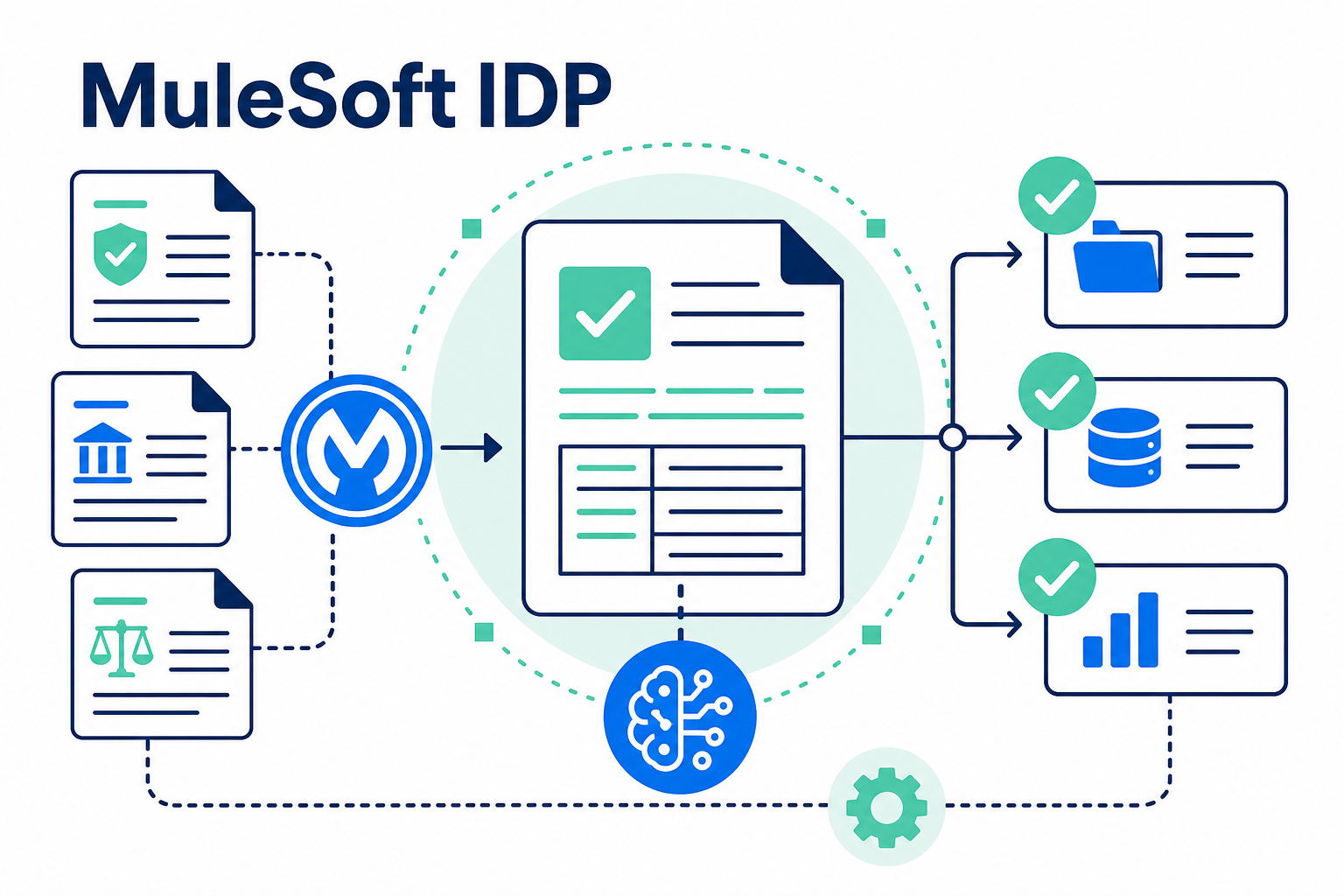
MuleSoft Intelligent Document Processing (IDP) turns KYC and compliance documents into structured, reviewable data. Organizations can configure document actions to extract required fields, score confidence, and route uncertain results to a reviewer instead of asking teams to rekey every identity, address, or corporate document. MuleSoft can then send validated data to Salesforce Financial Services Cloud (FSC), approved verification and screening providers, and case workflows. This supports a more consistent onboarding process; it is not an automatic compliance determination. Human review, documented controls, and organization-specific policies remain essential.
Key Takeaways (TL;DR)
- What is it? MuleSoft IDP uses AI-powered document actions to convert unstructured and semi-structured documents into structured data that other systems can use.
- Key benefit: It reduces repetitive document reading and data entry while making validation, exception handling, and handoffs more consistent.
- How it works: A document action extracts a defined schema, returns field-level results and confidence information, and can invoke a human-review path when results need verification.
- KYC use case: Teams can process identity documents, proof of address, ownership records, and other onboarding evidence, then route approved data to Salesforce and approved screening services.
- Best for: Compliance-driven organizations that need repeatable document intake without treating automation as a substitute for policy, investigation, or accountable review.
- Bottom line: The value comes from connecting document intelligence, workflow controls, Salesforce records, and human judgment in one traceable process.
Why is compliance document processing still so manual?
KYC and onboarding records rarely arrive in one clean format. A prospective client may submit a scanned identity document, utility statement, formation record, beneficial-ownership schedule, or a mix of files through a portal, email, or representative. Reviewers must decide whether each document is acceptable, find the required values, compare them with information on file, and preserve evidence of what happened.
Manual keying introduces transcription errors. Higher volume can make document and escalation rules inconsistent, while incomplete records complicate audit requests and later updates. The goal is not to remove reviewers from consequential decisions. It is to give them structured intake, reliable exception queues, and the context for a documented decision.
What is MuleSoft IDP?
MuleSoft Intelligent Document Processing reads unstructured or semi-structured documents and returns structured data. In IDP, a document action defines the document types and fields to process. Prompts and a custom schema can return JSON values rather than leaving downstream systems to interpret an image or free-form PDF.
For compliance workflows, the schema should follow a policy-approved evidence model. A proof-of-address action might extract the name, address, issuer, document date, category, and source reference. A corporate-document action might capture the legal entity name, registration number, jurisdiction, signatories, and effective date. Extract only what the process needs.
IDP also returns a confidence score for extracted fields. A value below a defined threshold can go to human review instead of being treated as final. Document actions can be published as APIs for Mule applications, RPA, and other authorized systems. MuleSoft implementation services can help align those APIs with approved architecture and controls.
Which KYC documents can a workflow organize?
The right document set depends on the organization’s risk program, jurisdiction, product, and client type. A well-designed MuleSoft IDP workflow can create separate document actions and validation rules for common KYC categories such as:
| Document category | Examples of data to capture | Typical workflow consideration |
|---|---|---|
| Identity evidence | Full name, date of birth, document number, issuing country, expiration date | Compare required fields with submitted onboarding data and flag mismatches. |
| Proof of address | Name, street address, issuer, statement date | Check permitted document types, recency rules, and address normalization. |
| Corporate formation records | Legal name, registration number, jurisdiction, entity type | Match the entity to account-origination records and require evidence completeness. |
| Ownership and authority records | Beneficial owners, signatories, ownership percentages, effective dates | Route complex structures or missing evidence to specialized review. |
| Supporting financial or account documents | Account holder, account reference, statement period, key balances or transactions | Extract only policy-approved fields and retain source references for review. |
This does not mean a single generic action should process every file. Different document types have different fields, quality characteristics, retention rules, and reviewer roles. Separate actions with clear schemas make it easier to test a workflow, tune a confidence threshold, and explain what a reviewer is being asked to validate.
How do extraction, validation, and enrichment work together?
Document extraction is only the first stage. A practical workflow combines four activities:
- Identify and classify. Associate the submitted file with the onboarding case and select the right action. Unreadable or out-of-scope files go to an exception queue.
- Extract a defined schema. Capture approved fields and, where needed, tables. MuleSoft’s custom schema supports field and table instructions.
- Validate against rules and records. Compare results with application data, checklists, format rules, and Salesforce records. A mismatch should create a governed review task: not silently overwrite a record.
- Enrich through approved systems. Use MuleSoft to call identity-verification, address-normalization, business-information, or internal master-data services. Retain provider response identifiers and timestamps with the case.
Extraction is not verification. It makes a value available faster; business rules and authorized sources determine whether it is acceptable. For nonstandard documents, test outputs and route uncertainty to people.
How can MuleSoft IDP auto-populate Financial Services Cloud records?
In a connected onboarding architecture, IDP returns structured data to a Mule application. The integration can map only validated, policy-approved fields into FSC client, household, account, onboarding, or custom compliance objects. It can also attach or reference the source document, preserve the original submission time, and create a work item when a reviewer is required.
For example, an applicant’s identity-document action might return a legal name, date of birth, document expiration date, and extraction confidence. The Mule flow can compare those values with the application, populate a pending-verification record, and require a compliance analyst to approve any material discrepancy. Once the appropriate checks are complete, the workflow can update the relevant FSC record and advance the onboarding stage.
Salesforce describes its financial-services onboarding capabilities as supporting data collection, KYC checks, account origination, stage management, and integrations with third-party identity-verification and screening providers. That makes FSC a useful operational system of record for the process, while MuleSoft connects it to the document action and the external systems the organization has selected. Salesforce implementation and advisory services can help teams define object mapping, lifecycle states, security, and review ownership before automation is put into use.
Where do watchlist and sanctions screening fit?
MuleSoft IDP is not a watchlist or sanctions-screening service. It extracts identity or entity attributes and makes them available to an approved screening provider through a governed integration. Document extraction alone does not complete KYC or sanctions obligations.
A flow can send verified or review-pending names, dates of birth, legal entity identifiers, and other policy-permitted attributes to the selected screening service. The response should set an explicit state, such as clear, potential match, unable to screen, or analyst review required. A potential match needs the organization’s documented escalation, investigation, and approval process.
Retain the source reference, extraction result and confidence, validation result, screening identifiers, timestamps, decision state, reviewer identity, and exception notes. System integration and data migration services can help establish the API, data-governance, and error-handling patterns behind that flow.
What makes the process more audit-ready?
Automation improves consistency only when paired with controls. For each document action, define approved downstream fields, the confidence threshold for review, override authority, required evidence, and the gate for advancing the workflow. Test against document variation, edge cases, duplicate submissions, expiration rules, and failed integrations.
MuleSoft’s IDP API can return execution status and, when additional metadata is configured, field confidence, page, and field-location information. These details can help a reviewer understand a value’s basis, but they do not replace retention policies, access controls, or legal guidance. Include compliance, legal, privacy, security, and records-management stakeholders in the design.
Failures must be visible. If an action fails, a callback is not received, a provider is unavailable, or Salesforce rejects an update, surface the case in an owned queue with a reason and next action.
A practical MuleSoft IDP-to-FSC workflow
A phased design lets teams establish control before expanding volume or document types:
- Map the evidence journey. Identify intake channels, required documents, records of authority, policy checkpoints, reviewer roles, and downstream systems.
- Build one narrow document action. Start with a high-volume, clearly defined document type, using a schema based on the approved onboarding checklist.
- Set validation and exception rules. Define confidence thresholds, mismatch rules, duplicate handling, and service-level ownership for each exception.
- Integrate with FSC and screening services. Use MuleSoft APIs to create or update controlled records, call the selected providers, and advance a case only when process requirements are met.
- Design the evidence record. Store the source reference, extracted values, validation outcomes, API correlation identifiers, and reviewer decisions in the appropriate systems.
- Pilot, measure, and expand carefully. Review false positives, extraction gaps, manual queue reasons, and user feedback before adding more document types or automatic routing.
This approach supports faster onboarding because reviewers receive structured, contextual work rather than a raw document pile. It also reduces opportunities for transcription errors and makes exceptions visible earlier. It does not promise an outcome or remove the need for accountable compliance review.
Best practices for compliance-driven document automation
- Treat policy as the source of truth. Build the schema and workflow from approved requirements, not from the easiest fields for an AI model to find.
- Use human review deliberately. Low confidence, conflicting data, high-risk cases, and policy exceptions should have named owners and clear resolution paths.
- Minimize data movement. Extract and transmit only the information needed for the approved task, with role-based access and documented retention handling.
- Keep writes controlled. Use pending states and validation results before updating authoritative client or entity records in FSC.
- Test with real variation. Include blurred scans, multi-page records, alternate formats, complex ownership structures, and duplicate submissions in test sets.
- Monitor the whole chain. Track document-action status, integration failures, screening-provider responses, Salesforce update results, and unresolved exception queues.
For organizations that need to connect document intelligence to a broader CRM roadmap, Vantage Point’s Salesforce expertise and MuleSoft-focused delivery can bring the architecture, process design, and change-management work together.
Frequently Asked Questions
What is MuleSoft IDP used for?
MuleSoft IDP is used to extract structured information from unstructured or semi-structured documents. Organizations can configure document actions, publish them as APIs, and connect the results to Mule applications, RPA, Salesforce, and other authorized systems.
Can MuleSoft IDP perform KYC by itself?
No. IDP can extract data from KYC-related documents and support a workflow, but KYC decisions require the organization’s policies, validation rules, approved data sources, screening providers, and accountable review process.
Can MuleSoft IDP process identity documents and proof of address?
Yes, a team can configure document actions for these document types and define the required output fields. It should test the actions against its approved documents and route uncertain, incomplete, or conflicting results to human review.
How does MuleSoft IDP work with Salesforce Financial Services Cloud?
A Mule application can map extracted and validated data into FSC records, cases, or custom objects, then use FSC workflow stages and tasks to manage follow-up. Teams should avoid writing unverified extraction results directly into authoritative records without controls.
Does MuleSoft IDP run sanctions or watchlist screening?
No. A MuleSoft integration can send policy-permitted identity or entity data to a selected screening provider and route the provider’s response into a governed review workflow. The screening service and the organization’s procedures determine how alerts are evaluated.
How can teams create an audit trail for document processing?
Keep a link or reference to the source document along with the document-action version, extracted values, confidence information, validation outcomes, screening response identifiers, process timestamps, exception history, and human decisions. Retention and access requirements should be set with the appropriate compliance and legal stakeholders.
Will IDP eliminate compliance review work?
It can reduce repetitive reading and rekeying, but it should not eliminate judgment-based review. The appropriate objective is consistent routing: straight-through steps for policy-permitted cases and visible, accountable escalation for exceptions.
Move from document intake to a controlled onboarding workflow
MuleSoft IDP can make KYC document processing faster and more consistent when it is paired with defined schemas, confidence-based review, validated integrations, and clear ownership. The goal is to help compliance teams focus on the exceptions and decisions that require their expertise while giving the business a more complete operational record.
Talk to Vantage Point about MuleSoft IDP
About Vantage Point
Vantage Point is a boutique, employee-owned CRM consulting firm that helps organizations design Salesforce, HubSpot, AI, and integration solutions. Our senior team combines strategy, implementation, data, and change-management expertise to build practical systems that people can use and govern.