If your company runs both HubSpot and Salesforce, the hardest question is not "how do we connect them." It is "what belongs where, and which system owns the truth." Get that wrong and you build a frankensystem: duplicate records, fighting automations, and reps who trust neither platform.
This guide gives a practical integration architecture for companies running HubSpot and Salesforce together. It covers what data should live in each system, how the sync should be designed, who owns each object, and how to keep the integration clean as you scale.
Quick Answer
A HubSpot + Salesforce integration architecture defines which platform owns each object, how records sync between them, and where automation runs so the two systems reinforce each other instead of competing. It matters for RevOps leaders, marketing operations, sales operations, and IT teams at companies that use HubSpot for marketing and Salesforce as the system of record. This guide helps you decide what goes where, design a reliable sync, and avoid the duplicate-data "frankensystem" that follows poorly planned integrations. Vantage Point designs and implements HubSpot and Salesforce architectures so data stays clean, automation stays predictable, and both platforms support adoption.
TL;DR
- A HubSpot + Salesforce integration works best when one system is the clear system of record (usually Salesforce) and HubSpot owns marketing engagement and top-of-funnel data.
- Decide object ownership, sync direction, and field-level rules before turning on the connector — most integration debt comes from skipping this step.
- Use the native HubSpot–Salesforce connector for standard CRM sync; use middleware like MuleSoft or Workato when you need complex transformations, multiple systems, or governed enterprise flows.
- Avoid the "frankensystem" by limiting two-way sync to fields that truly need it and assigning a single owner to every object and field.
- Vantage Point helps teams design the data model, sync rules, and governance for running HubSpot and Salesforce together without duplicate records or automation conflicts.
What Is a HubSpot + Salesforce Integration Architecture?
A HubSpot + Salesforce integration architecture is the plan that defines how the two platforms share data: which objects sync, in which direction, which system wins on conflict, and where automation and reporting live. It is a data and ownership design, not just a connector toggle.
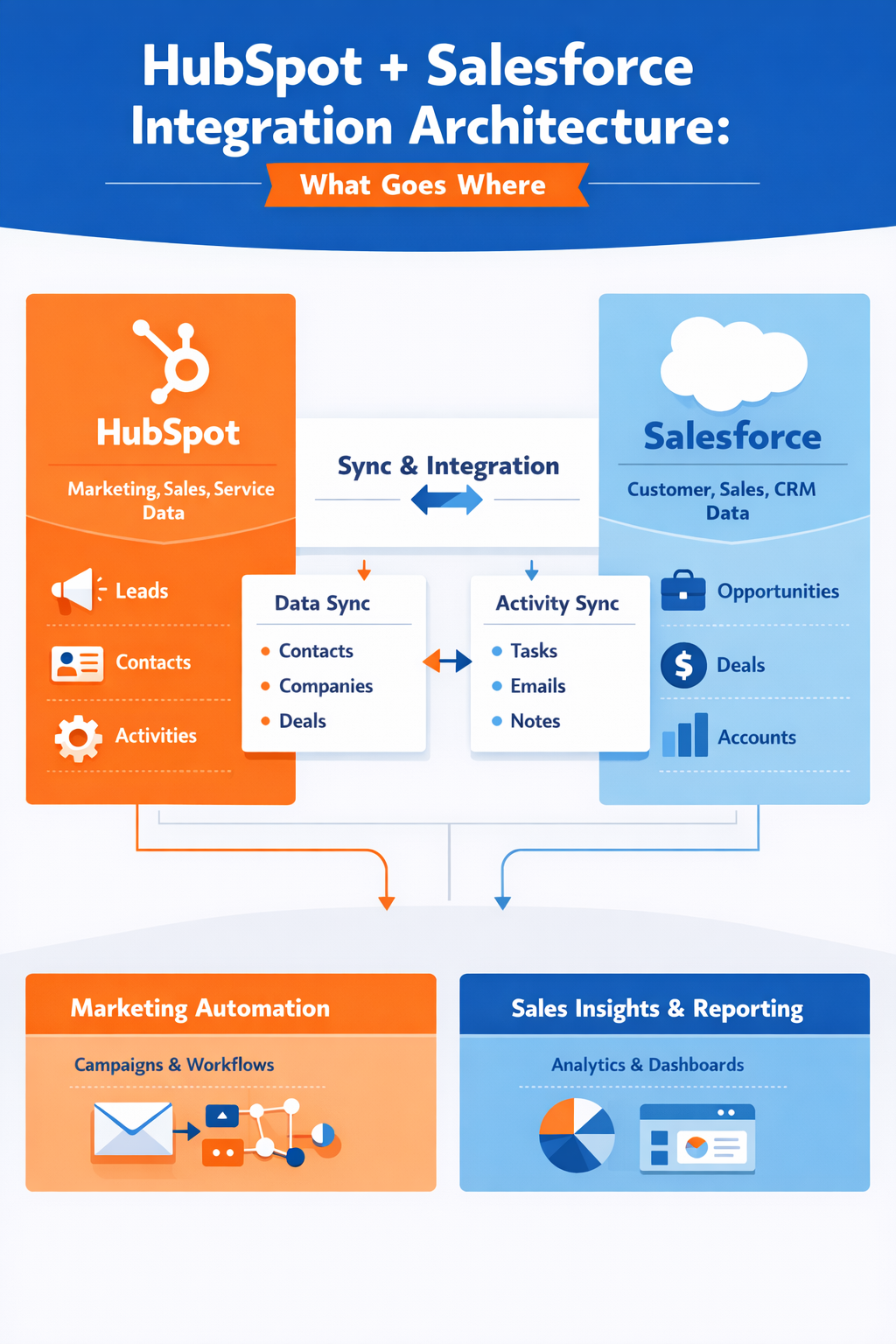
Most companies adopt both because each platform is strong at different things. HubSpot is excellent at marketing automation, email, forms, landing pages, and engagement tracking. Salesforce is strong as a configurable system of record for complex sales processes, service, and reporting. The integration's job is to let each do what it does best while keeping a single, trusted version of every contact, company, and deal.
Why This Matters in 2026
Running two CRMs without a clear architecture creates real operational cost. Duplicate records inflate marketing lists and skew reporting. Conflicting automations overwrite each other's data. Sales reps lose trust when the same lead shows two different statuses. And AI features in both platforms only amplify the problem, because AI built on messy, duplicated data produces unreliable output.
A deliberate architecture solves this by answering ownership questions up front. It also makes future work — adding a data warehouse, a billing system, or AI agents — far easier, because the data model and sync rules are already governed.
What Goes Where: System-of-Record Decisions
The core decision is which system owns each object. A common, reliable pattern for companies that close complex deals in Salesforce looks like this:
| Object / Data | Owner (System of Record) | Sync Direction | Notes |
|---|---|---|---|
| Marketing engagement (email opens, page views, form fills) | HubSpot | HubSpot → Salesforce (summary only) | Keep granular activity in HubSpot; push scores/summaries to Salesforce. |
| Leads / top-of-funnel contacts | HubSpot | HubSpot → Salesforce on qualification | Marketing nurtures until sales-ready, then creates/links in Salesforce. |
| Contacts & Accounts (qualified) | Salesforce | Two-way on selected fields | Salesforce is the master once a record is sales-owned. |
| Opportunities / Deals | Salesforce | Salesforce → HubSpot (read-only) | Sales process and forecasting live in Salesforce. |
| Lifecycle stage / lead status | Shared, single owner per stage | Carefully mapped two-way | Define exactly which system sets each stage to avoid loops. |
| Products, quotes, billing | Salesforce or ERP | Inbound to HubSpot if needed | Usually not managed in HubSpot. |
The principle: each field has exactly one owner. Two-way sync should be the exception, reserved for fields both teams genuinely update, with clear conflict rules.
How the Sync Should Work
A clean sync design follows a few rules:
- Minimize two-way fields. Most fields only need to flow one direction. One-way sync is easier to reason about and rarely loops.
- Map lifecycle and status explicitly. Decide which platform sets each stage. Mismatched lifecycle logic is the most common source of records bouncing back and forth.
- Use a stable matching key. Sync on a reliable identifier (email plus a record ID) and decide how to handle duplicates before go-live, not after.
- Define conflict resolution. When both systems change the same field, the system of record should win. Make that rule explicit in the connector or middleware.
- Add error handling and monitoring. Sync failures should alert someone. Silent failures create slow data drift that is painful to unwind later.
Native Connector vs Middleware: Which Should You Use?
Most companies start with the native HubSpot–Salesforce connector and move to middleware only when complexity demands it.
| Need | Native Connector | Middleware (MuleSoft / Workato) |
|---|---|---|
| Standard contact/company/deal sync | Strong fit | Overkill |
| Field-level mapping and basic rules | Supported | Supported |
| Complex transformations or business logic | Limited | Strong fit |
| Connecting more than two systems (ERP, billing, data warehouse) | Not designed for it | Strong fit |
| Governed, monitored, reusable enterprise flows | Limited | Strong fit |
| Compliance controls and audit logging | Basic | Robust |
Choose the native connector if you mainly need HubSpot marketing data and Salesforce CRM data to stay aligned with standard objects and straightforward rules.
Choose middleware if you need to connect additional systems, apply complex logic, enforce governance and audit requirements, or build reusable APIs. For multi-system needs, a managed integration layer pays off. Learn more about our system integration and data migration services.
How to Avoid the Frankensystem
A "frankensystem" is what you get when both platforms partially own everything. Symptoms include duplicate contacts, marketing emailing closed-won customers, and reports that never reconcile. To prevent it:
- Assign one owner to every object and every synced field.
- Keep granular marketing activity in HubSpot; push only what Salesforce reporting needs.
- Run deduplication before connecting the systems, and set rules to prevent new duplicates.
- Document the architecture so future admins do not "fix" it by adding more two-way sync.
- Review the integration quarterly as processes change.
If your team is evaluating how this applies to your HubSpot and Salesforce setup, Vantage Point can help assess the right architecture and build a practical implementation plan.
What Businesses Should Do Next
Start with a short discovery: list every object, decide the system of record for each, and document current automations in both platforms. Then design the field-level sync map and conflict rules before touching the connector. Clean your data, connect a limited set of fields, validate, and expand carefully. Treat the architecture as a living document, not a one-time setup.
How Vantage Point Helps
Vantage Point is a senior-led Salesforce and HubSpot consulting partner. We help companies running both platforms design the data model, define system-of-record ownership, and build sync and governance rules that keep data clean and automation predictable. Our work spans Salesforce implementation and advisory, HubSpot strategy and optimization, and HubSpot and Salesforce integration. For complex, multi-system environments, our system integration and data migration team designs governed integration layers using tools like MuleSoft and Workato. If adoption and process are part of the challenge, our workflow automation and process optimization practice can help.
FAQ
Should Salesforce or HubSpot be the system of record?
For most companies running both, Salesforce is the system of record for qualified contacts, accounts, and opportunities, while HubSpot owns marketing engagement and top-of-funnel leads. The right answer depends on where your core sales and service processes live. The key is to assign one clear owner per object so data does not conflict.
Is the native HubSpot–Salesforce connector good enough?
For standard contact, company, and deal sync with straightforward field mapping, the native connector is usually sufficient and the right place to start. You typically only need middleware when you must connect additional systems, apply complex transformations, or enforce governance and audit requirements. Vantage Point helps teams decide which approach fits their needs.
What is a CRM frankensystem and how do I avoid it?
A frankensystem is an integration where both platforms partially own the same data, causing duplicate records, conflicting automations, and untrustworthy reports. You avoid it by assigning a single owner to every object and field, minimizing two-way sync, and deduplicating before you connect the systems. Clear documentation prevents future "fixes" from reintroducing the problem.
How do I prevent duplicate records when syncing HubSpot and Salesforce?
Prevent duplicates by deduplicating both databases before connecting them, choosing a stable matching key such as email plus a record ID, and defining how the connector handles potential matches. Set conflict resolution so the system of record wins. Ongoing monitoring catches drift before it becomes a large cleanup project.
Which data should sync two-way versus one-way?
Most fields should sync one direction only, from the system that owns them. Reserve two-way sync for the small set of fields both teams genuinely update, such as certain lifecycle or status fields, and define explicit conflict rules for those. Limiting two-way sync is the simplest way to keep the integration stable.
When should we use MuleSoft or Workato instead of the native connector?
Use MuleSoft or Workato when you need to connect more than two systems, apply complex business logic or transformations, build reusable APIs, or meet governance, monitoring, and compliance requirements. These middleware platforms provide the control and scalability the native connector is not designed for. Vantage Point designs and implements both native and middleware-based architectures.
How long does a HubSpot and Salesforce integration take?
Timelines vary with data quality, the number of objects, and the complexity of your sync rules, so a reliable estimate comes from discovery rather than a fixed number. A focused integration with clean data and a clear ownership model moves faster than one that requires deduplication and process redesign first. Vantage Point scopes timelines after reviewing your current setup.