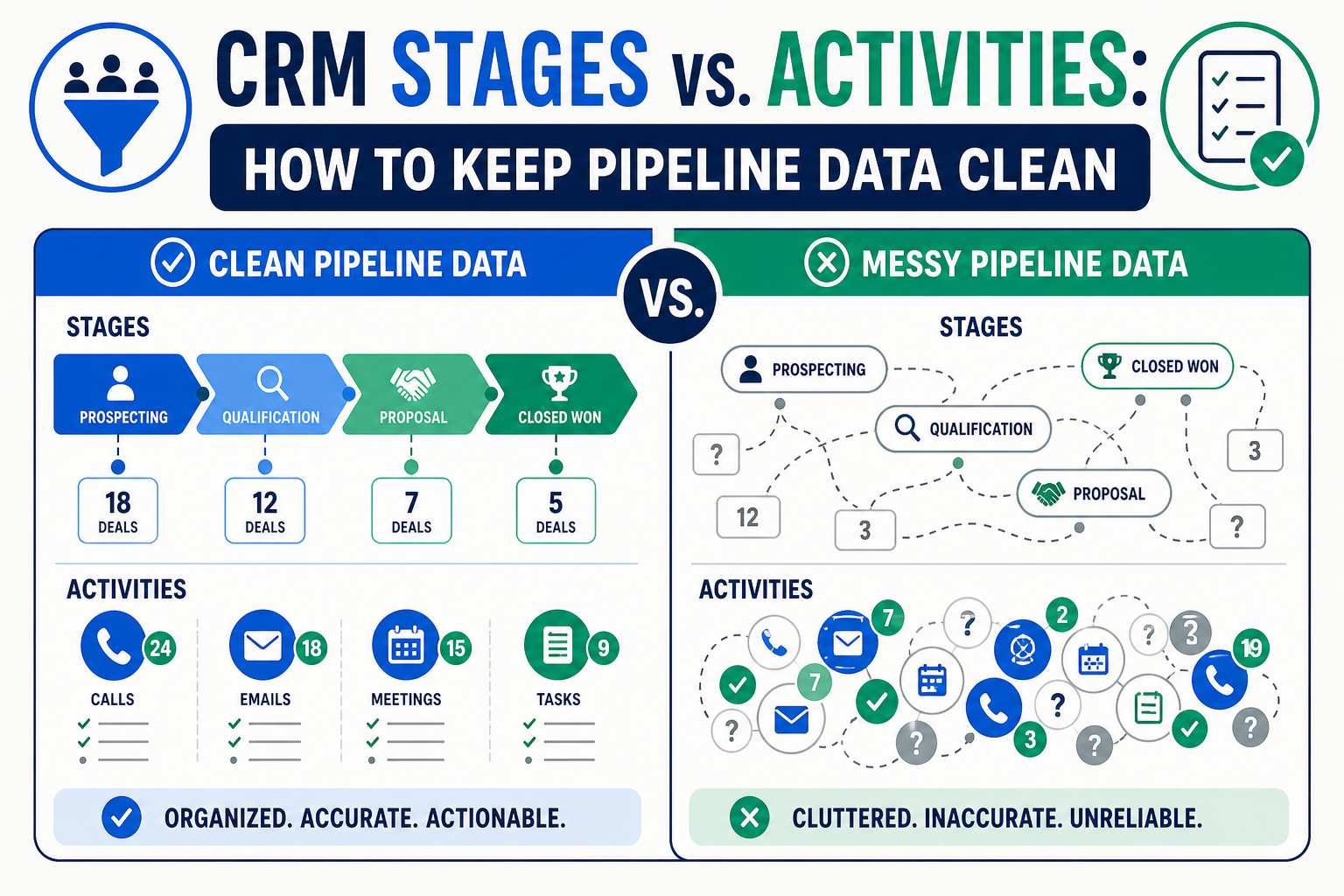
When a CRM uses a status such as “contacted,” “left voicemail,” or “sent email” as a pipeline stage, it tries to answer two different questions with one field: where the record is in a business process and what someone did today. The result is unreliable reporting and cluttered automation.
A stage describes a meaningful location in a lifecycle or process. An activity describes an interaction or piece of work that occurred. Both are useful, but they should not compete for the same job.
TL;DR
- Stages answer “where are we?” They represent durable process milestones, not every touch or task.
- Activities answer “what happened?” Calls, emails, meetings, notes, and tasks provide the work history around a record.
- Properties answer “what is true?” Use fields for facts such as segment, priority, qualification outcome, or product interest instead of forcing those facts into a stage.
- Use automation carefully: trigger meaningful workflow from stage changes; use activity-based automation only when a specific interaction matters.
- Simplify before you automate: a short, agreed stage model is more useful than a detailed list that users interpret differently.
What is the difference between a CRM stage and an activity?
A CRM stage is a durable marker of process location. It tells a manager or a teammate what business state a record has reached: for example, a deal is in discovery, a support issue is awaiting customer information, or a lead is qualified for sales engagement.
An activity is a record of something someone did or learned. In HubSpot, common activities include calls, emails, meetings, notes, and tasks. Salesforce and other CRMs have equivalent timeline records. Activities explain the route through the process; they should not redefine the process each time a user makes contact.
A practical test is this: if the same stage still describes the record after the activity is complete, the event belongs in the activity timeline, not in the stage field. A sales representative can call a prospect twice while the opportunity remains in discovery. A service owner can send three updates while a ticket remains waiting on customer input. The calls and updates matter, but they do not necessarily represent a different business milestone.
Why does mixing stages and activities damage pipeline data?
It seems harmless at first: a team adds “called,” “emailed,” “left voicemail,” and “followed up” because those labels are familiar. Soon, users apply “contacted” differently or leave the stage unchanged and log the call as an activity.
The CRM can no longer distinguish real process progress from another outreach attempt. Reporting measures activity volume as advancement, and automation loses a shared business signal.
Separate the elements so each can support the right decision: stages for conversion and aging, activities for work history, properties for qualification facts, and tasks for owned future work.
Which CRM element should hold each kind of information?
Use this decision table when teams debate whether a label belongs in the pipeline, an activity, or a field.
| If the team needs to record… | Use | Example | Why |
|---|---|---|---|
| A material process milestone | Stage | Qualified, proposal delivered, awaiting customer, closed | It changes the record’s lifecycle, forecast, service level, or operating path |
| A completed interaction | Activity | Call made, email sent, meeting held, note logged | It describes what happened on a date, not the record’s durable process state |
| A future action | Task | Call on Thursday, send document, confirm technical requirement | It creates accountable work with an owner and due date |
| A stable or changing fact | Property/field | Segment, source, priority, qualification reason, product interest | It can be filtered, reported, and used in automation without changing the process location |
| A complex decision with several dependencies | Structured object or checklist | Implementation readiness review, approval packet, compliance review | It may need multiple fields, owners, evidence, and separate reporting |
The data design should follow the business question. A stage must earn its place by carrying a shared definition and a meaningful consequence.
How many pipeline stages should a team use?
Use the fewest stages that let the business manage the process safely and honestly. More stages do not automatically create more control.
A useful stage usually has all of these qualities:
- A clear entry criterion. Users can explain what must be true before moving a record there.
- A clear exit criterion. The team knows what event moves it forward, backward, or out.
- A business consequence. The stage affects forecast treatment, queue priority, ownership, service level, customer communication, or automation.
- Consistent interpretation. Two trained users would place the same record in the same stage.
- Reportable value. The business will use the stage in a decision, not merely display it.
For example, “discovery complete” might qualify as a stage if the team uses it to trigger solution design and review conversion rates. “Left voicemail” usually does not; it is an activity that may inform the next task.
HubSpot supports pipelines and stage-based automation for objects such as deals and tickets. That makes disciplined definitions even more important: a stage change can affect reporting and may be configured to start downstream work. Before adding a new stage, define the shared meaning first.
How should stages, activities, tasks, and automation work together?
A clean design treats these parts as a system.
Stages set the business state
Stages should carry the minimum process model.
Activities retain the evidence and context
Activities document the calls, emails, meetings, notes, and messages that explain why the record moved, or did not. Keep them factual and concise.
Tasks turn intent into owned work
“Follow up next week” in a note is easy to miss. A task with an owner and due date is visible work. Use tasks for future actions that matter to the process. Close or reschedule them rather than creating a new stage called “needs follow-up.”
Properties hold qualification and decision details
Many organizations add extra stages because they need a fact the current model cannot represent. Fit, confirmed budget, or a required technical review may belong in properties or a structured checklist; those facts can inform a stage change without becoming one.
Automation responds to the correct signal
Trigger automation from a stage change when the business state changes; use activity-based automation only when a specific interaction is the right signal. Workflow automation and process optimization starts with choosing the correct event before building the workflow.
How do you clean up a pipeline that already mixes stages and activities?
Do not start by deleting labels. Start by understanding what users currently mean by them and what systems depend on them.
1. Inventory the existing stages and related automation
List every stage, definition, automated action, report, integration mapping, and user-facing instruction. Identify labels that describe an interaction (“called”), a waiting condition (“waiting for reply”), a fact (“high priority”), or an actual milestone (“proposal sent”). The first three may still be important, but they may belong somewhere else.
2. Write a one-sentence definition for every proposed stage
Use a plain sentence such as, “A deal is in solution review when the buyer is evaluating a documented recommendation and a next decision point is known.” If the team cannot agree on a sentence, it is not ready to automate the stage.
3. Move activity labels to the timeline or task model
Replace “contacted” stages with logged calls, emails, meetings, or notes, then establish a simple follow-up task rule. Replace “waiting to call” stages with an open task due date. Replace “sent document” stages with an activity and, if appropriate, a property that confirms receipt or review.
4. Preserve reporting continuity
Before migration, decide how historic stages map to the new model. Do not rewrite history casually. Instead, document the old-to-new mapping, decide which reports need an annotation or a new baseline, and validate integration behavior in a sandbox or test environment.
5. Pilot with users and inspect real records
Ask users to stage a small set of realistic records. Compare their choices, timeline entries, and tasks. If people disagree, fix the definition or the screen design before deploying more automation. Training should focus on examples and decisions, not only on button clicks.
6. Review stage aging and task completion together
A record can remain in a valid stage while work progresses. Review stage aging alongside open tasks and recent meaningful activities. That gives managers a more accurate picture than forcing users to flip stages after every call.
This cleanup often touches broader advisory and change management, because the difficult work is agreeing on the operating definition: not changing a picklist value.
What does a clean CRM pipeline look like in practice?
A clean pipeline has a small number of well-defined stages, a timeline that tells a concise story, tasks that show future work, and properties that hold key facts. Users should be able to answer: where is this record, what happened most recently, what must happen next, and what facts affect the next decision?
The approach applies whether the organization is using Salesforce, HubSpot, or both. If platforms share data, align the semantic model before mapping fields; otherwise, an activity in one system may accidentally become a stage change in another. Vantage Point’s CRM and marketing automation services and Salesforce implementation and advisory services can help validate the model and deployment approach.
How Vantage Point helps
Vantage Point helps organizations simplify CRM processes without stripping away the detail teams need to serve customers. We review the current stage model, activity timeline, task habits, properties, reports, automation, integrations, and adoption barriers. Then we define a practical data model and rollout plan that users can follow.
The goal is not a theoretical perfect pipeline. It is a process in which stages mean the same thing to everyone, activities retain useful context, and automation supports rather than confuses the team. Senior consultants only. No junior handoffs; the experts you meet are the experts who deliver.
Clean Up Your Pipeline Without Losing Useful Context
If your CRM stages are carrying calls, tasks, statuses, and milestones all at once, Vantage Point can help separate the model and implement a process your team can report on and use. Schedule a complimentary CRM health check.
Frequently Asked Questions
Is a CRM stage the same as a task?
No. A CRM stage describes a record’s current place in a business process, while a task describes a future piece of work with an owner and due date. A task may be needed while the record remains in the same stage.
Should “contacted” be a CRM stage?
Usually no. “Contacted” describes an interaction or outreach attempt, so it normally belongs in the activity timeline. Use a stage only if it represents a clearly defined, durable business milestone with a reporting or workflow consequence.
What should go in a CRM activity?
A CRM activity should record a meaningful call, email, meeting, note, task, or other interaction that explains what happened with a record. It should be concise enough for the next user to understand the outcome and next action.
How many stages should a CRM pipeline have?
A CRM pipeline should have the fewest stages that support consistent process management, reporting, and automation. Each stage needs a clear entry criterion, exit criterion, and business consequence; if it lacks those, it may belong in an activity, task, or property instead.
Can automation be triggered from CRM activities?
Yes, but activity-based automation should be used only when the particular interaction is the correct business signal. Use stage-change automation for material lifecycle transitions and activity-based automation for defined events such as a meeting outcome or a missed follow-up.
How do we migrate old activity-style stages safely?
Map old labels to the new process before making changes, document what historic reporting will mean, test integrations and automation, then pilot with real users. Preserve history where appropriate rather than rewriting it without context.
Sources
- HubSpot Knowledge Base: Set up and manage object pipelines
- HubSpot Knowledge Base: Create or log activities on a record
- HubSpot Knowledge Base: Set up pipeline automations for objects
Vantage Point is a boutique CRM consulting firm helping businesses transform with Salesforce, HubSpot, and AI.