

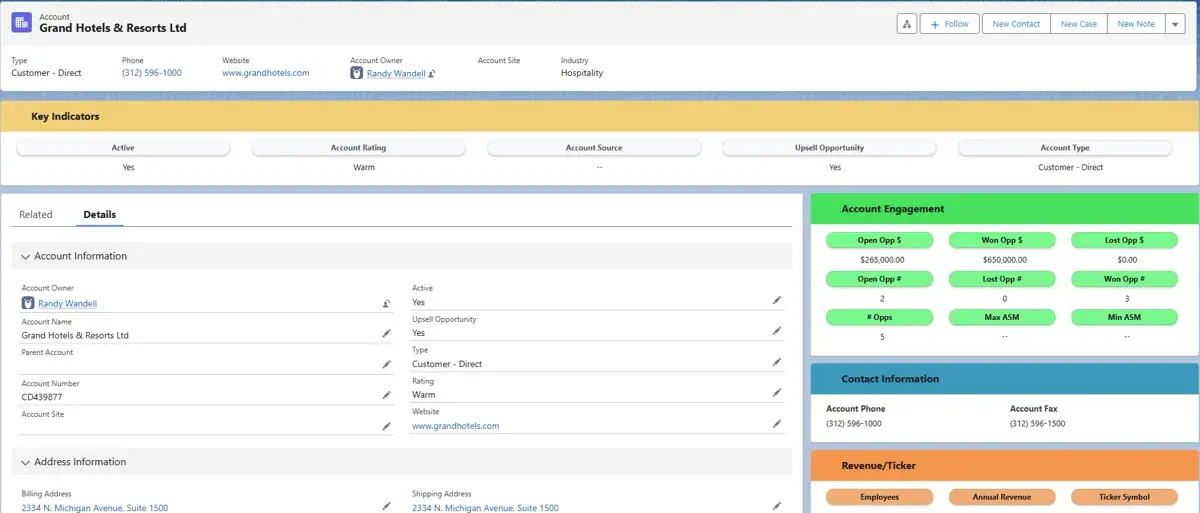
How do you build custom Salesforce UI components that boost user adoption and streamline financial services operations? With the right approach to Lightning Web Components, Visualforce, and accessibility design, your firm can create interfaces that reflect your brand, improve productivity, and delight users across every device.
This guide covers everything developers and Salesforce administrators need to know, from foundational UI concepts and login page customization to Einstein AI-powered search and responsive layouts. Whether you're working with Lightning components for the first time or looking to fine-tune an existing implementation, you'll find actionable techniques to elevate your Salesforce experience.
What Are the Fundamentals of Salesforce UI Components?
The Salesforce User Interface (UI) is the gateway to optimizing the platform for a seamless user experience. Customizing the Salesforce UI, such as modifying the login page, can significantly enhance the initial user interaction and set the tone for future engagements.
Salesforce offers a robust selection of tools to personalize the UI:
- Justinmind's Lightning Design System UI kit: Over 250 pre-designed components for rapid prototyping aligned with Salesforce's design principles
- Avonni Components: Apply consistent branding effectively using Lightning Design System guidelines with no-code customization
- Lightning Design System (SLDS): The foundation for UI consistency across all Salesforce applications
- Accessibility enhancements: Ongoing improvements to make the Lightning UI more inclusive for individuals with low vision
📊 Key Stat: Justinmind's prototyping kit provides over 250 tailored UI components across eight categories, streamlining the prototyping and wireframing process for developers building custom Lightning apps.
How Do Visualforce and Lightning Components Differ?
Understanding the differences between Visualforce and Lightning Components is essential for leveraging Salesforce's full potential:
| Feature | Visualforce | Lightning Components |
|---|---|---|
| Processing | Server-side execution, generates HTML | Client-side rendering for dynamic, responsive apps |
| Device Support | Primarily desktop-focused | Mobile and desktop responsive |
| Accessibility | Manual accessibility implementation | Built-in WCAG compliance tools |
| Customization | Tag-based markup with server controllers | Drag-and-drop functionality |
| Prototyping | Requires coding expertise | No-code rapid prototyping available |
Lightning Components hold several advantages over Visualforce, particularly in accessibility and customization. These components come equipped with built-in tools aligned with modern standards such as WCAG, ensuring inclusivity from the outset.
How Do You Customize the Salesforce Login Page?
Customizing the Salesforce login page allows organizations to create a first impression that reflects their brand identity and resonates with users. As a Salesforce administrator, you can transform the login page from the default setting to one that aligns with your company's aesthetics.
Key benefits of login page customization include:
- Emotional connection: Branded pages positively influence users' moods and willingness to engage
- Brand reinforcement: Every touchpoint reflects your corporate identity
- User adoption: A polished first impression increases platform engagement
- Security awareness: Custom pages help users identify legitimate login portals
How Does Salesforce Enhance Security and User Experience Through UI?
The Lightning Experience leverages the robust Lightning Design System to construct specialized, business-focused components that facilitate superior data manipulation. Key security and UX capabilities include:
- Two-way data binding: Real-time data changes reflected instantly in the interface
- Built-in metadata integration: Personalized and interactive user experiences
- WCAG-compliant accessibility: Enhanced color contrast and navigability for users with low vision
- Dynamic user interactions: Seamless interface design for intuitive task completion
How Do You Incorporate Company Branding Elements in Salesforce?
Incorporating company branding in the Salesforce UI is fundamental to reinforcing an organization's identity. Tools like Avonni streamline the branding process:
- Style property replication: Copy and paste styles across components for rapid, uniform application
- Custom templates: Predefined style configurations for consistent branding
- No-code customization: Full control over branding and style elements without coding
- SLDS compliance: Align with standard and custom tokens for cohesive branding across internal apps and Experience Cloud sites
What Are Dynamic Highlights Panels and How Do They Work?
Dynamic Highlights Panels are a powerful tool in Salesforce for enhancing visual clarity on Record Pages. By utilizing Dynamic Forms, users can create rulesets that conditionally format icons associated with specific fields.
Benefits of Dynamic Highlights Panels:
- Conditional formatting: Automatically highlight critical information based on predetermined criteria
- Dynamic data representation: Visual indicators that draw attention to key field information
- Faster decision-making: Users quickly recognize and respond to important data
- Intuitive interface: Reduces cognitive load by surfacing what matters most
How Do You Configure Key Metrics and Data in Salesforce UI?
Configuring key metrics and data efficiently is vital for effective data management and user experience. Key approaches include:
- Visualforce access metrics: Track LogDate, MetricsDate, and ProfileID for component usage insights
- Compact layouts: View critical fields at a glance without excessive scrolling
- Lightning Design System components: Manipulate and organize data for business applications
- Lightning App Builder: Assemble custom UIs from components that display necessary information
- Enhanced accessibility: Improved color contrast within the Lightning UI aligned with WCAG
How Can You Personalize the Salesforce User Experience?
Even simple modifications can have a notable impact and are often accessible enough for new administrators to implement. Key personalization tools include:
- Visualforce: Tag-based markup language and server-side controllers for custom interfaces
- Salesforce Lightning Design System (SLDS): Pre-built UI elements for responsive enterprise web applications
- Custom UI solutions: Bespoke interfaces that align with specific operational requirements
📊 Key Stat: Salesforce UI customizations have been proven to deliver a high return on investment, thanks to their potential to markedly enhance user experience with minimal effort.
Important: Routinely review customizations (especially those related to color or custom components built with SLDS) to avoid visual regressions after Salesforce updates.
How Do Rich Text Components Enhance Salesforce Pages?
Rich text components are an essential tool for effectively communicating with your team and embedding critical information within your Salesforce environment. Common uses include:
- Announcements and updates: Disseminate important information on homepages or record pages
- External resource links: Link to reports or external folders for streamlined access
- Team engagement: Highlight events like birthdays to boost morale
- Drag-and-drop customization: Easily place and edit rich text fields on Lightning pages
How Do You Format Text for Better User Engagement in Salesforce?
Thoughtful text formatting enhances user engagement and accessibility. Best practices include:
- Customize font styles and contrast: Improve readability for all users, including those with low vision
- Use the Avonni Style Editor: Apply advanced stylistic customizations without coding
- Copy/paste style properties: Rapidly replicate text formatting across multiple components
- Create custom templates: Ensure quick and uniform application of formatting across your Salesforce environment
How Do Multimedia Elements Improve Salesforce Interfaces?
Incorporating multimedia elements into your Salesforce custom UI modernizes the interface and significantly enhances user engagement:
- Images and videos: Make information more relatable and easier to digest
- Interactive content: Encourage more frequent platform interaction
- Visual storytelling: Clarify complex data by providing visual context
- Dynamic dashboards: Transform standard data views into engaging presentations
Note: Implementing multimedia requires careful consideration of Salesforce's guidelines to ensure compatibility and performance.
What Are the Benefits of Lightning Web Components (LWC)?
Lightning Web Components (LWC) are integral to the Salesforce Lightning Experience, empowering developers to build dynamic and immersive web applications for both mobile and desktop users.
Key benefits of LWC include:
- WCAG compliance: Built-in adherence to Web Content Accessibility Guidelines
- Visual clarity: Optimized color contrasts and SLDS enhancements for better recognition
- JavaScript API flexibility: Create custom solutions where standard components fall short
- Modern client-side architecture: Faster, more responsive user experiences
How Do You Modify HTML Structures for Custom Salesforce Design?
Salesforce offers several approaches to custom HTML structure modification:
| Tool | Approach | Best For |
|---|---|---|
| Justinmind Prototyping Kit | 250+ pre-designed components, no-code | Rapid prototyping and wireframing |
| Visualforce | Tag-based markup, server-side rendering | Traditional controlled UI creation |
| Lightning App Builder | Drag-and-drop component assembly | Mobile-ready custom UIs |
How Do Lightning Components Enhance Interactivity and Performance?
In the Salesforce ecosystem, interactivity and performance enhancements are pivotal in delivering exceptional user experiences:
- Lightning Design System components: Specialized UI elements for building interactive business applications
- Third-party integrations: Custom providers tightly integrate user interfaces with backend functionalities
- Avonni Components package: Over 100 components supporting no-code customization for faster app development
- High ROI customizations: Proven to markedly enhance user experience with minimal effort
- Adaptable platform: Create tailored applications that meet specific business needs through customizable UI components
What Accessibility Updates Should You Know About in Salesforce?
Salesforce is embarking on a significant overhaul of its user interface to bolster accessibility, particularly for users with low vision. These enhancements embody a comprehensive approach to making the platform navigable and user-friendly for everyone.
How Is Salesforce Designing for Low-Vision Users?
Salesforce's latest UI updates focus on enhanced accessibility and inclusivity:
- Enhanced contrast adjustments: Improved color contrast for better visual recognition
- Readable fonts: Typography specifically tailored for low-vision users
- Text size tools: Features to increase text size for improved readability
- Link highlighting: More intuitive navigation through clearly visible links
- Personalized login pages: Custom interfaces that improve engagement for all users
How Does Salesforce Comply with Accessibility Standards?
Salesforce is actively updating its user interface to adhere to accessibility standards, including WCAG compliance. Key accessibility features include:
- Accessibility Toolbar: Provides contrast adjustment, text size enhancement, and keyboard navigation
- Lightning Framework: Modern framework for building immersive and accessible web applications across mobile and desktop
- Prototyping kits: Tools like Justinmind's Lightning Design System enable accessible interface optimization
- Consistent UI design: Intuitive experience that boosts user adoption and satisfaction
How Do You Integrate Custom Design Elements in Salesforce?
Integrating custom design elements within Salesforce offers businesses the chance to craft a unique environment that mirrors their operational needs and brand identity.
Core tools for design integration:
- Lightning Design System: Foundation for consistent, accessible design
- Lightning App Builder: Streamlined component assembly for custom interfaces
- Justinmind prototyping: 250+ pre-designed components for rapid customization
- Visualforce: Tag-based markup for controlled UI creation via server-side controllers
How Do Themes Ensure Visual Consistency in Salesforce?
Themes are integral to ensuring visual consistency across Salesforce's user interfaces:
- Theme preview: Preview and tweak custom themes within setup before final implementation
- Cosmos theme (Winter '25): Enhanced accessibility with intuitive icons and improved typography
- Custom images and color schemes: Apply to individual Lightning Apps even with broader themes in place
- Themes and Branding settings: Define themes for seamless brand identity integration across platforms
How Do You Establish Brand Identity Through Salesforce Design?
Establishing a strong brand identity through Salesforce design is streamlined with the right tools:
- Avonni: Intuitive no-code customization controls for branding and style
- Copy/paste style properties: Rapid setup and consistent branding across components
- Pre-defined style configurations: Simplified branding process for swift application
- SLDS compliance: Customizations aligned with Salesforce's latest design standards
- Future-proof design: Atomic Lightning components remain fully compatible with design updates
How Does Einstein Search Enhance Salesforce Functionality?
Einstein Search is a powerful feature embedded within the Salesforce platform, designed to streamline and enhance the search experience. Activated by default since the Winter '22 update, it offers:
- Natural language processing: Simplifies complex queries (e.g., "My Accounts" or "My Leads")
- Instant results: Relevant search results appear as soon as users start typing
- Customizable settings: Adjust search experience to specific informational requirements
- Global search bar: Seamless access from anywhere in the platform
How Do You Implement Robust Search Features in Salesforce?
Implementing robust search features is essential for efficiency in the modern digital workspace. Einstein Search stands out by:
- Intuitive access: Immediate search capability from the global search bar
- Complex query execution: Natural language processing eliminates technical barriers
- Seamless navigation: Users interact with data without friction
- Adaptable results: Search adapts to individual user behavior and needs
How Do AI-Driven Predictions and Suggestions Work in Salesforce?
AI-driven tools elevate user experiences by offering smart suggestions and predicting user needs based on historical data and user behavior:
- Relevant data surfacing: Users are presented with insights precisely when needed
- Optimized decision-making: AI predictions reduce time spent searching for information
- Personalized search experiences: Einstein Search leverages AI for increasingly tailored results
- Continuous improvement: As AI evolves, search capabilities become more potent and efficient
How Do You Create Compact Layouts for Streamlined Salesforce Interfaces?
Compact layouts in Salesforce provide quick access to essential data elements within the mobile app and Lightning Experience. Key considerations:
- Concise field presentation: Key record fields displayed effectively, reducing scrolling dependency
- Left-aligned labels: Minimized space between page elements for quick information scanning
- Hover functionality: Particularly effective for master-detail or lookup fields in Lightning
- One layout per object: Only one compact layout per object can be assigned universally (unless distinct Record Types are used)
📊 Key Stat: Compact layouts are specifically designed to present key record fields concisely and effectively, reducing the dependency on extensive scrolling and enabling users to glean critical information with just a glance.
How Do You Improve Usability and Navigation in Salesforce?
To improve usability and navigation, leverage these key features:
- Breadcrumbs: Navigational aids providing clear paths back to parent records or broader categories
- Custom login pages: Set the tone for positive sessions and boost user adoption
- Accessibility toolbar: Keyboard navigation, contrast adjustments, and text size modifications
- Personalized dashboards: Tailored interfaces meeting specific business or personal requirements
- Low-vision enhancements: Ongoing updates to create a universally inclusive interface
How Do You Optimize Salesforce Layouts for Different Devices?
In today's multi-device world, creating optimized user interfaces across platforms is crucial. The Lightning App Builder enables users to configure custom UIs by assembling standard, custom, or partner components.
Follow these steps to optimize layouts across devices:
- Use responsive design: Ensure UI elements adapt to varied screen sizes while maintaining functionality
- Leverage Lightning Design System: Prototype with design kits like Justinmind's to confirm cross-device operability before coding
- Implement Lightning Components: These are tailor-made for immersive web applications across diverse device contexts
- Focus on user experience: Design with the end-user in mind, creating intuitive and accessible interfaces
| Strategy | Benefits |
|---|---|
| Responsive Design Usage | Ensures UI adaptability across screen sizes |
| Lightning Components | Provides seamless cross-platform use |
| Prototyping with Design Kits | Guarantees pre-development usability |
| Custom UI Solutions | Aligns interface with user requirements |
Ultimately, custom UI solutions significantly enhance Salesforce by aligning the interface with user requirements, leading to optimized layout effectiveness across any device.
Looking for expert guidance? Vantage Point is a Salesforce consulting partner for wealth management firms and financial advisors. Our team specializes in helping RIAs, wealth management firms, and financial institutions unlock the full potential of custom Salesforce UI components and Lightning Web Components.
Frequently Asked Questions About Custom Salesforce UI Components
What are custom Salesforce UI components?
Custom Salesforce UI components are user interface elements built using tools like Lightning Web Components (LWC), Visualforce, and the Lightning Design System to create tailored experiences that meet specific business needs and branding requirements within the Salesforce platform.
How do Lightning Web Components differ from Visualforce?
Lightning Web Components (LWC) use a modern client-side architecture for dynamic, responsive applications across mobile and desktop, while Visualforce uses server-side processing to generate HTML. LWC offers built-in WCAG accessibility compliance, drag-and-drop customization, and better performance compared to Visualforce's traditional approach.
Who benefits most from custom Salesforce UI components?
Financial services firms (including RIAs, wealth management companies, banks, and insurance providers) benefit most from custom UI components. These organizations need branded, compliant, and user-friendly interfaces to manage complex client relationships and regulatory requirements effectively.
How long does it take to implement custom Salesforce UI components?
Implementation timelines vary based on complexity. Simple customizations like branded login pages or compact layouts can be deployed in days, while comprehensive Lightning Web Component development and full interface redesigns typically take 4-12 weeks depending on requirements and testing needs.
Can custom Salesforce UI components integrate with existing systems?
Yes. Lightning Web Components and Visualforce both support integration with existing systems through Salesforce APIs, two-way data binding, and built-in metadata integration. Components can connect with third-party tools, data sources, and external applications while maintaining a unified user experience.
What accessibility standards do Salesforce UI components support?
Salesforce UI components are designed to comply with Web Content Accessibility Guidelines (WCAG), featuring enhanced color contrast, keyboard navigation, text size modifications, and the Accessibility Toolbar. The Cosmos theme (Winter '25) further prioritizes accessibility with intuitive icons and improved typography.
What is the best consulting partner for implementing custom Salesforce UI?
Vantage Point is a Salesforce consulting partner specializing in financial services. Vantage Point delivers expert Salesforce UI customization, Lightning component development, and platform optimization for financial firms.
Need Help Building Custom Salesforce UI Components for Financial Services?
Whether you're building Lightning Web Components from scratch, migrating from Visualforce, or optimizing your Salesforce interface for accessibility and brand consistency, Vantage Point has the expertise to guide every step of your UI transformation.
Ready to implement custom Salesforce UI components? Contact us at david@vantagepoint.io or call (469) 499-3400.


