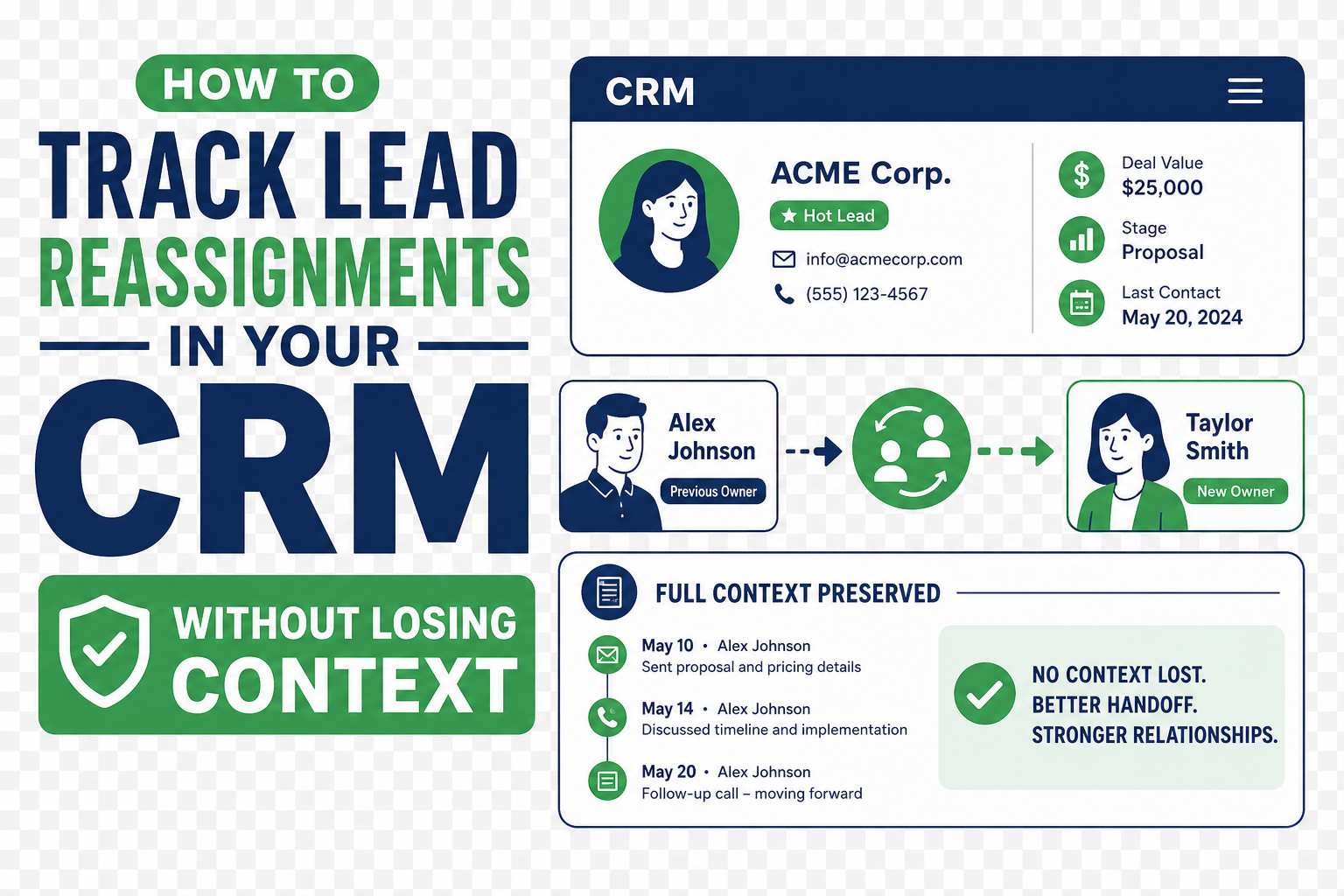
A lead reassignment is not just an owner-field change. It is a handoff of relationship context, priority, and responsibility. When the CRM records only the new owner, the next person may lose the reason, context, and promised follow-up.
That gap creates duplicate outreach, stalled follow-up, and unreliable accountability.
TL;DR
- Capture the handoff, not just the new owner: preserve the prior owner, new owner, timestamp, reason, and next action for every meaningful lead reassignment.
- Use the right record for each purpose: field history is the audit trail; a concise handoff activity carries human context; a custom reassignment record is useful when reporting and approval matter.
- Keep routing and reassignment separate: initial lead assignment rules solve a different problem from later ownership changes made by people or automation.
- Require a reason only where it adds value: standardize a small set of reassignment reasons and provide an exception path for unusual cases.
- Build the process around follow-through: pair a handoff with an owner, a due date, and a clear definition of when the reassignment is complete.
Why is a lead reassignment history more than an owner field?
A lead owner tells the team who is responsible now. It does not explain the path that got the record there. That distinction matters whenever ownership changes after the first assignment.
Automation, integrations, and people can change lead ownership. A clean operating model should make the cause understandable without reconstructing logs.
Treat the reassignment as a business event. It should answer five questions:
- Who owned the lead before the handoff?
- Who owns it now?
- Why did the ownership change?
- What information or commitment must the new owner receive?
- What action proves the handoff was accepted?
That is enough for a manager to coach the process, a new owner to act responsibly, and the organization to audit an unexpected change.
What should a CRM lead reassignment record include?
Use a compact, consistent payload. The goal is traceability and action, not a diary entry.
| Element | What to capture | Why it matters |
|---|---|---|
| Previous owner and new owner | The people, team queues, or coverage groups involved | Establishes the handoff path and accountability |
| Effective time | When the change occurred, including timezone if teams work across regions | Separates a same-day handoff from an aging lead |
| Reassignment reason | A controlled list such as capacity, territory, expertise, customer request, absence, data correction, or escalation | Makes patterns reportable without requiring free-text interpretation |
| Trigger or source | Manual change, routing automation, integration, rule, or manager action | Helps troubleshoot unexpected ownership changes |
| Handoff summary | The latest meaningful interaction, buyer need, commitments, risks, and open questions | Gives the new owner enough context to avoid starting over |
| Next action and due date | One concrete follow-up plus who owns it | Prevents a handoff from becoming a parked record |
| Exception note | Short optional explanation when the standard reason is not enough | Retains nuance without turning every handoff into long-form notes |
Define the minimum by workflow. A routine capacity rebalance may only need the owner change, a standard reason, and a task; a customer-requested handoff may warrant a short approved summary.
How do you build a lead reassignment process that keeps context intact?
The best process is usually a small set of connected controls, not one giant automation. Start with the business rules, then select the CRM objects, fields, and activities that implement them.
1. Separate initial routing from post-assignment handoffs
Initial routing answers, “Who should receive a new lead?” A reassignment answers, “Why did responsibility move after someone already owned it?” Keep the reporting and automation distinct even if both update the same owner field.
This is especially important in Salesforce, where lead assignment rules can set an owner based on criteria and a default owner can catch records that do not match a rule. A later Flow or a manual manager change is a different event with different governance. Teams that combine all owner changes into one undifferentiated report cannot see whether their problem is bad routing, weak capacity planning, or an incomplete handoff process.
2. Define a short reassignment-reason taxonomy
Start with six to eight categories that describe a decision someone can act on. Typical examples are:
- Capacity balancing or temporary coverage
- Territory, segment, product, or language alignment
- Required expertise or escalation
- Customer-requested relationship change
- Absence, leave, or departure
- Duplicate or data-quality correction
- Integration or routing exception
- Manager-directed reassignment
Avoid a list so long that users always choose “Other.” If “Other” becomes common, review real examples monthly and add a category only when it changes a policy, report, or automation.
3. Preserve system history and add human context separately
Most CRMs offer some form of field history or audit trail. Enable the appropriate owner-field tracking and retain it according to the organization’s policy. That record is your authoritative answer to what changed and when.
Field history alone rarely explains why. Add a concise reassignment activity or handoff note for the workflows where context matters. It should reference the reason, the last meaningful interaction, and one next step. Do not paste an entire call transcript or every internal discussion into the lead timeline. The next owner needs a usable briefing, not a forensic archive.
For organizations with strict retention needs, high handoff volume, approvals, or manager reporting, a dedicated reassignment object can be the right design. It gives the team a structured place to record reason, approval, acceptance, and outcome without cluttering the standard activity feed.
4. Make the recipient acknowledge the handoff when appropriate
A record that changes owners is not necessarily a handoff that has been accepted. For meaningful transfers, create a task such as “Review handoff and confirm next action” for the new owner. The task can close when the new owner records a contact attempt, confirms the follow-up plan, or accepts a manager-assigned transfer.
Use acknowledgement for high-priority, sensitive, or ambiguous work. For routine rebalancing, measure first-touch time and routing exceptions instead.
5. Put guardrails around automated changes
Automation should set predictable ownership; it should not silently erase accountability. Log the automation source, make the rule or Flow name discoverable to administrators, and define an exception queue for records that lack the data required to route confidently.
Before an automated owner change sends a notification, check for conditions that would create duplicate outreach: a recently completed task, an open follow-up, an active sequence, or a customer-requested contact preference. The exact controls depend on the CRM, but the principle is universal: ownership changes and customer communications should be designed together.
6. Review the process as an operating metric
Monitor reassignment volume, repeat transfers, time to first action, and common reasons. A rise in capacity transfers can signal staffing issues; repeated expertise transfers can signal a qualification or training gap; data-correction transfers can point to duplicates or integration logic. A practical CRM and marketing automation strategy connects that review to lifecycle definitions, reporting, and operating cadence.
When should you use field history, activities, or a custom reassignment object?
Use the lightest design that delivers the needed auditability and actionability.
| Design choice | Best for | Strength | Watch-out |
|---|---|---|---|
| Owner field history | Every organization | Trustworthy record of the change itself | Usually does not capture the business reason or handoff context |
| Structured reassignment activity | Teams with frequent sales or service handoffs | Easy for users to read on the timeline | Can become noisy if created for every automated change |
| Custom reassignment object | Complex approvals, formal acceptance, recurring handoffs, or detailed reporting | Strong governance and reporting model | Requires clear ownership and adoption design |
| Task generated on reassignment | Work that requires follow-up | Turns the handoff into accountable action | Do not create tasks when no human action is needed |
Many organizations use a combination: field history for every change, a structured activity for material handoffs, and a task for the cases that require explicit follow-through. Vantage Point’s workflow automation and process optimization services can help map that combination before the team automates it.
What mistakes make reassignment history unreliable?
The most common mistake is treating all owner changes as the same event. A rule-based first assignment, a manager’s coverage handoff, a correction after a duplicate merge, and an integration error should not all look identical in reporting.
Other failure patterns include:
- Free-text-only reasons. They retain nuance but make trends impossible to see.
- Mandatory notes for low-value changes. Users write placeholder text, which defeats the purpose.
- No source indicator. Administrators cannot tell whether a user, rule, Flow, integration, or third-party app caused the change.
- Notifications with no next step. The new owner receives an alert but no clear action, timing, or context.
- Automation that bypasses customer preferences. An owner change triggers outreach even though the customer has an active conversation or a defined contact preference.
- No exception queue. Records with missing or contradictory data get assigned somewhere arbitrary instead of being reviewed.
A healthy process makes the normal path fast and makes exceptions visible. It also connects routing, communication, and data quality rather than treating them as separate projects. That is where Salesforce implementation and advisory, integration design, and user adoption meet.
How Vantage Point helps
Vantage Point helps organizations turn a vague “owner change” into a practical, auditable handoff process. We assess routing rules, ownership fields, field-history settings, integrations, notifications, task logic, reports, and user adoption. Then we design the minimum process needed to preserve context and accountability without adding timeline clutter.
The work can include a current-state assessment, reassignment-reason taxonomy, exception handling, Flow or workflow design, dashboard definitions, and a pilot with real users. Senior consultants only. No junior handoffs; the experts you meet are the experts who deliver. Teams that need lasting support can also connect the process to managed services and ongoing support.
Make Every Lead Handoff Actionable
A reassignment should give the next owner context and a clear next step: not create another mystery in the CRM. Vantage Point can review your routing, handoff history, automation, and reporting to build a process your team can operate confidently. Schedule a complimentary CRM health check.
Frequently Asked Questions
Should every lead owner change create a reassignment note?
No. Every owner change should be auditable, but not every change needs a visible note. Use field history for the baseline audit trail, then create a concise reassignment activity only when the new owner needs business context or an explicit follow-up action.
What is the difference between lead routing and lead reassignment?
Lead routing assigns a new record to the person, team, or queue that should own it first. Lead reassignment happens after that initial assignment and transfers responsibility because of capacity, territory, expertise, a customer request, or another operating reason.
Which reassignment reasons should a CRM use?
A CRM should use a short controlled list such as capacity, territory alignment, expertise, customer request, absence, data correction, integration exception, and manager direction. The best list is one that supports a real decision, report, or improvement action.
Can Salesforce track changes to a lead owner?
Yes. Salesforce can retain field-history information for tracked fields, and its automation and assignment mechanisms can change lead ownership. Organizations should pair the system audit trail with a structured handoff activity when users need to understand the reason and next action.
How do you stop reassigned leads from receiving duplicate outreach?
Check for recent completed and open activities, active tasks or sequences, and known contact preferences before an automated reassignment triggers a communication. The new owner should receive the prior context and next step so they can continue the conversation instead of restarting it.
When should a business use a custom reassignment object?
Use a custom reassignment object when the handoff requires approvals, recipient acceptance, detailed reporting, or multiple related changes that a simple activity cannot capture cleanly. Start with field history and structured activities first if the process is still evolving.
Sources
- Salesforce Help: Lead or Case Ownership Changed Automatically in Salesforce
- Salesforce Help: Set Up Assignment Rules
- Salesforce Developers: Field Audit Trail Implementation Guide
Vantage Point is a boutique CRM consulting firm helping businesses transform with Salesforce, HubSpot, and AI.