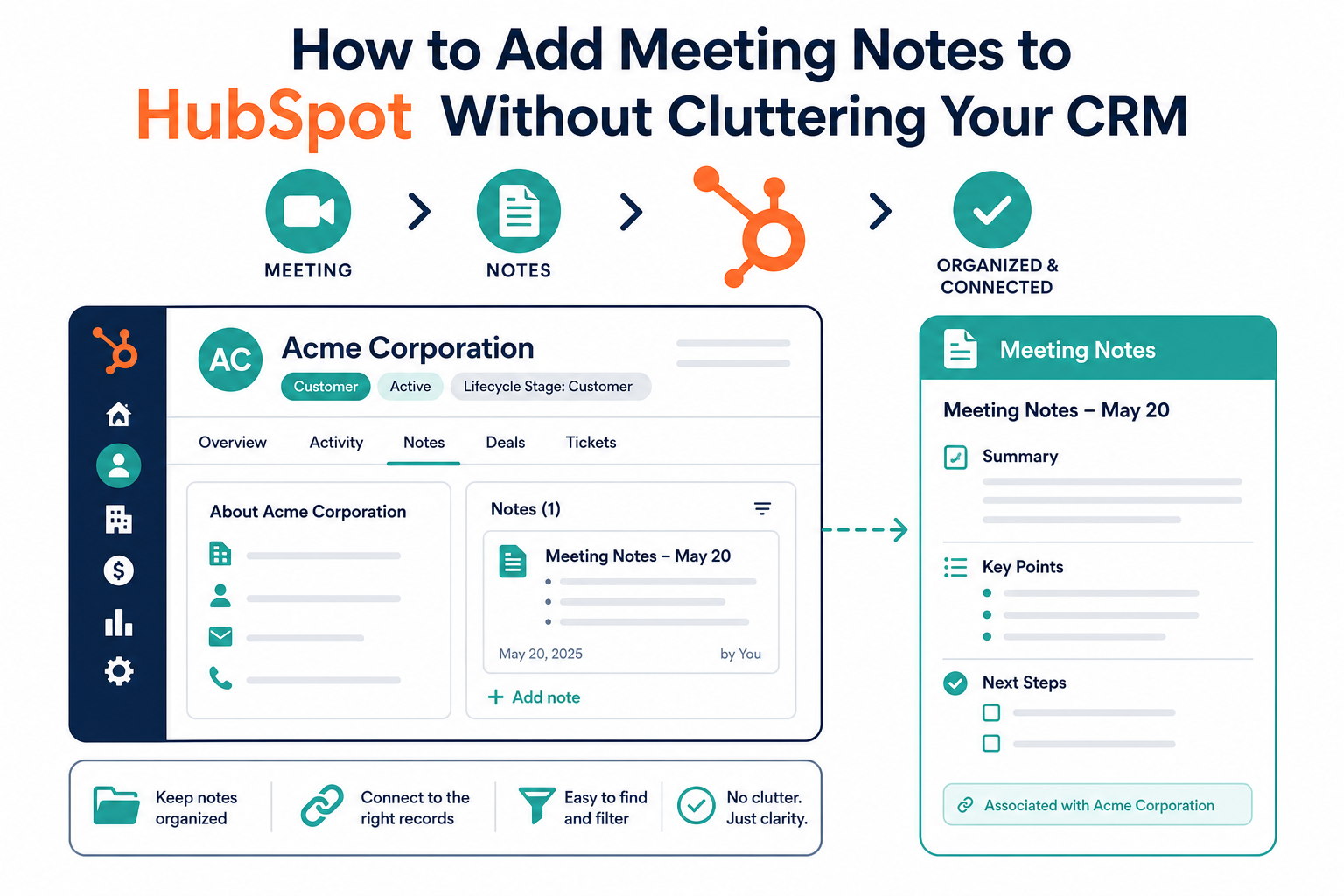
Teams should put the useful outcome of a customer or prospect meeting in HubSpot, not blindly copy every word of every transcript. The right setup gives the next seller, service owner, or manager enough context to act while preserving a clean timeline and a reliable source of truth.
As teams use more meeting and note-taking tools, the CRM can become either a dependable operating record or a stream of duplicate notes. The difference is a clear rule for what to capture, where it belongs, and what stays in the source system.
Quick Answer
Meeting notes in HubSpot work best when they are a concise, structured activity tied to the right contact, company, deal, ticket, or custom object: not a raw transcript pasted everywhere. This approach matters for teams that need reliable handoffs and follow-up without hiding important context in another tool. Start with a summary, decisions, risks, and assigned next steps; define association rules; then choose the lightest workflow that can apply those rules consistently. Vantage Point helps organizations design the HubSpot data, automation, and integration approach behind that process.
TL;DR
- Use HubSpot for the operational record: log the meeting outcome, commitments, risks, and next actions where the responsible team works.
- Keep raw transcripts selective: retain the full transcript in the meeting or notes tool unless a defined compliance, coaching, or delivery reason requires it in the CRM.
- Associations are the control point: a good note reaches the relevant contact, company, and active deal or ticket without appearing on unrelated records.
- Standardize the summary: a short template makes notes useful for handoffs, reporting, and follow-up automation.
- Start with the simplest path: manual logging may be enough; use native features, an integration, or a custom workflow only when the volume and risk justify it.
What does it mean to add meeting notes to HubSpot?
Adding meeting notes to HubSpot means creating a CRM activity that records the business outcome of a conversation and associates it with the records that need that context. HubSpot supports meetings and notes as activities, and activities can appear on the timelines of associated contacts, companies, deals, tickets, and custom objects.
The goal is not to make HubSpot a second copy of every meeting platform. The goal is to make sure a person opening a CRM record can answer four questions quickly:
- What happened in the latest meaningful conversation?
- What changed in the relationship, opportunity, or work item?
- What must happen next, and who owns it?
- Where can someone find deeper context if they need it?
A raw transcript rarely answers those questions efficiently. A structured summary usually can.
Why do raw transcripts clutter a CRM timeline?
Full transcripts can help with review, coaching, research, or a disputed detail, but they are rarely the right CRM default. They bury decisions in dialogue, duplicate information already in a recording or workspace tool, and can add unnecessary detail to a widely used timeline.
A better default is a short activity that captures the outcome and points to the source transcript only when deeper context is needed.
What should a useful HubSpot meeting note include?
Use the same concise structure every time. It improves adoption because people know where to find information, and it makes it easier to automate only the repeatable parts.
| Section | Include | Do not make it |
|---|---|---|
| Purpose | Why the meeting happened and the record context | A generic meeting title with no business meaning |
| Key outcome | Decision, status change, confirmed requirement, or resolved issue | A sentence-by-sentence replay |
| Open items and risks | Questions still unanswered, blockers, dependencies, or dates to watch | A private running commentary |
| Next steps | Owner, action, and due date where known | An unassigned wish list |
| Source reference | A link or identifier for the original recording or note, when appropriate | A duplicate upload of every raw artifact |
For a sales meeting, the key outcome might be a confirmed problem, buying process, or next commitment. For a service meeting, it may be a decision, issue, owner, and target date. The fields change by workflow; the principle does not: capture information that changes what the team does next.
Which HubSpot records should receive the note?
Association design is more important than the writing tool. A note that reaches the wrong records can mislead an account owner just as easily as a missing note can.
Define an association rule for each meeting type. A sales discovery summary may belong on the primary contact, company, and active deal; a delivery update may belong on the company plus the relevant deal, ticket, or custom object. Do not attach every meeting to every open deal simply because a contact attended.
HubSpot supports automatic and manual activity associations, and the rules can be customized. Test the behavior before connecting a meeting application. The implementation question is not merely, “Can this tool send notes to HubSpot?” It is, “Can it send the right summary to the right records with an exception path when it cannot?”
How should teams choose between manual notes, native tools, and integrations?
Choose the lightest reliable method. The right answer depends on meeting volume, the consistency required, data sensitivity, and how much context must move between systems.
Option 1: Manual or guided logging
A user logs a meeting or creates a note from the relevant HubSpot record using a shared template. This is often the best start for lower-volume, high-value meetings because the person closest to the conversation confirms the outcome and associations. Pair it with a follow-up task when a commitment needs an owner.
Option 2: Native HubSpot workflow
Use HubSpot’s meeting and activity capabilities when the meeting is already scheduled or recorded through connected tools and the required summary is straightforward. This works best when association rules are simple, the team can adopt a standard template, and permissions and activity settings have been reviewed.
Option 3: Connected note-taking or meeting platform
A connected platform can create a short summary, recording link, or task after a meeting when a separate tool is already the trusted system for notes. Use it only when it can preserve association rules and limit output to a useful CRM summary rather than importing every transcript, attendee list, and draft summary.
Option 4: Custom integration or workflow automation
A custom workflow can classify meeting type, look up the right records, format a summary, and create follow-up tasks. It is appropriate when the process spans multiple systems or uses custom objects, not simply because automation is available.
Use it after the team has proved the note template and exception process manually. Vantage Point’s workflow automation and process optimization services can help teams automate a stable process rather than scale a confusing one.
A practical process for keeping meeting notes clean
Use this six-step rollout to create reliable notes without overbuilding the system.
- Classify the meeting types. Start with the few meeting types that change a sales, service, or delivery decision. Differentiate a discovery call, a project-status meeting, and an internal working session instead of forcing one template onto all of them.
- Define the CRM payload. Specify the fields or sections that will travel into HubSpot: outcome, decisions, risks, next step, owner, date, and source reference. Make the summary short enough to scan in under a minute.
- Write association rules. State which record types should receive each meeting type and what happens if an active deal, ticket, or custom object is missing. Build a review queue for ambiguous matches rather than guessing.
- Set retention and access rules. Decide where raw recordings and full transcripts live, who can access them, and when they should be removed. The CRM summary should not bypass the organization’s privacy or records-management policy.
- Pilot with real users. Review a small sample each week. Check whether notes are complete, whether associations are accurate, and whether the next action is actually being completed.
- Measure usefulness, then automate. Ask account owners whether the note helped them prepare, hand off work, or follow up. If it did not change an action, remove or simplify it before adding more automation.
This design work connects naturally to HubSpot implementation and to broader CRM and marketing automation strategy. It is not an isolated note-taking project; it is a data-quality and adoption decision.
What can go wrong with automated meeting summaries?
Automation can save time, but it should not decide business truth without controls. Common failure modes include a summary linked to the wrong deal, a task assigned to the wrong person, an unreviewed AI interpretation recorded as fact, or a sensitive detail copied into a broadly visible timeline.
Build controls around those risks. Use a clear marker for automated summaries, include the original-source reference, and give users an easy way to correct a summary or association. For high-impact meetings, require a human owner to confirm the outcome and next step before a record stage, task, or customer-facing action changes.
Teams should also avoid using a meeting-summary workflow as a substitute for clean CRM structure. If the business cannot reliably identify the company, contact, deal, or work item related to a meeting, fix the association and data model first. Vantage Point’s HubSpot technology services and system integration and data migration services address the underlying record, integration, and governance work.
How Vantage Point helps
Vantage Point helps organizations turn meeting context into a usable CRM process. We assess the current activity timeline, associations, note sources, record permissions, follow-up workflow, and reporting needs; then we design a practical path from manual template to native configuration or integration.
The focus is not on copying more data. It is on giving the right person the right context at the right time. Senior consultants only. No junior handoffs; the experts you meet are the experts who deliver. If your team needs to clean up an existing process or map a new one, start with a complimentary CRM health check that identifies the most useful next step.
Turn Meetings Into a Cleaner CRM
Meeting context should make handoffs and follow-up easier: not add another stream of noise. Vantage Point can review your HubSpot activity design, association rules, integrations, and automation options, then build a practical implementation plan. Schedule a complimentary CRM health check.
Frequently Asked Questions
Should every meeting transcript be added to HubSpot?
No. Most teams should add a concise summary, the decision, risks, and next steps to HubSpot while keeping the full transcript in the meeting or notes system. Add a raw transcript only when it serves a defined compliance, coaching, delivery, or records-management purpose.
What is the difference between a meeting activity and a note in HubSpot?
A meeting activity records that a meeting occurred and can capture its outcome, timing, and related details, while a note is a flexible written activity. Choose the format that best matches the workflow, then use consistent associations and a shared summary template.
Which records should receive a meeting summary in HubSpot?
A meeting summary should be associated with the records that need the context to act, commonly the relevant contact, company, and active deal, ticket, or custom object. Define the rule by meeting type and send uncertain matches to review instead of attaching a note broadly.
Should we connect a meeting-note app to HubSpot?
Connect a meeting-note app to HubSpot when it can create a useful, correctly associated summary and your team has clear retention and review rules. Do not connect it simply to copy every transcript into the CRM.
Can HubSpot create follow-up tasks from meeting notes?
HubSpot can support follow-up tasks alongside logged activities, but the task should have a clear owner, action, and due date. A meeting summary is most useful when the next step becomes a visible, accountable piece of work.
How do we prevent meeting notes from appearing on the wrong records?
Prevent incorrect notes by defining association rules for each meeting type, testing them with real records, and creating a review path for ambiguous matches. Users should be able to correct an association before an automated summary becomes part of the relationship history.
Do we need a custom integration for meeting notes in HubSpot?
No. Many teams can start with a manual template or native HubSpot activity workflow. A custom integration is appropriate when meeting context must reliably move across multiple systems, custom objects, or high-volume workflows after the process has been proven.
Sources
- HubSpot Knowledge Base: Create or log activities on a record
- HubSpot Knowledge Base: Associate activities with records
Vantage Point is a boutique CRM consulting firm helping businesses transform with Salesforce, HubSpot, and AI.