A new B2B ad campaign always raises the same fork in the road: send clicks to a landing page on your own website, or let people convert right inside LinkedIn with a pre-filled lead form? The two paths produce very different funnels, and picking the wrong one for your goal wastes budget before the first click lands.
This guide breaks down how LinkedIn Lead Gen Forms and website landing pages actually perform, what each one costs you in data quality and follow-up work, and how to decide which one fits a specific campaign, especially when the campaign is run through a CRM like HubSpot.
Quick Answer
LinkedIn Lead Gen Forms pre-fill a member's profile data and let them submit without leaving LinkedIn, which typically converts at a meaningfully higher rate than a website landing page. Website forms send the prospect to your own site, where you control tracking, retargeting, and page content, and where completed forms tend to indicate stronger intent. The right choice depends on funnel stage and CRM readiness: use Lead Gen Forms for top-of-funnel volume and account discovery, and use website forms when you need on-site engagement signals or a highly qualified, sales-ready lead. Vantage Point configures both paths inside HubSpot through its HubSpot implementation services.
Key Takeaways (TL;DR)
- Lead Gen Forms convert higher: pre-filled, in-feed forms remove friction and typically post higher completion rates than landing pages.
- Website forms qualify better: a prospect who leaves LinkedIn and completes a form on your site has usually shown more intent.
- Match the form to the funnel stage: use Lead Gen Forms for awareness and list-building; use website forms for demo requests and sales-ready offers.
- CRM readiness matters more than the ad platform: a lead worth little without fast routing, deduplication, and follow-up is a lead worth little on either path.
- How Vantage Point helps: we connect LinkedIn campaigns to HubSpot so leads route, score, and follow up correctly regardless of which form type you choose.
What Is the Real Difference Between a Lead Gen Form and a Website Form?
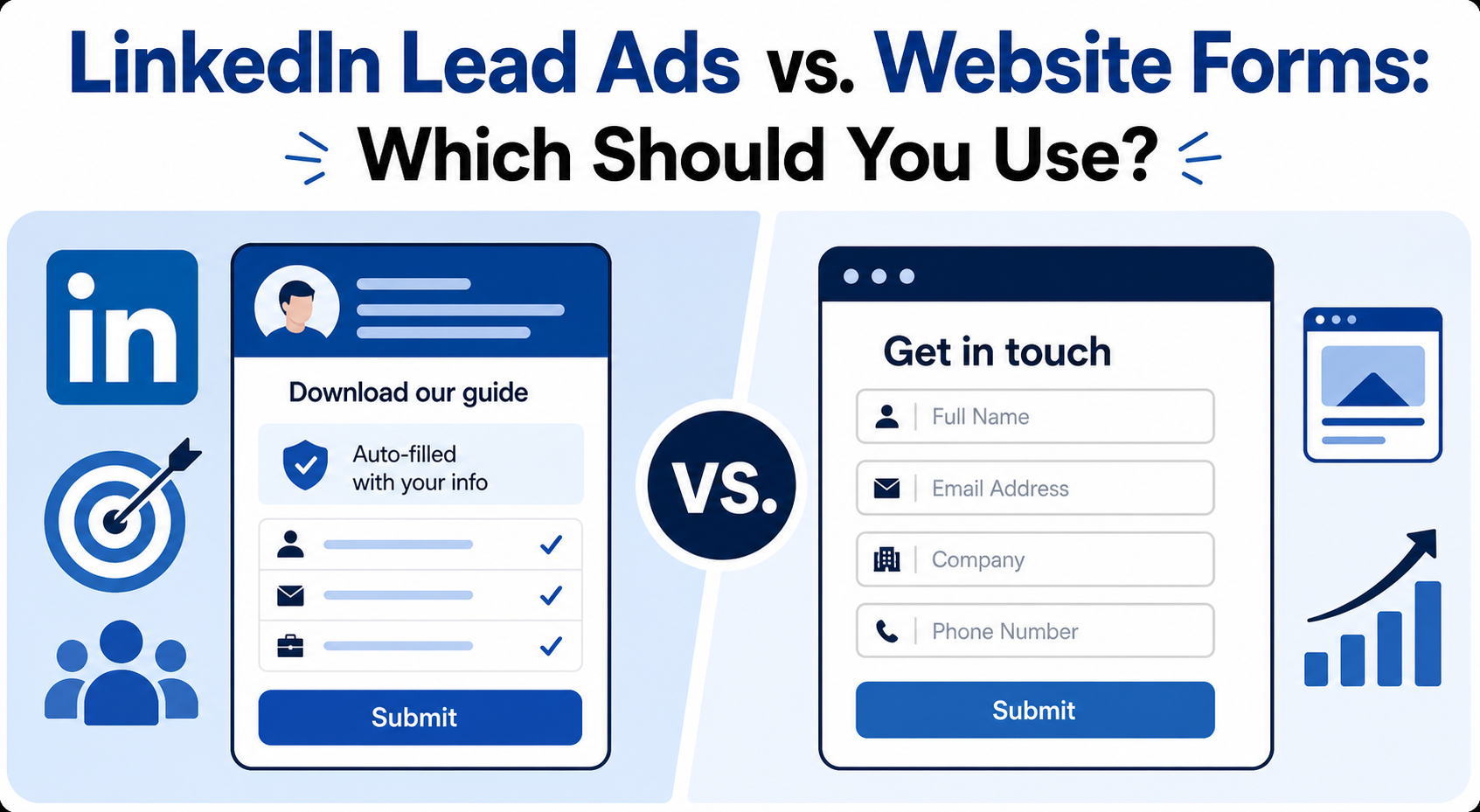
A LinkedIn Lead Gen Form appears directly inside a sponsored post or InMail. When a member clicks the call to action, LinkedIn opens a form already populated with fields from their profile (name, work email, job title, and company) and the member submits without leaving the platform or loading a new page.
A website form requires an extra step: the ad click takes the prospect to a landing page on your own domain, where they have to read the offer, decide it is worth their time, and manually type in their information before submitting.
That one extra step is exactly where most of the drop-off happens, and also exactly where a serious prospect self-selects.
Which One Converts Better?
Removing a step almost always raises completion rates. Industry benchmark reporting on LinkedIn advertising consistently shows Lead Gen Forms completing at a noticeably higher rate than a typical B2B landing page reached from a paid click. The gap is large enough that it shapes which format makes sense for a given budget and goal.
Conversion rate is not the only number that matters, though. Landing page traffic that survives the extra click and still fills out a form tends to convert to a qualified sales conversation at a noticeably higher rate than Lead Gen Form submissions, because the prospect has already demonstrated more effort and self-interest.
How Should You Choose Between Them for a Given Campaign?
Treat the decision as a funnel-stage question, not a platform preference.
| Factor | Favors Lead Gen Form | Favors Website Form |
|---|---|---|
| Funnel stage | Top-of-funnel awareness, list-building, retargeting audience creation | Mid-to-bottom funnel, demo requests, gated high-value content |
| Volume goal | Need audience scale to hit ad-platform matching thresholds | Need a smaller number of highly qualified leads |
| Data captured | Limited to a few pre-fillable fields | Can capture custom fields, use case, budget, timeline |
| On-site signal | None: the prospect never visits your website | Page views, time on page, and content engagement are available |
| Follow-up urgency | Requires fast, automated first-touch follow-up to offset lower intent | Prospect already expects a follow-up conversation |
A common, effective pattern is to run both in the same campaign structure: a Lead Gen Form to build volume and a retargeted audience, paired with a website-form offer aimed at the same audience once they've shown initial engagement.
What Should the Form Itself Ask For?
Whichever format you use, resist the urge to ask for everything up front. A short list of core fields (name, work email, and company) keeps completion rates healthy. Additional qualifying questions (team size, current tool, timeline) can be captured on website forms where the prospect has already committed to filling something out, but they tend to suppress completion on an in-feed Lead Gen Form.
If the intended next step is a scheduled call rather than a generic "thanks for submitting" message, route the confirmation to a booking page. A form that ends in a scheduled meeting produces a measurably different pipeline than one that ends in a static thank-you screen.
Why Does CRM Readiness Matter More Than the Ad Platform?
Neither format solves the problem that actually determines ROI: what happens to the lead in the first hour after submission. Leads coming from either source need to be:
- Deduplicated against existing contacts and companies so a new campaign doesn't create conflicting records for people already in your CRM.
- Tagged with source and campaign consistently, so performance reporting reflects reality instead of a pile of "unknown source" contacts.
- Routed to the right owner immediately, default ownership rules and stale account assignments quietly kill a meaningful share of paid leads before anyone follows up.
- Scored or segmented so sales effort goes toward the leads most likely to convert, rather than treating every form fill identically.
A native integration between your ad platform and your CRM (both HubSpot and LinkedIn support this natively) removes the manual export/import step and keeps attribution intact from ad click to closed deal.
How Do You Connect LinkedIn Campaigns to Your CRM?
Both major CRM platforms support a native connection to LinkedIn's ad platform, which removes the need to manually export a CSV of leads after each campaign and re-import it later. Setting this up well involves a few deliberate steps rather than accepting the default configuration:
- Connect the ad account, not just a single campaign. A full account-level connection lets every campaign, current and future, feed the same pipeline without repeating setup work each time.
- Decide contact ownership rules before the first lead arrives. Default ownership assignment (often "most recently active owner" or a round-robin) can silently route campaign leads to an inactive or departed team member if it isn't checked. Set an explicit default owner for net-new campaign contacts.
- Build the audience segment for retargeting inside the CRM, not just the ad platform. A synced segment of contacts who engaged but didn't convert lets you retarget with LinkedIn ads and follow up with CRM-native email in parallel.
- Watch data-quality edge cases. Blank company names, contacts marked non-marketing by default, and duplicate company records from enrichment tools are common after a first bulk import. Plan a review pass rather than assuming the import is clean.
A campaign audience also needs to clear the ad platform's minimum size threshold to serve reliably. If an initial audience built from a narrow list (a specific industry, revenue band, or technology stack) falls short, broadening one criterion, commonly the revenue range, is usually enough to clear the threshold without diluting who you're actually targeting.
What Should Marketing Teams Do Next?
- Match the form type to the funnel stage and volume goal for the specific campaign, not a blanket policy.
- Keep the form short; move qualifying questions to a follow-up step or a website form later in the sequence.
- Connect the ad platform to your CRM directly rather than manually exporting leads.
- Define lead-source and campaign tagging conventions before launch, not after the first report looks wrong.
- Build the first-touch follow-up (email, booking link, or sales alert) into the campaign plan itself, not as an afterthought.
How Vantage Point Helps
Vantage Point configures LinkedIn advertising campaigns inside HubSpot, including native ad account connections, Lead Gen Form and website-form setup, list segmentation, and lead routing. Our HubSpot implementation services cover the CRM side of the campaign (deduplication rules, ownership, and reporting) so a lead's source is never lost between the ad platform and the pipeline. We are employee-owned and staff every engagement with senior consultants only. No junior handoffs; the experts you meet are the experts who deliver.
Planning a LinkedIn Campaign Tied to Your CRM?
Vantage Point can set up your LinkedIn and HubSpot connection so leads route, score, and follow up correctly from the first click. Talk to Vantage Point about your next campaign.
Frequently Asked Questions
Do LinkedIn Lead Gen Forms convert better than website landing pages?
Yes, typically. Lead Gen Forms remove the extra step of leaving LinkedIn and pre-fill profile data, which usually produces a meaningfully higher completion rate than a comparable B2B landing page, though landing page leads often show stronger downstream intent.
Which form type produces better-qualified leads?
Website forms tend to qualify better because the prospect has left LinkedIn, read your offer, and manually entered their information: each of those steps filters out lower-intent clicks. Lead Gen Forms trade some qualification for higher volume.
Can you use both form types in the same campaign?
Yes. A common approach is a Lead Gen Form for initial volume and retargeting-list building, paired with a website-form offer aimed at the same audience once they've engaged once already.
How many fields should a lead form ask for?
Keep it short. Name, work email, and company are usually enough for the first touch. Additional qualifying questions suppress completion rates more on in-feed Lead Gen Forms than on website forms, where the prospect has already committed to filling something out.
Does the CRM matter if the ad platform already captures the lead?
Yes. Deduplication, source tagging, and fast routing to the right owner happen in the CRM, not the ad platform, and they determine whether a lead gets followed up on in time to matter. A direct integration between the ad platform and the CRM keeps attribution accurate end to end.
Should a lead form end in a thank-you message or a booking link?
A booking link that lets the prospect schedule a call directly produces a measurably different pipeline than a static confirmation message, because it converts interest into a committed next step immediately.