During a HubSpot Marketing Hub evaluation, someone on the buying committee eventually asks: "Do we need a dedicated IP?" It sounds like the enterprise-responsible choice — your own sending infrastructure, your own reputation. But HubSpot's shared IP pools are actively managed and perform well for most senders, and a dedicated IP comes with a 40-day warm-up and a new set of obligations. For many teams, the honest answer is no.
This guide explains what you actually get with HubSpot's dedicated IP add-on, how it differs from the default shared pool, who genuinely needs one, and what the warm-up commitment looks like before you check the box on an order form.
Quick Answer
Most HubSpot customers do not need a dedicated IP. HubSpot's shared IPs carry consistently strong sender reputations managed by HubSpot's deliverability team. A dedicated IP — a paid add-on for Marketing Hub Professional and Enterprise — makes sense for high-volume senders who want complete control over their sending reputation and can sustain the sending volume to keep it healthy. Budget for a 40-day warm-up before all your marketing email routes over it.
- What it is: the choice between HubSpot's default shared sending IPs and a paid dedicated IP address only your account uses.
- Who it matters for: marketing ops teams evaluating Marketing Hub or reconsidering deliverability infrastructure.
- Decision it supports: whether the dedicated IP add-on earns its cost, or whether shared IPs plus good list hygiene get you the same outcome.
Key Takeaways (TL;DR)
- Shared is the default and it's good: HubSpot's deliverability team manages shared IP reputation actively, and most senders see strong inbox placement without any add-on.
- Dedicated means ownership: a dedicated IP is used only by your account, so your reputation is entirely yours — for better and for worse.
- It's an add-on: connecting a dedicated IP requires the Dedicated IP Address Add-On (or the Transactional Email Add-On for transactional mail), available with Marketing Hub Professional and Enterprise.
- Warm-up is real: marketing email on a new dedicated IP goes through a 40-day warm-up before all traffic routes over it, and the warm-up pauses if you stop sending for more than 7 days.
- Volume is the qualifier: dedicated IPs reward consistent, high-volume sending. Low or erratic volume can't build or hold an independent reputation.
What's the Difference Between Shared and Dedicated IPs?
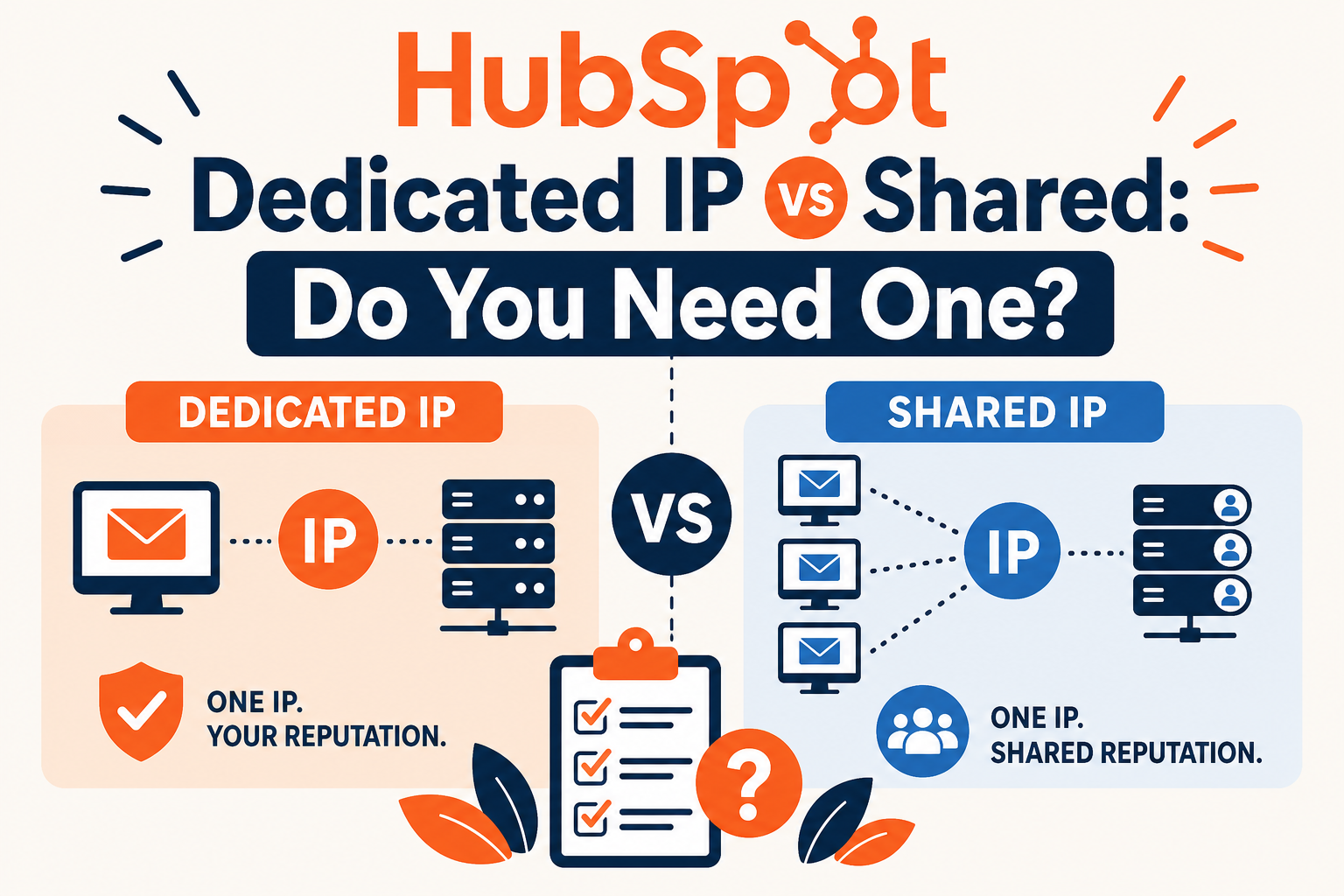
Every marketing email HubSpot sends originates from an IP address. By default, your mail goes out over IP addresses HubSpot shares across many customers. HubSpot's deliverability team monitors those pools, manages sender behavior on them, and — per HubSpot's own materials — maintains consistently high sender scores on them. Your reputation rides with the pool, and the pool is professionally managed.
A dedicated IP is the opposite arrangement: an IP address only your account sends from. Nobody else's behavior can drag your reputation down — and nothing protects your reputation except your own sending practices. HubSpot is explicit about the fit: a dedicated IP suits accounts that send a high volume of email and need greater control over sending reputation.
Why It Matters: Reputation Ownership Cuts Both Ways
Inbox providers (Gmail, Outlook, Yahoo, corporate filters) judge your mail heavily by the reputation of the IP it arrives from. On a shared pool, you inherit a mature, managed reputation — but you also share the consequences if the pool degrades. On a dedicated IP, you own the asset — including the responsibility to build it from zero and keep it warm.
This is why volume matters so much. Reputation systems learn from sending patterns. A dedicated IP sending hundreds of thousands of emails a month builds a clear, stable reputation quickly. A dedicated IP sending a few thousand emails sporadically never accumulates enough signal — it stays effectively "unknown" to inbox providers, which can perform worse than a healthy shared pool. Buying a dedicated IP without the volume to sustain it is paying to make deliverability your own problem.
What HubSpot's Dedicated IP Add-On Includes
| Aspect | Shared IPs (default) | Dedicated IP (add-on) |
|---|---|---|
| Availability | Included with Marketing Hub | Requires the Dedicated IP Address Add-On, with Marketing Hub Professional or Enterprise (the Transactional Email Add-On covers transactional mail separately) |
| Reputation | Pooled; managed by HubSpot's deliverability team | Yours alone; rises and falls with your sending practices |
| Warm-up | None needed — the pool is already warm | 40-day warm-up for marketing email before all traffic routes to the dedicated IP; transactional IPs can be used immediately |
| Send limits | Standard account send limits apply | No sending limits over the dedicated IP |
| Setup | None | DNS records (A, MX with priority 0, and SPF TXT) configured in your domain settings |
| Best fit | Most senders, especially under high volume thresholds | High-volume, consistent senders with engaged lists and deliverability expertise |
Two operational details from HubSpot's documentation are worth knowing before purchase. First, the warm-up: HubSpot automatically warms the dedicated IP based on how contacts interact with your email, gradually shifting traffic over the 40 days — but if you pause sending for more than 7 days, the warm-up pauses too. Plan the purchase around a real sending calendar, not a quarter-end push. Second, the dedicated IP from the marketing add-on can only send marketing email; transactional mail on a dedicated IP is a separate add-on with its own IP.
When You Actually Need a Dedicated IP
The honest checklist is short:
- You send at sustained high volume — enough weekly volume for inbox providers to build and maintain a reputation profile on your IP.
- You have a specific control requirement. Some organizations need to isolate reputation by business unit, brand, or compliance boundary. (HubSpot has separately introduced dedicated IPs per brand for multi-brand accounts.)
- You've hit a real shared-pool problem. Rare, but if your deliverability is measurably suffering from pool effects and your own practices are clean, a dedicated IP removes the variable.
- You can staff the ownership. Monitoring sender score, managing warm-up, watching bounce and complaint rates — someone has to own this, or the dedicated IP underperforms the pool you left.
If none of these apply, the better investment is list hygiene and engagement-based sending on the shared pool: suppress unengaged contacts, honor unsubscribes fast, authenticate your sending domain, and segment by engagement. That work improves results on either infrastructure — and it's usually where the actual deliverability gap lives.
What Businesses Should Do Next
Before adding the line item, baseline where you stand: check your current deliverability metrics in HubSpot (open, click, bounce, and spam-complaint rates by send), confirm your sending domain is authenticated, and clean your suppression lists. If those numbers are healthy, a dedicated IP is unlikely to move them. If they're unhealthy, a dedicated IP won't fix them — it will just make them exclusively yours.
If you do proceed, time the purchase to a steady sending period, complete the DNS setup promptly, and assign an owner to monitor the warm-up and the sender score afterward. Treat the first 90 days on the new IP as a deliverability project, not an infrastructure checkbox.
How Vantage Point Helps
Vantage Point's HubSpot consultants help teams make exactly this call: auditing deliverability on shared IPs, designing engagement-based sending and suppression strategy, and — when a dedicated IP is justified — planning the warm-up and DNS cutover so it lands cleanly. Our HubSpot services team covers platform configuration, and our CRM and marketing automation practice aligns the sending strategy with your broader lifecycle design.
Weighing a Dedicated IP Purchase?
Vantage Point has guided HubSpot email strategy across more than 400 engagements. Talk to us about your deliverability setup — a short audit usually settles whether the add-on earns its cost.
FAQ
Do I need a dedicated IP for HubSpot marketing email?
Usually no. HubSpot's shared IPs are actively managed and carry consistently strong sender reputations, which is sufficient for most senders. A dedicated IP is for high-volume senders who want full control over their sending reputation.
What HubSpot subscription do I need for a dedicated IP?
Per HubSpot's knowledge base, connecting a dedicated IP is available with Marketing Hub Professional or Enterprise and requires the Dedicated IP Address Add-On. Transactional email on a dedicated IP uses the separate Transactional Email Add-On.
How long is the HubSpot dedicated IP warm-up?
Marketing email on a new dedicated IP has a 40-day warm-up period before all traffic routes over it. HubSpot manages the warm-up automatically based on recipient engagement, and the process pauses if you stop sending for more than 7 days.
Can a dedicated IP hurt my deliverability?
Yes, if your volume is low or erratic. Inbox providers need consistent sending volume to build a reputation profile for an IP; a quiet dedicated IP can perform worse than HubSpot's healthy shared pools. Dedicated IPs reward sustained high-volume sending.
Is there a send limit on a HubSpot dedicated IP?
No. HubSpot's documentation states there are no sending limits when sending email over a dedicated IP address — one of the practical differences from the standard account send limits.
What setup does a HubSpot dedicated IP require?
You connect it in your domain settings and configure DNS records at your provider: an A record for the IP, an MX record (priority 0) for bounce and reply processing, and a TXT record for SPF authentication.