Key Takeaways (TL;DR)
- What it is: An AI-generated recap of an eligible call transcript, available while the conversation is still fresh.
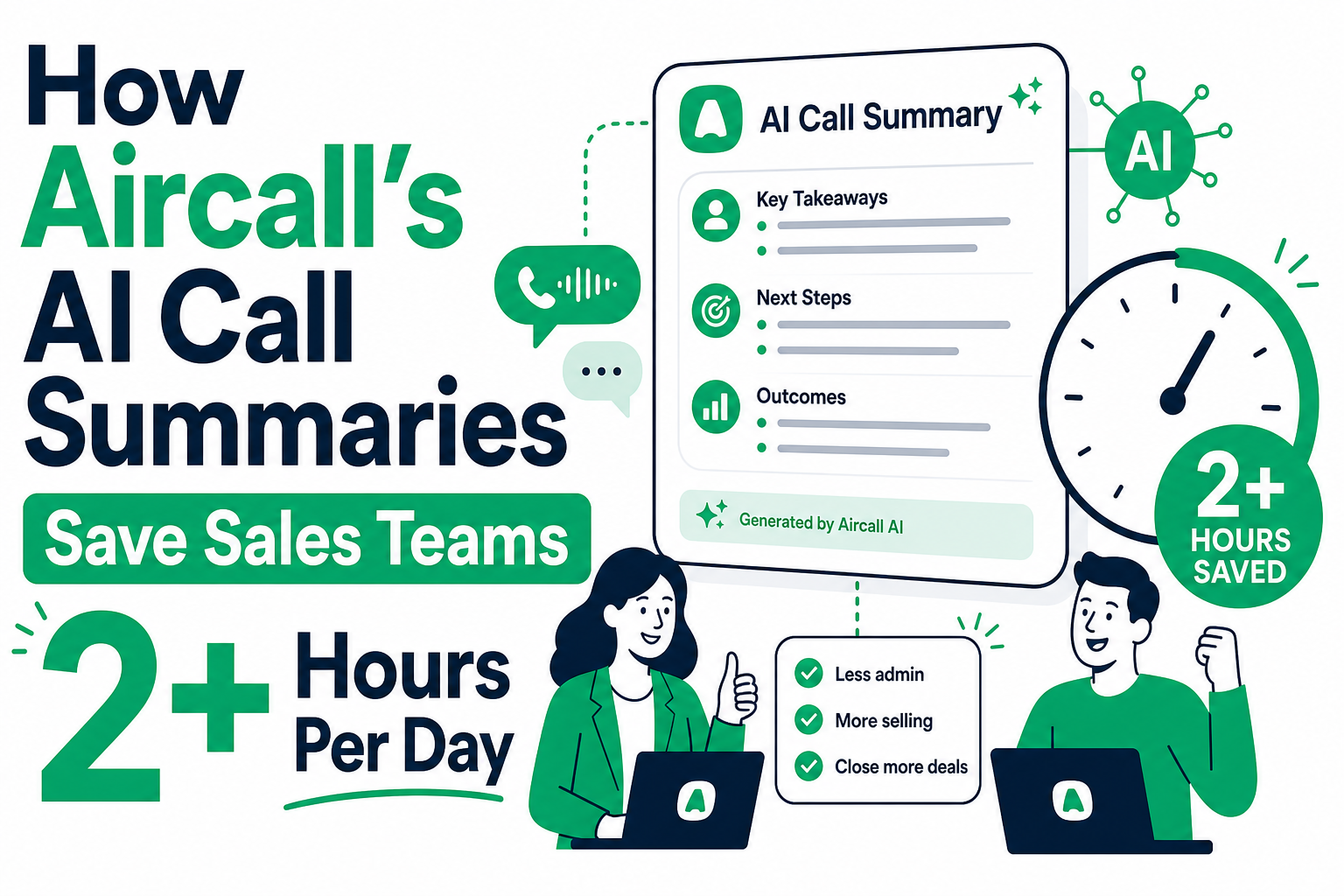
- What it captures: A summary, key topics, action items, talk ratio, and customer-mood signal, based on the configured Aircall AI capability.
- Why it helps: Products discussed, objections, commitments, and next-step themes are easier to find and review.
- Time impact: Aircall reports 2+ hours saved per rep per day; validate this Aircall-reported estimate in a controlled rollout.
- CRM decision: Define fields, review rules, permissions, and ownership before logging insights to Salesforce or HubSpot.
Sales calls contain the evidence behind a forecast: the problem a buyer described, the product or workflow they asked about, the concern that slowed the deal, and the next commitment. Yet those details often live in a rep's memory, a partial note, or an unreviewed recording. When the next call begins, the update becomes easy to postpone.
Aircall's AI capabilities are designed to reduce that post-call gap. The goal is not simply to create more call data. It is to make a timely, consistent record that a rep, manager, and CRM workflow can use without asking the rep to reconstruct the conversation from scratch.
What Are Aircall AI Call Summaries?
Aircall AI call summaries are AI-generated recaps of eligible calls. Aircall describes its AI Assist capabilities as creating call summaries, key topics, action items, talk ratio, and customer mood. The summary is a starting point for CRM documentation, not a substitute for human judgment.
A useful post-call record should state the buyer's goal, product or process discussed, concern or objection, and next action. The transcript preserves detail; the summary makes that detail easier to use in the next call, deal review, or forecast meeting. Access and behavior depend on the configured AI capability, user assignment, call eligibility, transcription, and integration, so teams should verify their environment.
Why Does Post-Call Administration Slow Sales Teams Down?
After-call work often means capturing a note, updating the contact and deal, marking an outcome, creating a task, identifying an objection, and explaining a changed risk or close date. Together, those small actions create friction that rises with call volume.
Delayed or uneven notes make the CRM less reliable for people who missed the conversation. Managers ask for context, reps repeat discovery questions, and forecast reviews become a search for detail.
Aircall reports that its AI call summaries can save reps 2+ hours per day. This Aircall-reported vendor claim is not a guaranteed outcome. Use it as a pilot hypothesis: baseline after-call work, define the review step, then measure time saved and record completeness.
How Do Aircall AI Summaries Turn a Conversation Into CRM-Ready Context?
A practical call-intelligence workflow converts a conversation into several distinct kinds of information. Each has a different job, so teams should avoid treating a short summary as a replacement for the transcript or the CRM record itself.
| Call output | What it contributes | Sales use | Control to add |
|---|---|---|---|
| Transcript | A searchable record of what was said. | Revisit details, validate an AI output, and prepare for a follow-up. | Define who may access recordings and transcripts, and how long they are retained. |
| Call summary | A concise narrative of the conversation. | Create a fast handoff and a consistent starting point for call notes. | Require a rep review before the summary becomes the final deal note. |
| Key topics and action items | Themes and commitments extracted from the call. | Spot products discussed, objections, dependencies, and next steps. | Define a shared taxonomy and map only useful data to the CRM. |
| Customer mood or sentiment | A signal about conversational tone. | Prioritize review, coach a response, and investigate a potential risk. | Treat it as a triage cue, not a definitive measure of buyer intent. |
For an eligible call, recording and transcription create the source material; Aircall's AI produces the insights available in the team's configuration. A rep or manager reviews the transcript and summary, corrects important details, and uses the output to update the CRM.
A short recap may be enough for a simple call but not for an escalation, complex opportunity, or customer commitment. Define what may be logged automatically and what requires confirmation.
How Does Key Topic Recognition Improve Sales Follow-Through?
Key topic recognition makes recurring conversational themes visible. Aircall explains that Key Topics lists topics discussed during a call so managers can find important talking points more quickly. In sales, that can surface a product question, objection, dependency, or agreed next action.
The value extends beyond one record. Repeated topics can reveal an emerging objection, a confusing capability, or a missed discovery point. Aircall's conversation intelligence tools support topic tracking across calls, which can make coaching and enablement more evidence-based.
Start with a short, business-owned list of themes that matter to the sales process. Define the difference between an implementation question, a technical dependency, a competitive objection, and a requested next step. Then test whether recognition is accurate enough for coaching or workflow automation.
How Should Sales Teams Use Sentiment Analysis?
Sentiment analysis helps a team review conversational tone at scale. Aircall calls the output customer mood and says its sentiment analysis can help filter and prioritize calls with negative sentiment, identify improvement opportunities, and reduce personal bias in review.
Use the signal as a prompt for judgment, not a score for judging a buyer or rep. A negative segment may reflect a real concern, a tough negotiation, an unrelated frustration, or imperfect transcription. Open the call, read the context, and decide whether follow-up, coaching, or escalation should change.
Aircall notes that sentiment analysis applies only under defined conditions, including eligible calls with transcripts and required AI access. Set recording consent, privacy, permissions, retention, and review procedures before routing insights through the CRM.
How Do Aircall, Salesforce, and HubSpot Work Together?
The CRM integration is where call intelligence becomes operational. Aircall documents that AI Assist users can log Call Summaries, Key Topics, and Customer Mood into Salesforce through the Aircall AI object. Clear field ownership and review rules make this a more consistent call record.
In HubSpot, Aircall logs call information as engagements, and its support documentation describes Key Topics in call engagement details. Verify the current connector configuration and supported fields. Decide whether the summary belongs on the activity timeline, whether selected details update deal or contact properties, and who handles matching exceptions.
A connected workflow should strengthen the system of record, not create a second note collection. Vantage Point can align Salesforce implementation and advisory, HubSpot CRM strategy and optimization, and system integration and data migration with dependable automation rules. See our Aircall AI messaging agents for HubSpot guide for broader HubSpot context.
Why Do Better Call Records Improve Coaching, Pipeline Accuracy, and Forecasting?
The immediate win is less typing. The larger value is a better shared record of the customer conversation. When summaries and topics are useful, managers can coach against specific moments rather than a rep's recollection: Was an objection explored? Does the next step have an owner? Does the deal need a different resource?
Pipeline quality improves when the CRM captures why an opportunity changed, not only that it changed. A call summary can prompt an updated next step; topics can expose a dependency; customer mood can flag a risk for review. Do not update a forecast automatically without process rules.
A standard summary and visible review habit reduce variation between detailed note-takers and people rushed between calls. That supports cleaner handoffs, reporting, enablement, and CRM operations.
What Are the Best Practices for Implementing Aircall AI Call Summaries?
A productive rollout is a workflow design project, not only an AI feature activation.
- Define the minimum useful call record. Use a concise schema: outcome, buyer goal, product or capability, objection, next step, owner, date, and risk.
- Map insights to the right CRM location. Decide what belongs in an engagement, deal note, property, task, or manager view; do not overwrite a durable field with an unreviewed inference.
- Pilot one motion before scaling. Baseline after-call time, note completeness, follow-up timeliness, and manager adoption for a focused team or call type.
- Make review explicit. Reps should check names, dates, commitments, product references, and next steps, with an easy correction path for recurring errors.
- Set governance before broad access. Document consent, retention, permissions, sensitive-data handling, and escalation procedures; confirm the integration honors CRM security rules.
- Create a coaching rhythm. Use summaries, topics, and sentiment to select calls for review, not to replace review; share patterns with enablement.
Connect notes to CRM fields and meetings the team already uses. Design for reviewable automation: fast enough to save time, structured enough to improve data, and controlled enough to keep people accountable.
How Vantage Point Helps
Vantage Point is a boutique, senior-led Salesforce and HubSpot consulting partner. We help businesses assess their call-to-CRM workflow, define data ownership, configure integrations, improve record quality, and create an adoption plan that makes AI assistance useful in daily work.
If your team is evaluating Aircall with Salesforce, HubSpot, CRM governance, or system integrations, Talk to Vantage Point about Aircall. We can help define a practical pilot and a scalable operating model before you automate a high-volume customer conversation process.
Frequently Asked Questions
How do Aircall AI call summaries work?
Aircall AI call summaries use information from eligible call transcripts to produce a concise post-call recap and related insights such as key topics, action items, and customer mood, depending on the AI capability and configuration. A sales team should use the generated content as a fast starting point, then review important details before treating it as the final CRM record.
Can Aircall AI call summaries save sales reps two hours per day?
Aircall reports that AI call summaries can save reps 2+ hours per day. That is an Aircall-reported vendor estimate, so the right business approach is to measure actual after-call work, CRM completion, and follow-up speed during a controlled pilot rather than assume identical results.
What are Aircall Key Topics?
Aircall Key Topics are AI-generated topics discussed during a call. They can help sales teams find recurring product questions, objections, commitments, and next-step themes, but teams should validate accuracy and align the topic list with their own sales process before using it for automation or reporting.
Is Aircall customer mood the same as sentiment analysis?
Aircall uses customer mood as a call insight, and its sentiment analysis helps teams identify and review the tone of eligible customer interactions. The result is a useful triage signal, not a definitive statement of buyer intent, satisfaction, or rep performance; people should review the supporting call context.
Can Aircall AI insights sync to Salesforce?
Yes. Aircall documents that its Salesforce integrations can log Call Summaries, Key Topics, and Customer Mood for users with the required Aircall AI access. Teams should still confirm record matching, field mapping, permissions, and the review process in their own Salesforce configuration.
Does Aircall work with HubSpot?
Yes. Aircall's HubSpot integration logs call information as engagements, and Aircall documents Key Topics in call engagement details when the applicable AI capability is enabled. Businesses should test current supported fields and decide which insights belong on the activity timeline, tasks, or CRM properties before automating updates.
What should a business configure first?
Begin by defining the minimum useful post-call record and the review rule for each field. Next, map the summary, topics, tasks, and exceptions to Salesforce or HubSpot; pilot one sales motion; and document access, retention, consent, and escalation requirements before wider rollout.