A customer signs an agreement based on certain numbers: a contract value, a balance, a list of items, a fee rate. Six months later, those numbers have changed. Items were added or removed, balances moved, and the deal looks different in the CRM than it did on signing day. Now someone asks a simple question: which number should the fee, the commission or the report use?
If your CRM only stores the live value, you can't answer it reliably. This guide explains the difference between snapshot values and live values, when to freeze data at signing, and how to set it up in Salesforce and HubSpot.
Quick Answer
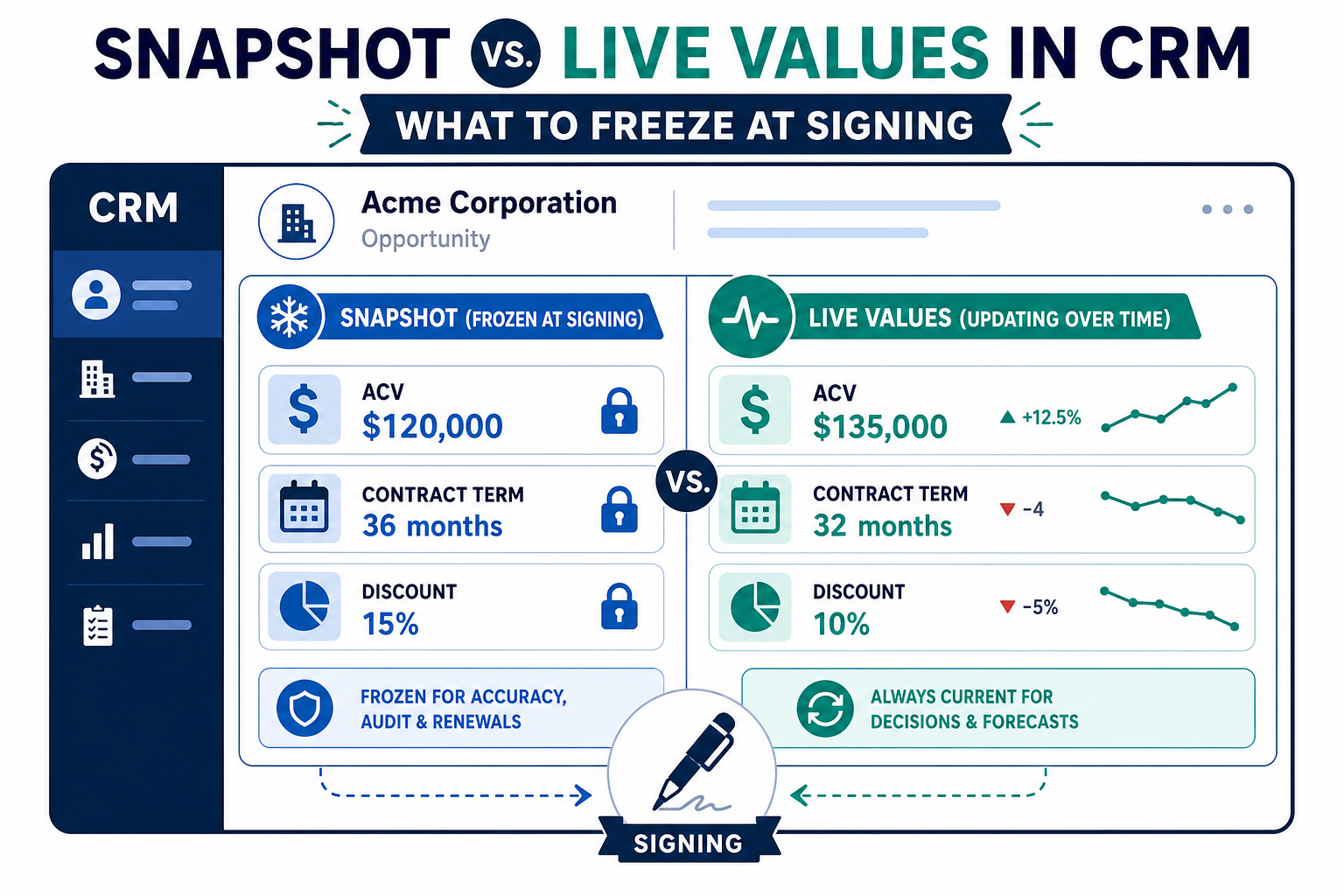
Snapshot vs. live values in CRM is the choice between storing a number as it was at a key moment, such as contract signing, and storing it as it is now. Most businesses need both. Capture an "at signing" copy of amounts, rates and counts that drive fees, commissions or commitments, and lock it. Keep live fields for day-to-day service and forecasting. Decide in writing which value each calculation and report uses. Vantage Point designs these data models through its Salesforce and HubSpot implementation services.
Key Takeaways (TL;DR)
- Live values change: formulas, roll-ups and synced fields always show the current number.
- Snapshots preserve commitments: an at-signing copy keeps the number the customer agreed to.
- Decide per calculation: fees, percentages and commissions each need an explicit rule for which value they use.
- Automate the capture: copy values when a record reaches a key stage, then lock the copy.
- History isn't a snapshot: field history shows changes, but it's a poor basis for calculations and reports.
What Is the Difference Between a Snapshot Value and a Live Value?
A live value reflects the current state of your data. A roll-up of related items, a formula based on today's balance, or a field synced from another system all update automatically. That's exactly what you want for service work and forecasting.
A snapshot value is a copy taken at a specific moment and then left alone. "Contract value at signing," "committed amount at signing" and "rate at close" are all snapshots. They answer the question, "What did we and the customer agree to?"
The trouble starts when a single field tries to do both jobs. If "Total Amount" is a live roll-up, it's no longer the signed amount the first time anything changes. Reports built on it quietly rewrite history.
When Should You Freeze Data at Signing?
Freeze a value whenever something important is calculated from it or promised against it. Common examples:
- Fees or pricing set as a percentage of an amount at signing.
- Commissions and bonuses tied to the value of a closed deal.
- Contract commitments, such as a minimum volume, a term or a set of included items.
- Performance measures, where progress is judged against a starting point, such as a percentage of an original balance.
- Handoff records, where service needs to know what sales promised.
If nobody calculates anything from a value and nobody will ever ask what it was on a past date, a live field is fine.
Which Value Should Each Calculation Use?
This is a business decision, not a technical one, and it should be written down. A simple decision table helps:
| Question | Use the snapshot when | Use the live value when |
|---|---|---|
| How is the fee calculated? | The agreement fixes the fee at signing | The agreement adjusts fees as amounts change |
| How is progress measured? | Progress is judged against the starting point | You only need the current position |
| What goes in the header? | Users need the original reference, such as the original account or amount | Users need the current status |
| What drives commissions? | Commission is earned on the signed value | Commission follows actual revenue over time |
| What do forecasts use? | Rarely | Almost always |
Often the best answer is to show both side by side. For example, a service screen can show the original and current balance next to each other, so users see what changed at a glance.
How Do You Capture Snapshot Values in Salesforce?
In Salesforce, a snapshot is usually a regular field populated by automation at a key moment:
- Create "at signing" fields as standard number, currency or date fields, not formulas or roll-ups.
- Populate them with a record-triggered flow when the record reaches the signing stage, such as a status change or a closed-won opportunity.
- Lock them. Use a validation rule, field-level security or both, so only an authorized role can change a snapshot after capture.
- Point calculations at the right field. Update formulas, flows and reports to reference the snapshot or the live field deliberately.
For trends over time, such as pipeline or balances week by week, Salesforce reporting snapshots can save a report's results on a schedule into a custom object. That's a different job from a per-record at-signing field, and many orgs use both.
How Do You Capture Snapshot Values in HubSpot?
HubSpot follows the same pattern with different tools:
- Create custom "at signing" properties on the deal or relevant object.
- Use a workflow triggered by the deal stage or status change to copy the live value into the snapshot property. HubSpot's guide to copying property values in workflows lists which property types are compatible.
- Restrict editing of snapshot properties to the teams who should change them, where your subscription supports property permissions.
- Build reports that reference the snapshot and live properties by name, so nobody mixes them up.
What Happens When Items Are Added or Removed After Signing?
Many agreements cover a set of items: products, accounts, locations or balances. Customers add and remove items over time, and each change moves the live total. The snapshot shouldn't move with it, but you still need a clear record of what changed.
A practical pattern has three parts:
- Keep the original snapshot untouched. The at-signing total and count stay as they were.
- Track amendments explicitly. When the agreement is formally changed, record an amendment with its own date and new committed value, rather than overwriting the original.
- Let the live total follow reality. Day-to-day service works from the current total, while fees and commitments follow whichever value the agreement specifies.
Also decide who can change items after an agreement goes out. If salespeople can edit the item list after sending an agreement but before signature, capture the snapshot at signature, not at sending.
Why Isn't Field History Enough?
Salesforce field history tracking and HubSpot property history both show how a value changed over time. They're valuable for audits and investigations. But they're awkward to calculate from, can be limited in which fields and how long they're kept, and require someone to reconstruct the value on a given date.
A dedicated snapshot field gives you the number directly, on the record, ready for formulas and reports. Keep history for accountability. For more on that side, see our guide to building audit trails in your CRM.
What Mistakes Should You Avoid?
- Using a formula for a snapshot. Formulas recalculate, so they can never hold a frozen value.
- Capturing too late. If the flow runs after the first edit, the snapshot is already wrong. Trigger it at the signing event itself.
- Leaving snapshots editable. An unlocked snapshot is just another live field waiting to drift.
- Not backfilling. Existing records need their at-signing values populated, ideally from the signed documents or historical data.
- Skipping the naming convention. Labels like "Amount (at signing)" and "Amount (current)" prevent report errors.
What Should Businesses Do Next?
- List every calculation that uses an amount, rate or count, including fees, commissions and performance measures.
- For each one, decide whether it uses the at-signing value or the live value, and get sign-off.
- Add snapshot fields and capture automation for the values that need them.
- Backfill existing records and test with a handful of real examples.
- Update page layouts to show original and current values side by side where users need both.
How Vantage Point Helps
Vantage Point helps businesses design CRM data models that keep commitments and current reality separate. Our Salesforce implementation and advisory team and HubSpot implementation team define snapshot fields, build capture automation and align reports with the agreed rules. Senior consultants only. No junior handoffs; the experts you meet are the experts who deliver.
Are Your Reports Rewriting History?
If fees, commissions or progress measures depend on numbers that keep changing, it's time for a review. Vantage Point can map your calculations and set up snapshot fields that hold. Talk to Vantage Point about your CRM data model.
Frequently Asked Questions
What is a snapshot field in a CRM?
A snapshot field stores a copy of a value at a specific moment, such as contract signing, and doesn't change afterward. It preserves what was agreed even when the live value moves.
Should fees be calculated from the value at signing or the current value?
It depends on your agreement. If the fee is fixed at signing, calculate it from a locked at-signing field. If the agreement adjusts fees as amounts change, use the live value, and document the rule.
Can a formula field hold a snapshot value?
No. Formula fields recalculate whenever their inputs change. Use a regular field populated by automation at the signing event, then lock it.
How do you capture a snapshot value in Salesforce?
Create a standard field for the at-signing value, populate it with a record-triggered flow when the record reaches the signing stage, and lock it with validation rules or field-level security.
How do you capture a snapshot value in HubSpot?
Create a custom property for the at-signing value and use a workflow triggered by the deal stage to copy the live value into it. Restrict who can edit the property afterward.
Isn't field history tracking enough?
Field history shows how values changed, which helps audits. But it's awkward to calculate from and may be limited in scope, so a dedicated snapshot field is better for fees, commissions and reports.
What are Salesforce reporting snapshots?
Reporting snapshots save a report's results on a schedule into a custom object, so you can report on trends over time. They complement per-record at-signing fields rather than replacing them.