A client signs a proposal. Two months later, they want more: an extra deliverable, a faster timeline, a new phase. Now your team has to decide how to record it in Salesforce. Do you edit the original opportunity, create a new quote, or open a separate opportunity for the change order? The choice affects your pipeline reports, revenue history, commissions and project handoff. This guide compares the options and recommends a model that holds up as your business grows.
Quick Answer
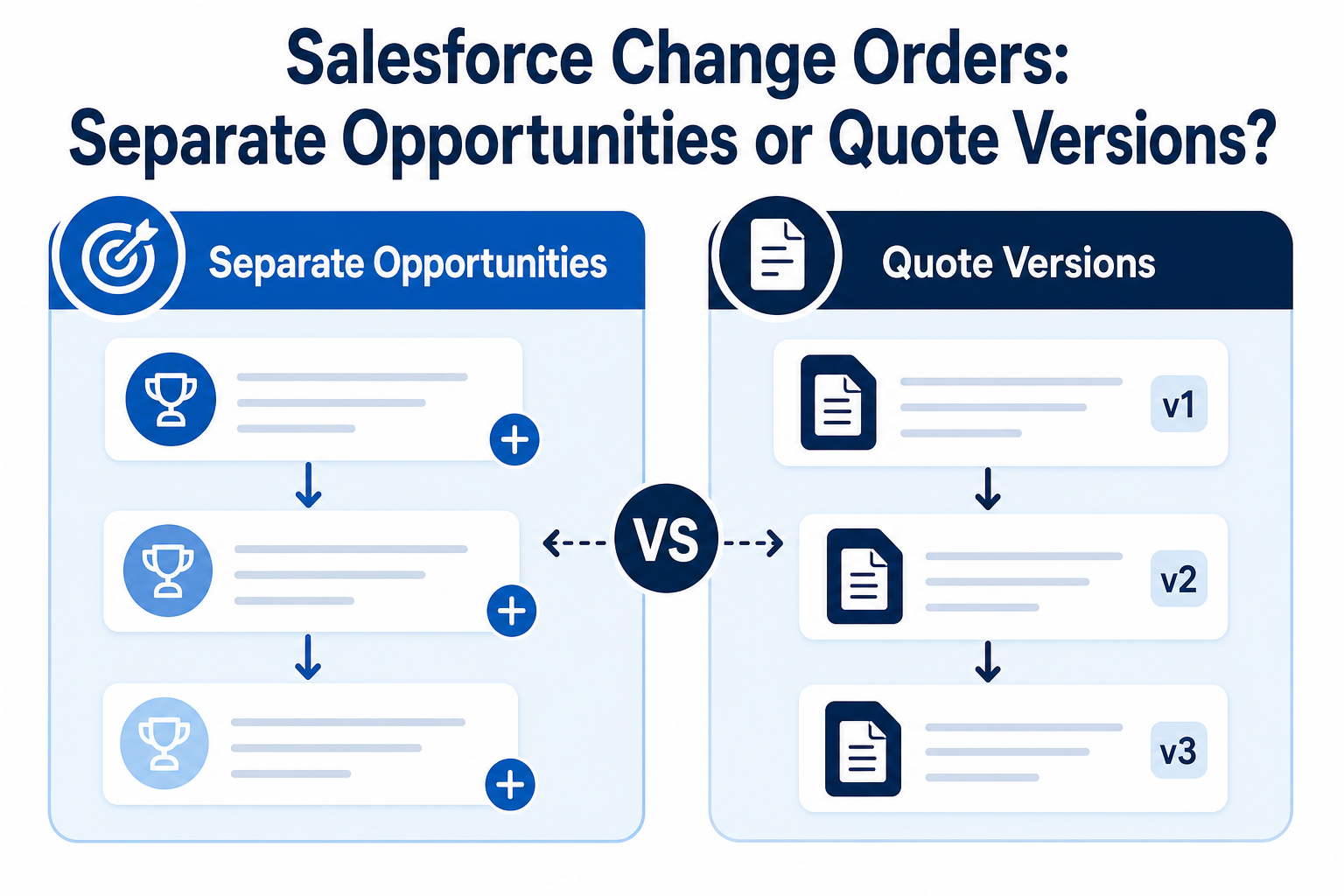
Salesforce change orders are usually best recorded as separate opportunities linked to the original opportunity, not as edits to a closed deal. Use quote versions for revisions before the client signs, because an opportunity can have many quotes but syncs with only one at a time. After signature, open a change-order opportunity with a lookup to the original, and roll the values up for a total contract view. Treat recurring renewals the same way. Vantage Point designs these models through its Salesforce implementation and advisory services.
Key Takeaways (TL;DR)
- Before signature, use quotes: each revision becomes a new quote on the same opportunity, with one synced as the current version.
- After signature, use change-order opportunities: they keep the original deal intact and show new revenue when it was actually won.
- Link and roll up: a lookup to the original opportunity plus a rolled-up total gives the full contract value.
- Model deliverables as products: products and price books make pricing, reporting and project handoff consistent.
- Keep it simple for users: the right model is the one your team will follow every time.
Why Is Change-Order Modeling a Common Problem?
Most Salesforce orgs start with a simple rule: one deal, one opportunity. That works until clients change their minds. Then teams improvise. Some edit the closed opportunity's amount. Some add products to it months after it closed. Others create a new opportunity with no link to the first.
Each shortcut causes a different problem. Editing a closed deal rewrites history and distorts win-rate and forecast reports. Unlinked opportunities make it impossible to see the full value of a client engagement. And inconsistent practice across reps means no report can be trusted.
How Do Salesforce Quotes and Opportunities Work Together?
An opportunity represents a potential deal. Opportunity products list what's being sold, drawn from a price book. Quotes are formal offers created from an opportunity, with their own line items.
According to Salesforce Help, an opportunity can have multiple quotes, but it can sync with only one quote at a time. While synced, changes to products on one record flow to the other. That makes quotes a natural fit for proposal revisions: create a new quote for each version, and sync the one the client is currently considering.
What Are the Options for Recording a Change Order?
| Option | How it works | Pros | Cons |
|---|---|---|---|
| Edit the original opportunity | Add products or increase the amount on the closed deal. | Fast and simple. | Rewrites history, distorts reporting, and hides when new revenue was won. |
| New quote on the original opportunity | Create a revised quote and sync it. | Keeps versions together and works well before signature. | After close, it still changes the original deal's value and timing. |
| Separate change-order opportunity | Open a new opportunity linked to the original with a lookup field. | Preserves history, shows new revenue in the right period, supports its own approvals. | Needs a rollup for total contract value and clear naming rules. |
| Fields on the opportunity only | Track revisions in custom fields without quotes. | Minimal setup. | No version history, weak audit trail, hard to report. |
Why Are Separate Change-Order Opportunities Usually Best?
A separate, linked opportunity keeps each commercial decision as its own record, with its own amount, close date, owner and approvals. That brings several benefits:
- Accurate reporting. The original deal stays as it was signed, and new revenue appears in the period it was won.
- Clear approvals. Change orders can follow their own approval path, such as sign-off from delivery before pricing is sent.
- Full contract view. A lookup to the original opportunity, plus a rollup of related change-order values, shows the total engagement at a glance.
- Cleaner handoff. Delivery teams see exactly what was added and when.
Because the relationship is a lookup rather than master-detail, standard roll-up summary fields won't calculate the total automatically. A record-triggered flow or a rollup tool can maintain it instead.
How Should You Handle Recurring Renewals?
The same thinking applies to recurring services, such as managed services or subscriptions. Rather than extending the original opportunity each year, create a renewal opportunity linked to it. Renewals then show up in the pipeline with their own close date, forecast category and owner.
This makes it much easier to spot renewals at risk and to report on retention. Our guide to why teams miss renewals covers the data habits that keep renewals visible.
Should Deliverables Be Products or Something Else?
In service businesses, teams sometimes debate whether deliverables should be products, custom records, or people. In most cases, model what you sell as products in a price book, and assign people to the work after the deal is won.
Products give you consistent pricing, reporting by service line, and a clean handoff to project or delivery systems. People and capacity belong in resource planning, not on the opportunity.
How Do You Handle Price Adjustments Like Rush Fees?
Adjustments such as rush fees, specialist surcharges or discounts raise a similar question: separate line items, or folded into one price? Separate line items are usually better. They make adjustments visible to approvers, reportable over time, and easier to explain to clients.
Keep the list short. A few well-named adjustment products, each with clear rules, work better than dozens of one-off options. If pricing logic becomes truly complex, with many conditional rules, that's the point to evaluate a configure-price-quote tool rather than building complex logic into custom fields. For a HubSpot comparison, see our guide to quote-to-cash in HubSpot.
What About Subcontractors and Partners?
Service firms often involve subcontractors in proposals and delivery. They usually shouldn't be Salesforce users just to be named on a deal. Instead, record them as contacts linked to a partner account, or use a custom related object if you need to track rates, roles and availability. Keep user licenses for people who actually work in Salesforce.
Which Fields and Conventions Keep Change Orders Clean?
A few small conventions make the model easy to follow and easy to report on:
- An opportunity type or record type. Values such as "New Business," "Change Order" and "Renewal" let every report separate the three.
- A parent opportunity lookup. Required on change orders and renewals, so nothing is created without a link to the original.
- A naming pattern. For example, the original name followed by "CO-1," "CO-2" or "Renewal 2027," so records sort together in lists.
- A reason field. A short picklist, such as added scope, timeline change or new phase, shows why engagements grow.
- A total contract value field on the original. Maintained automatically, never typed by hand.
Validation rules can enforce the basics, such as requiring the parent lookup when the type is "Change Order."
How Do You Roll Out a New Change-Order Model?
- Agree the rules. Define when to use a new quote, when to open a change-order opportunity, and how to name each.
- Build in a sandbox. Add the lookup field, record type or opportunity type, rollup and any approval steps, and test them with real scenarios.
- Update reports. Make sure pipeline, bookings and account reports treat change orders and renewals correctly.
- Clean up history. Decide whether to restructure past change orders or apply the model going forward only.
- Train and reinforce. Show reps the "why" as well as the "how," and review new records for the first few weeks.
Keep the user experience simple. A quick action that creates a change-order opportunity pre-filled from the original saves time and makes the right path the easy one.
What Should Businesses Do Next?
- Audit how change orders and renewals are recorded today.
- Choose one model and write clear rules for it.
- Use quotes for revisions before signature and linked opportunities after.
- Model deliverables and adjustments as products.
- Test in a sandbox and update reports before rollout.
If you're weighing whether to use standard objects or build something custom, our guide to custom objects vs. standard objects can help.
How Vantage Point Helps
Vantage Point helps service businesses design Salesforce data models that match how they sell, deliver and renew. Our Salesforce implementation and advisory team designs opportunity, quote and product structures, and our workflow automation services build the flows, rollups and approvals that keep them consistent. Senior consultants only. No junior handoffs; the experts you meet are the experts who deliver.
Model Change Orders and Renewals the Right Way
A clear change-order model keeps your history accurate and your pipeline honest. Vantage Point can review your current setup, recommend the right structure, and build it in Salesforce. Talk to Vantage Point about your Salesforce design.
Frequently Asked Questions
How should change orders be tracked in Salesforce?
Most teams do best with a separate change-order opportunity linked to the original by a lookup field. This preserves the original deal, shows new revenue in the period it was won, and supports a rolled-up total contract value.
Can a Salesforce opportunity have more than one quote?
Yes. An opportunity can have multiple quotes, but it can sync with only one quote at a time. That makes quotes well suited to tracking proposal revisions before the client signs.
Should we edit a closed opportunity when the client adds work?
Generally, no. Editing a closed opportunity rewrites history and distorts win-rate and bookings reports. A linked change-order opportunity records the new work without changing the original deal.
How do you get a total contract value across change orders?
Add a lookup from each change-order opportunity to the original, then use a record-triggered flow or a rollup tool to sum related values onto the original. Standard roll-up summary fields need a master-detail relationship.
Should renewals be separate opportunities?
Yes, in most cases. Separate renewal opportunities give each renewal its own close date, forecast and owner, which makes retention easier to manage and report.
Should service deliverables be modeled as products?
Usually, yes. Products in a price book give consistent pricing, reporting by service line and a clean handoff to delivery. Assign people to the work after the deal is won.
Do subcontractors need Salesforce user licenses?
Not if they don't work in Salesforce. Record them as contacts on a partner account, or use a custom related object to track their roles and rates on proposals.