HubSpot's built-in workflows are powerful, but they stop at the edge of HubSpot. The moment a process needs to reach an ERP, a billing system, a data warehouse, or a second CRM, native automation runs out of room. That is the gap Workato fills.
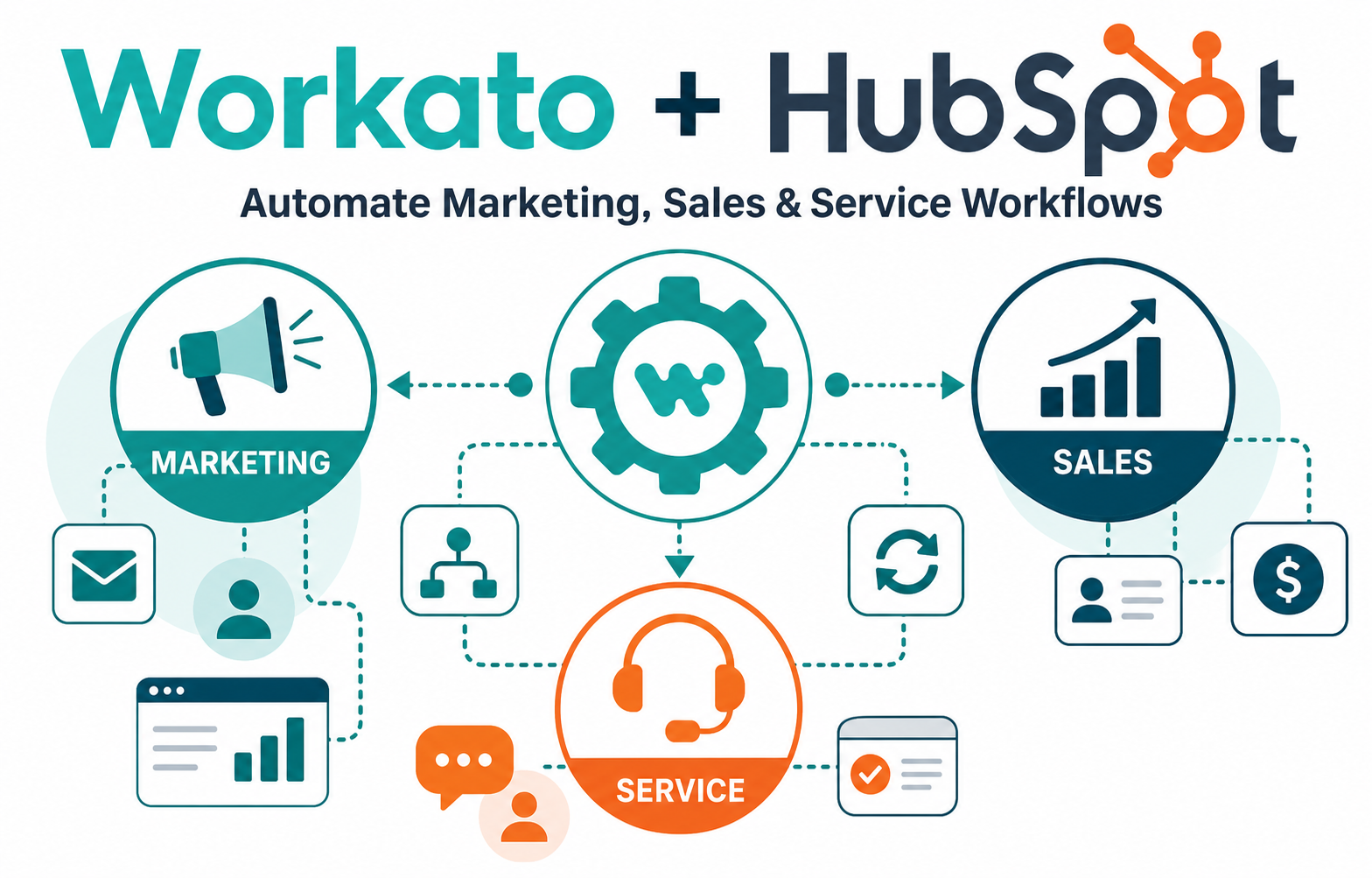
Workato is an integration and automation platform (iPaaS) with a deep HubSpot connector. It lets you trigger actions in HubSpot from outside systems — and push HubSpot data anywhere — using reusable "recipes" instead of custom code. For teams running Marketing Hub, Sales Hub, and Service Hub, that means lead routing, campaign triggers, and cross-system data sync can run automatically and reliably.
If you own RevOps, marketing operations, or a HubSpot admin function and you keep hitting the limits of native workflows, this guide shows what Workato adds, where it fits, and how to roll it out without creating a tangle of brittle automations.
Quick Answer
Workato connects HubSpot to the rest of your tech stack and automates workflows that span multiple systems. Native HubSpot workflows handle automation inside HubSpot — lead nurturing, internal notifications, property updates. Workato extends that automation across systems: syncing HubSpot contacts with an ERP or data warehouse, routing leads based on data HubSpot doesn't hold, and triggering HubSpot campaigns from external events. It matters for any organization whose customer process touches more than one platform, and it helps you decide when to use native HubSpot automation versus an iPaaS. Vantage Point implements and governs these integrations across HubSpot and Salesforce so they stay clean, monitored, and maintainable.
TL;DR
- What it is: Workato is an iPaaS with a HubSpot connector that automates workflows spanning HubSpot Marketing, Sales, and Service Hubs and outside systems.
- Why it matters: Native HubSpot workflows stop at HubSpot's boundary; Workato handles multi-system automation like lead routing, campaign triggers, and bidirectional data sync.
- Best for: RevOps and marketing operations teams whose processes connect HubSpot to ERPs, data warehouses, billing tools, or a second CRM.
- Decision point: Use native HubSpot workflows for in-app automation; reach for Workato when a process crosses system boundaries or needs reliable error handling at scale.
- How Vantage Point helps: We design and support Workato and HubSpot integrations through our system integration and data migration services and HubSpot consulting work.
What Is the Workato + HubSpot Integration?
The Workato + HubSpot integration is a connection between HubSpot and Workato's automation platform that lets you build cross-system workflows without custom code. Workato provides a prebuilt HubSpot connector with triggers (events that start a workflow, such as a new or updated contact) and actions (operations Workato performs in HubSpot, such as creating a deal or updating a property).
You assemble these into recipes — Workato's term for an automated workflow. A recipe can listen for an event in one system and take action in HubSpot, or listen in HubSpot and act in another system. Because recipes are reusable and centrally managed, the same logic can power multiple processes instead of being rebuilt inside each tool.
You can find the connector on the HubSpot App Marketplace listing for Workato and on Workato's HubSpot integration page.
This is the workflow-level companion to broader platform integration. For connecting HubSpot and Salesforce together through Workato at an enterprise level, see our guide to Workato enterprise integration without code.
Why Workato + HubSpot Matters in 2026
Most growing businesses don't run on a single platform. HubSpot holds marketing and sales context, but pricing lives in an ERP, support history lives in a help desk, product usage lives in a data warehouse, and finance lives somewhere else entirely. Native HubSpot workflows can't see those systems.
Three pressures make this a now problem:
- Data lives in more places. As teams adopt specialized tools, the number of systems that need to share customer data keeps growing. Manual exports and one-off scripts don't scale and break quietly.
- Buyers expect coordinated experiences. A lead that fills out a form, a customer who upgrades, and a support ticket that escalates should all trigger the right follow-up — even when the triggering event happens outside HubSpot.
- AI depends on connected, clean data. AI features in HubSpot and elsewhere are only as good as the data feeding them. Reliable integration is the foundation, not an afterthought.
The goal is not to automate everything in Workato. It's to use the right tool for each job — native HubSpot workflows where they fit, and an iPaaS where automation has to cross system lines.
How Workato Automates HubSpot Workflows
Workato recipes follow a simple pattern: a trigger starts the recipe, optional logic (conditions, lookups, loops) shapes it, and one or more actions carry it out. Here is how that plays out across the three HubSpot hubs.
Marketing Hub: campaign triggers and enrichment
- Enroll a HubSpot contact in a campaign when an event fires in another system — a product signup, a webinar registration in a separate tool, or a purchase recorded in your ERP.
- Enrich HubSpot contacts with firmographic or product-usage data pulled from a data warehouse before a nurture sequence starts.
- Sync campaign membership and engagement back to a central analytics store for reporting.
Sales Hub: lead routing and deal sync
- Route inbound leads using data HubSpot doesn't natively hold — territory tables, account ownership in an ERP, or scoring from an external model — then assign the owner and create the deal in HubSpot.
- Keep deals in sync between HubSpot and a second CRM or finance system so revenue data stays consistent.
- Trigger an internal alert and a follow-up task when an external signal (a renewal date, a usage spike) indicates sales should act.
Service Hub: tickets and post-sale data
- Create or update HubSpot tickets from an external support or monitoring system, with full context attached.
- Push resolved-ticket data to a warehouse or notify account teams when a high-value customer hits a support threshold.
- Sync product or subscription status into HubSpot so service reps see an accurate account picture.
Workato vs. Native HubSpot Automation: Which to Use
Workato does not replace HubSpot workflows — it extends them. Use this table to decide where each belongs.
| Capability | Native HubSpot Workflows | HubSpot Operations Hub | Workato (iPaaS) |
|---|---|---|---|
| Automation inside HubSpot | Strong | Strong | Possible, usually overkill |
| Multi-system / cross-app automation | Limited | Some (curated apps) | Strong — connects hundreds of systems |
| Custom logic & data transformation | Basic | Programmable automations | Advanced (conditions, loops, lookups, formulas) |
| Bidirectional data sync to ERP / warehouse | No | Limited | Yes |
| Error handling & retries at scale | Basic | Improved | Robust monitoring, retries, alerting |
| Best for | In-app nurture, alerts, property updates | HubSpot-centric data ops | Enterprise, multi-system workflows |
A useful rule of thumb: if every step of a process happens inside HubSpot, build it in HubSpot. If a step depends on a system HubSpot can't reach, that's the signal to bring in Workato.
For a side-by-side look at lighter automation tools, see our comparison of Workato vs. Zapier for business automation.
Common Workato + HubSpot Use Cases
The highest-value recipes tend to fall into a few patterns:
- Lead-to-account routing using territory or ownership data from an external source.
- Campaign triggers fired by product, billing, or event-platform activity outside HubSpot.
- Contact and company sync between HubSpot and an ERP, data warehouse, or second CRM.
- Quote-to-cash handoffs that move closed-won deals from HubSpot into finance or provisioning.
- Service escalations that create HubSpot tickets from monitoring or support tools.
- Reporting pipelines that consolidate HubSpot engagement data into a central analytics store.
Implementation Checklist
Before you build, work through these steps to keep your integration clean and maintainable:
- Map the process first. Document the trigger, the systems involved, the data that moves, and the desired outcome — before opening Workato.
- Decide native vs. iPaaS for each step. Don't move HubSpot-only logic into Workato; keep it where it's simplest to maintain.
- Define a system of record per field. Decide which system owns each data point so sync direction is unambiguous and you avoid update loops.
- Standardize data before you sync. Inconsistent picklists, formats, and duplicates will propagate across systems. Clean first.
- Build in error handling. Use Workato's monitoring, retries, and alerts so failures surface immediately instead of silently.
- Start small and expand. Launch one recipe, validate it in production, then scale the pattern.
- Govern access and change. Control who can edit recipes and document each one so the automation layer doesn't become a black box.
If your team is mapping where HubSpot automation ends and integration begins, Vantage Point can help assess the right architecture and build a practical rollout plan across HubSpot and Salesforce.
What Businesses Should Do Next
- Audit your HubSpot workarounds. List the manual exports, copy-paste steps, and one-off scripts your team runs today. Each is a candidate for a Workato recipe.
- Identify your true systems of record. Knowing which platform owns which data is a prerequisite for safe sync.
- Prioritize by impact and risk. Start with a high-value, low-complexity workflow to prove the model before tackling quote-to-cash or multi-CRM sync.
- Plan for ongoing ownership. Integrations need monitoring and maintenance. Decide who owns them in-house or through a partner.
How Vantage Point Helps
Vantage Point is a boutique, senior-led Salesforce and HubSpot consulting partner. We design integrations that stay clean and maintainable rather than becoming the next layer of technical debt:
- Integration design and delivery: Our system integration and data migration services connect HubSpot to ERPs, warehouses, and other CRMs with clear systems of record and reliable error handling.
- HubSpot strategy and build: Our HubSpot consulting services make sure native workflows and Workato recipes are used for the right jobs.
- Workflow and process optimization: Our workflow automation and process optimization work maps processes before automating them, so you build the right thing once.
- HubSpot + Salesforce together: If you run both platforms, our HubSpot and Salesforce integration services keep data consistent across the stack.
Resources: Workato on the HubSpot App Marketplace · Workato HubSpot connector
FAQ
What is the Workato HubSpot integration?
It is a connection between HubSpot and Workato's automation platform that lets you build cross-system workflows without code. Workato provides a HubSpot connector with triggers and actions you assemble into reusable recipes, so HubSpot can automatically exchange data and events with ERPs, data warehouses, support tools, and other CRMs.
How is Workato different from native HubSpot workflows?
Native HubSpot workflows automate processes inside HubSpot — lead nurturing, internal alerts, and property updates. Workato automates processes that cross system boundaries, such as syncing contacts with an ERP or triggering HubSpot campaigns from external events. Use HubSpot workflows for in-app logic and Workato when a step depends on a system HubSpot can't reach.
Do I need Workato if I already have HubSpot Operations Hub?
Not always. Operations Hub is strong for HubSpot-centric data operations and a curated set of app syncs. Workato is built for broader, multi-system automation with advanced logic, transformations, and enterprise-grade error handling. Many teams use both — Operations Hub for HubSpot data ops and Workato for workflows that span many systems.
What can you automate between Workato and HubSpot?
Common automations include lead routing using external territory data, campaign triggers fired by product or billing events, bidirectional contact and deal sync with an ERP or second CRM, quote-to-cash handoffs, and service escalations that create HubSpot tickets. Any process where HubSpot needs to react to or update another system is a candidate.
Does Workato work with both HubSpot and Salesforce?
Yes. Workato connects to hundreds of applications, including both HubSpot and Salesforce, which makes it a common choice for organizations running both CRMs. Vantage Point implements these integrations so data stays consistent and ownership of each field is clearly defined.
How do I keep Workato and HubSpot integrations from breaking?
Define a clear system of record for each field, standardize data before syncing, and use Workato's monitoring, retries, and alerting so failures surface immediately. Document each recipe and control who can change it. Starting with one validated workflow before scaling the pattern also prevents most early problems.
Is Workato better than Zapier for HubSpot automation?
It depends on complexity. Zapier suits simple, low-volume connections between a few apps, while Workato is built for higher-volume, multi-system workflows with advanced logic and governance. If your HubSpot automation involves transformations, conditional routing, or enterprise data sync, Workato is usually the better fit.