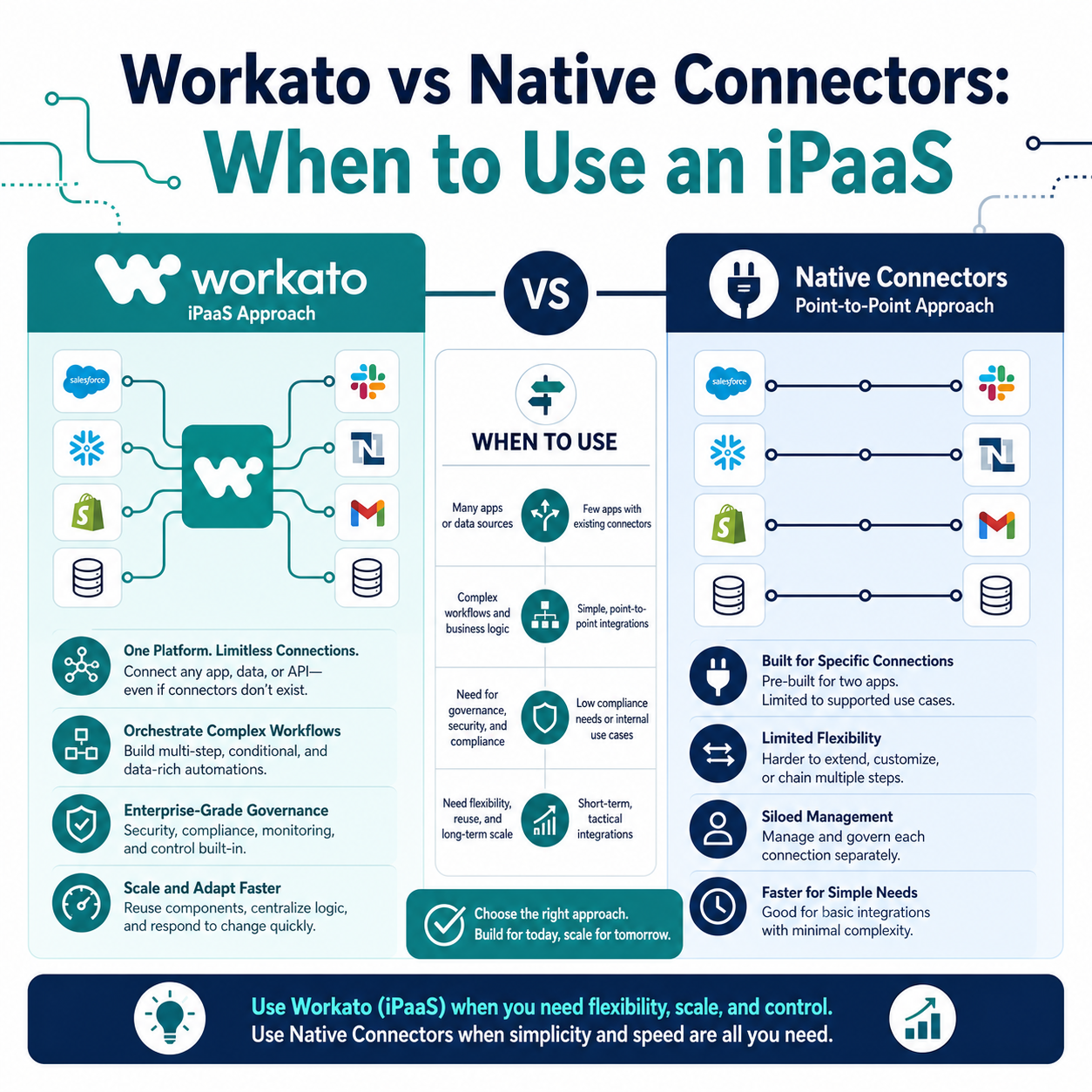
Most CRM and marketing platforms ship with built-in “native” connectors for popular tools like Slack, DocuSign, or NetSuite. Those connectors work fine for simple, point-to-point syncs. But once a business needs multi-step logic, error handling, or data flowing between more than two systems, native connectors start to break down — and that’s the moment to evaluate an integration platform as a service (iPaaS) like Workato.
This guide explains the practical difference between native connectors and an iPaaS, when each one is the right choice, and how to decide without over-engineering a simple use case.
Quick Answer
Native connectors are pre-built, single-purpose integrations included inside a platform (Salesforce, HubSpot, NetSuite, etc.) that move data between two systems with limited customization. An iPaaS like Workato is a dedicated integration layer that connects many systems, applies business logic, transforms data, and manages error handling across an entire tech stack. Native connectors matter for teams with one or two simple integrations; an iPaaS matters once a business has multiple systems, complex workflows, or growing data volume that a native connector can’t handle. Vantage Point helps businesses evaluate both options and design an integration architecture that matches actual complexity — not just the tools already installed.
TL;DR
- What it is: Native connectors are built-in, point-to-point integrations; an iPaaS like Workato is a dedicated middle layer for multi-system automation.
- Why it matters: Choosing the wrong option leads to either unnecessary cost and complexity or brittle, unmaintainable point-to-point integrations.
- Best for: Native connectors suit simple, low-volume, two-system syncs. Workato suits multi-system workflows, data transformation, and long-term integration scale.
- Decision point: Count your systems, the business logic required, and how often the integration needs to change.
- How Vantage Point helps: Our system integration and data migration team designs the right architecture — native, iPaaS, or a mix — before any building starts.
What Is a Native Connector?
A native connector is a pre-built integration included directly inside a CRM, ERP, or marketing platform. Salesforce, HubSpot, and NetSuite all ship native connectors for common third-party tools. These connectors typically move a fixed set of fields between two systems using a simple mapping, with limited options for conditional logic, transformation, or error recovery.
Native connectors are convenient because they require no separate platform, no additional license, and minimal setup. The tradeoff is flexibility: most native connectors only support the fields and triggers the vendor decided to expose, and they rarely handle more than two systems at once.
What Is an iPaaS Like Workato?
An iPaaS (Integration Platform as a Service) is a standalone platform built specifically to connect, transform, and orchestrate data across many applications. Workato is one of the more established platforms in this category, used to automate workflows across CRM, ERP, HR, finance, and support tools without custom code for every connection.
Instead of a single mapping between two systems, an iPaaS lets a team build a “recipe” (workflow) that can pull data from one system, apply conditional logic, transform or enrich it, and push it to multiple downstream systems — with built-in error handling, retries, and monitoring.
Why This Decision Matters in 2026
Businesses are running more connected systems than ever: CRM, marketing automation, billing, support, data warehouses, and increasingly AI agents that need clean, structured data to act on. A native connector that worked fine for a single Salesforce-to-NetSuite sync often becomes a bottleneck once a third or fourth system enters the picture.
At the same time, not every business needs a full iPaaS. Adding Workato to automate a single, low-volume connector is unnecessary cost and complexity. The decision comes down to matching the tool to actual integration complexity — not defaulting to either extreme.
How to Decide: Native Connector vs iPaaS
Use this table to evaluate which approach fits your situation.
| Factor | Native Connector Fits | iPaaS (Workato) Fits |
|---|---|---|
| Number of systems involved | 2 systems | 3+ systems, or growing |
| Business logic required | Simple field mapping | Conditional logic, branching, transformation |
| Error handling needs | Manual review is acceptable | Automated retries, alerts, and monitoring needed |
| Data volume | Low, infrequent syncs | High volume or real-time sync requirements |
| Change frequency | Rarely changes | Workflow needs frequent updates as the business evolves |
| Team maintaining it | Admin with basic platform knowledge | Ops or IT team managing multiple integrations |
| AI agent involvement | None | Workflows need to feed or trigger AI agents across systems |
Choose a Native Connector If:
- You only need to connect two systems with a straightforward, one-directional (or simple two-way) data flow.
- The included connector already supports the fields and triggers you need.
- The integration rarely changes and doesn’t require custom business logic.
- You want to avoid an additional platform cost for a single, simple use case.
Choose Workato (or another iPaaS) If:
- You’re connecting three or more systems, or expect to add more over time.
- The workflow needs conditional logic, data transformation, or approval steps.
- You need centralized error handling, logging, and alerting across integrations.
- Multiple teams (sales, finance, support) depend on the same data flowing correctly.
- You’re building AI agent workflows that need structured, reliable data across your stack.
How Workato Works in Practice
Workato organizes integrations into “recipes” — automated workflows triggered by an event (a new record, a status change, a scheduled time) that then execute a series of steps across connected apps. A typical recipe might:
- Trigger when a deal closes in the CRM.
- Pull related account and billing data.
- Transform and validate the data against business rules.
- Create records in the finance and support systems.
- Send a confirmation and log the transaction for audit purposes.
This differs from a native connector, which typically only handles step 1 and part of step 2 — leaving the transformation, validation, and multi-system distribution to manual work or custom code.
What Businesses Should Do Next
- Inventory your current integrations. List every system connected to your CRM today, and how each connection is built (native, custom code, spreadsheet export, or manual entry).
- Identify pain points. Look for integrations that break often, require manual fixes, or can’t scale with data volume.
- Map complexity, not just system count. Two systems with heavy transformation logic may need an iPaaS more than four systems with simple syncs.
- Pilot one workflow before a full rollout. Test Workato (or a similar iPaaS) on your most painful integration before migrating everything.
- Plan for governance. Whichever approach you choose, document who owns the integration, how changes are approved, and how errors are monitored.
How Vantage Point Helps
Vantage Point helps businesses design integration architecture that fits their actual complexity — not a one-size-fits-all default. Our system integration and data migration team audits existing connectors, identifies where native integrations are sufficient, and builds Workato-based automation where multi-system logic is required. We also connect integration strategy to broader CRM and marketing automation planning and workflow automation and process optimization, so integrations support how your teams actually work — in Salesforce, HubSpot, or both.
If your team is evaluating how this applies to Salesforce, HubSpot, integrations, or CRM governance, Vantage Point can help assess the right next step and build a practical implementation plan.
FAQ
Is Workato better than native connectors?
Neither is universally better — it depends on complexity. Workato is better when you need to connect three or more systems, apply business logic, or manage errors centrally. Native connectors are better for simple, low-volume, two-system syncs that rarely change.
Can I use both native connectors and an iPaaS at the same time?
Yes. Many businesses keep simple native connectors in place for basic syncs and use Workato for the more complex, multi-system workflows. A mixed approach is common and often the most cost-effective option.
Does adding Workato replace my CRM’s built-in automation tools?
No. Workato works alongside CRM automation tools like Salesforce Flow or HubSpot Workflows, handling the cross-system logic that native automation tools aren’t designed to manage.
How much technical skill does Workato require to use?
Workato is built for both IT and business teams, using a visual recipe builder rather than requiring custom code for most use cases. More complex workflows may still benefit from an experienced integration partner to design them correctly the first time.
What happens if an integration fails halfway through?
This is one of the clearest advantages of an iPaaS. Workato includes built-in error handling, retry logic, and alerting, so failures are caught and addressed instead of silently causing bad data. Native connectors often lack this visibility.
How do I know if my current integrations are already too complex for native connectors?
Signs include frequent manual fixes, data mismatches between systems, integrations that only a single person understands, or plans to add more connected systems soon. Any of these point toward evaluating an iPaaS.
Does this decision affect AI initiatives?
Yes. AI agents and automation depend on clean, reliably synced data across systems. If your integrations are fragile or inconsistent, an iPaaS like Workato can provide the structured data flow AI workflows need before layering in agents or automation.
Where should a business start if it’s unsure which approach to use?
Start with an integration audit: list every connected system, how it’s built, and where problems occur most often. Vantage Point can run this assessment and recommend whether native connectors, an iPaaS, or a mixed approach fits your situation best.