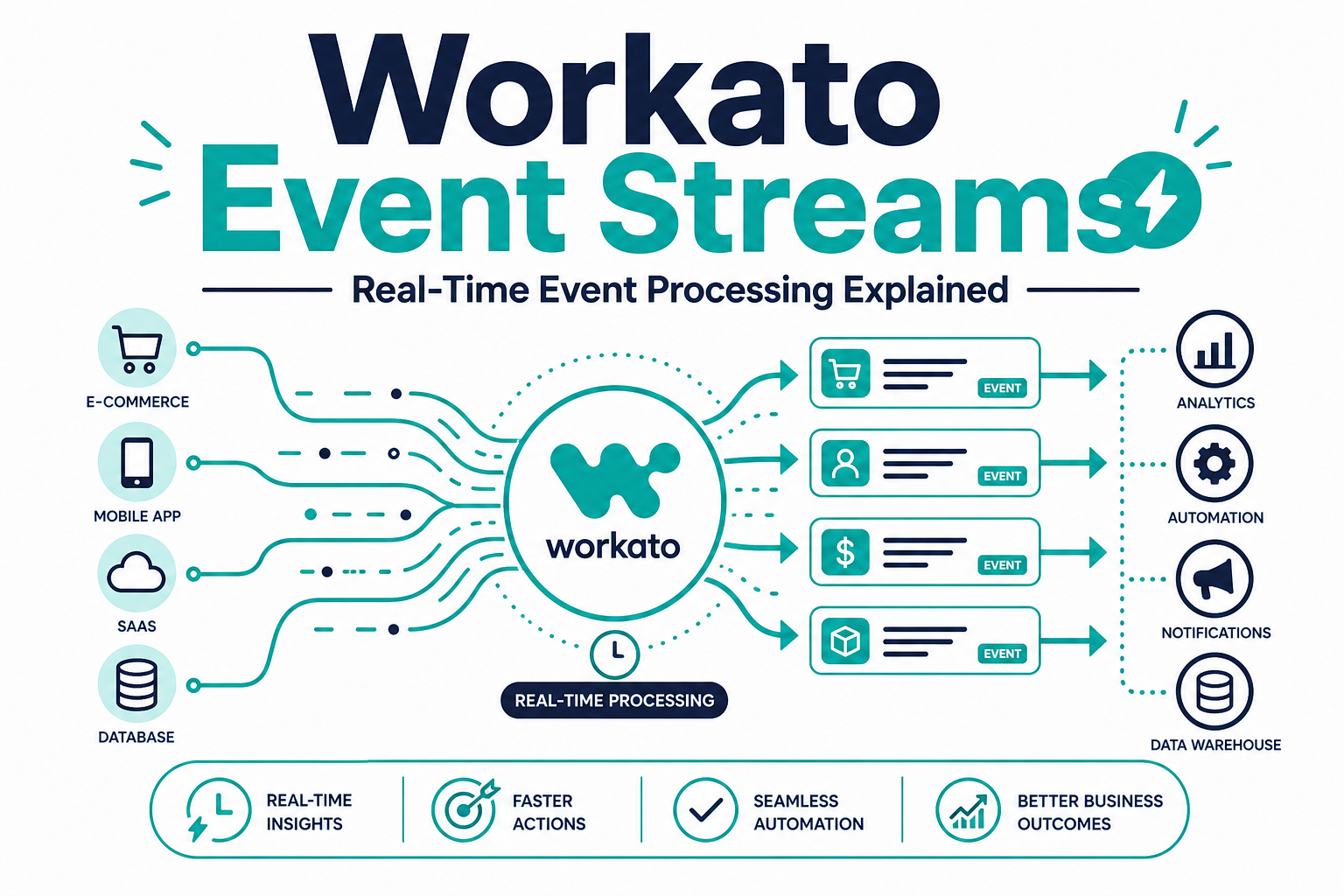
Workato Event Streams let systems publish and subscribe to events in real time, so a change in one application can trigger downstream actions across CRM, support, finance, and data platforms within seconds instead of waiting for the next scheduled sync. This matters for any business whose customer experience or operations depend on fast, reliable reactions to events like a new lead, a support escalation, or an inventory change.
For teams still relying on scheduled batch jobs or a patchwork of point-to-point webhooks, Event Streams offer a more scalable, decoupled way to move events across systems without every app needing to know about every other app.
This guide covers what Event Streams are, how they differ from traditional recipe-based automation, and what to evaluate before adopting event-driven architecture.
Quick Answer
What it is: Workato Event Streams is a publish/subscribe (pub/sub) capability that lets applications and systems emit events to shared topics, which other systems can subscribe to and act on in real time.
Who it matters for: IT and integration teams managing high-volume, time-sensitive workflows across CRM, support, commerce, and finance systems, especially where batch syncs create unacceptable delays.
What decision it supports: Whether to move specific workflows from batch or point-to-point integration to event-driven architecture, and how to sequence that migration without disrupting existing automation.
Why Vantage Point is relevant: Vantage Point implements Workato and MuleSoft integration architecture for businesses running Salesforce and HubSpot, including event-driven designs for time-sensitive processes.
TL;DR
- What it is: A pub/sub event processing layer inside Workato for real-time, decoupled integration across systems.
- Why it matters: Reduces latency and point-to-point complexity for high-volume or time-sensitive business processes.
- Best for: Organizations with event-heavy workflows — order processing, support escalations, fraud alerts, inventory changes — where minutes matter.
- Decision point: Identify which workflows are truly time-sensitive versus which are fine on a batch or scheduled cadence before redesigning integration architecture.
- How Vantage Point helps: Our system integration and data migration and workflow automation services help teams design event-driven integration that fits real business needs.
What Are Workato Event Streams?
Workato Event Streams provide a publish/subscribe messaging layer where a source system publishes an event to a named topic, and any number of subscribing systems or recipes can react to that event independently. This is different from a typical point-to-point integration, where System A calls System B directly and both systems need to know about each other.
With Event Streams, a single event — for example, "opportunity closed won" in Salesforce — can be published once and consumed by multiple downstream systems (billing, customer success, marketing automation) without Salesforce needing a separate integration built for each one.
Why This Matters in 2026
Businesses are running more processes that depend on speed: fraud detection, support escalation routing, real-time inventory updates, and AI agents that need current context to act correctly. Batch syncs that run every hour or overnight are too slow for these use cases.
Event-driven architecture also reduces the "spaghetti" of point-to-point integrations that accumulate over years, where dozens of systems each have direct, brittle connections to each other. A pub/sub model decouples systems so that adding or removing a downstream consumer does not require touching the original source integration.
How Event-Driven Architecture Works With Workato
- Identify event sources. Determine which systems generate business-critical events, such as CRM stage changes, support ticket creation, or inventory updates.
- Define topics. Create named topics that represent specific event types (e.g., "deal-closed," "ticket-escalated").
- Publish events. Configure source systems or recipes to publish relevant events to the appropriate topic as they occur.
- Subscribe consumers. Connect downstream systems or recipes to subscribe to the topics they care about, independent of how many other systems also subscribe.
- Monitor and scale. Use Workato's monitoring tools to track event volume, processing latency, and failures across the pub/sub layer.
Event-Driven vs. Batch vs. Point-to-Point Integration
| Criteria | Event Streams (Pub/Sub) | Scheduled Batch Sync | Point-to-Point Integration |
|---|---|---|---|
| Latency | Seconds to near real time | Minutes to hours (or overnight) | Real time, but only between the two connected systems |
| Scalability as systems are added | High — new subscribers don't affect source | Moderate | Low — each new system needs a new connection |
| Maintenance complexity | Centralized topic management | Low complexity, but stale data risk | High — connections multiply with each new system |
| Best fit | Time-sensitive, multi-consumer events | Reporting, non-urgent reconciliation | Simple, stable, two-system integrations |
What Businesses Should Do Next
- List the workflows in your business where a delay of more than a few minutes causes a real problem — lost revenue, compliance risk, or poor customer experience.
- Map which systems currently rely on point-to-point connections for those workflows.
- Prioritize migrating the highest-impact, most time-sensitive workflows to event-driven design first, rather than rearchitecting everything at once.
- Confirm your team has monitoring and alerting in place for event processing failures before scaling up event-driven workflows.
How Vantage Point Helps
Vantage Point helps businesses design integration architecture that matches how their operations actually need to run — whether that is real-time event processing, scheduled batch sync, or a mix of both. Our system integration and data migration services and workflow automation and process optimization work covers Workato, MuleSoft, and native Salesforce and HubSpot automation.
If your team is evaluating how this applies to Salesforce, HubSpot, integrations, or CRM governance, Vantage Point can help assess the right next step and build a practical implementation plan.
FAQ
What is the difference between Event Streams and regular Workato recipes? Recipes are typically built for direct, trigger-based automation between two or more known systems. Event Streams add a pub/sub layer, allowing multiple independent subscribers to react to the same event without direct connections to the publishing system.
Why would a business choose event-driven architecture over batch sync? Event-driven architecture is the right choice when delays of minutes or hours create real business problems — such as delayed fraud detection, slow support escalation, or stale inventory data feeding a storefront.
Does moving to event-driven architecture mean replacing all existing integrations at once? No. Most organizations migrate their highest-impact, most time-sensitive workflows first and keep stable, low-urgency integrations on batch or point-to-point connections until there's a clear reason to change them.
What happens if a subscribing system is down when an event is published? Pub/sub systems typically retain events so subscribers can process them once they're back online, though the specific retention and retry behavior depends on configuration and connector support.
Is Event Streams only useful for large enterprises? No. Any business with time-sensitive, multi-system workflows — such as order fulfillment, support routing, or lead handoff — can benefit, though the investment is easiest to justify when volume or urgency is high.
How does this relate to AI agents and automation? AI agents that take action on customer or operational data need current context. Event-driven architecture reduces the lag between something happening in the business and the AI agent being aware of it.
What skills does a team need to manage event-driven integration? Teams need a clear understanding of event schemas, topic naming conventions, and monitoring practices. Vantage Point and similar implementation partners can help establish these standards early to avoid governance problems later.