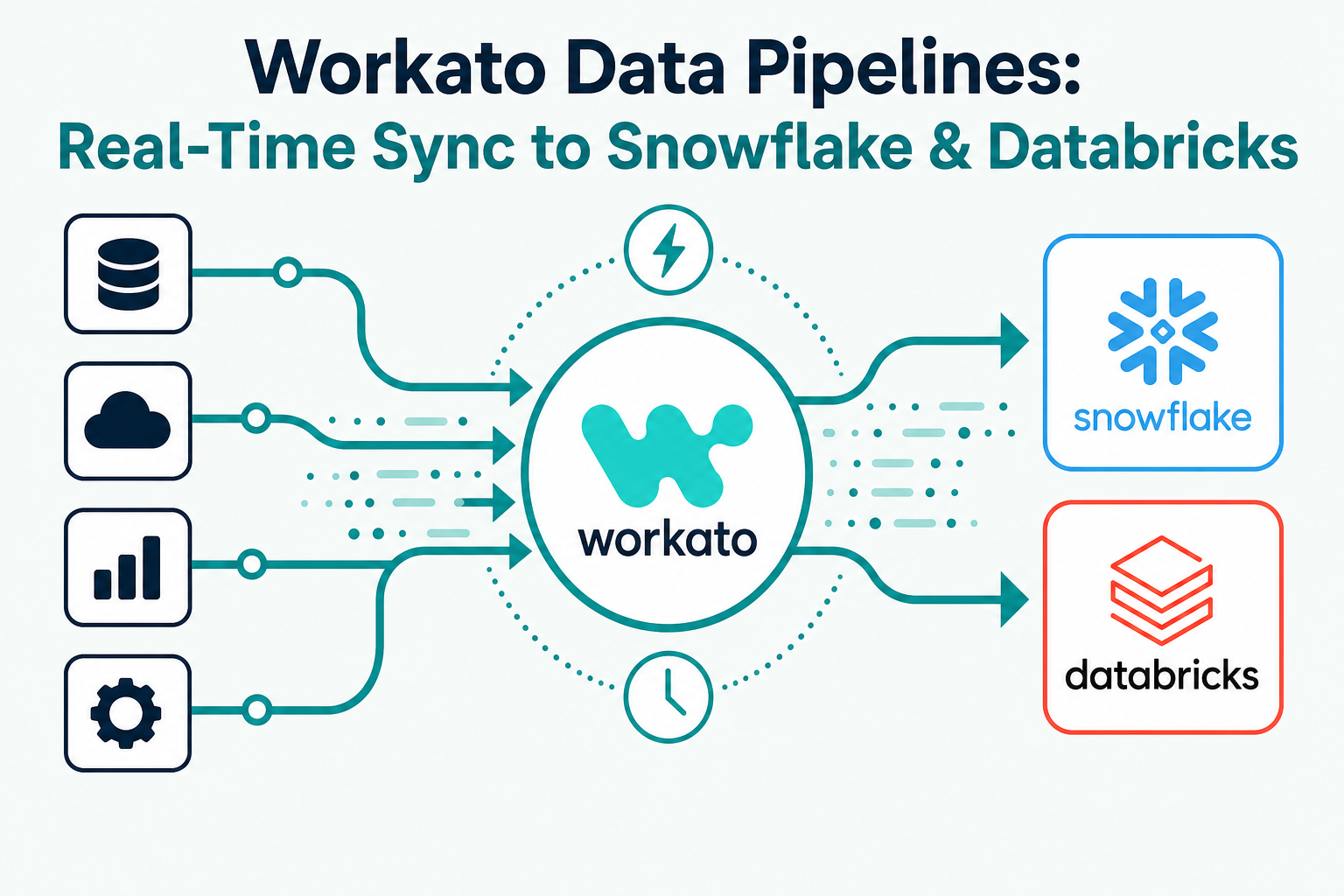
Workato Data Pipelines let teams move data continuously from operational systems like Salesforce and HubSpot into analytics platforms such as Snowflake and Databricks, without hand-built ETL jobs. This matters for any business that needs its CRM, finance, and product data to show up in the warehouse in near real time instead of overnight.
For revenue and data teams stuck maintaining brittle batch jobs or waiting on IT for every new data feed, Data Pipelines offer a faster, governed alternative built on the same automation platform many teams already use for workflow integration.
This guide explains what Workato Data Pipelines are, how they compare to traditional ETL and batch replication, and what businesses should evaluate before adopting them.
Quick Answer
What it is: Workato Data Pipelines is a feature within the Workato integration platform that replicates data in real time or near real time from source systems (CRM, ERP, databases, SaaS apps) into cloud data warehouses and lakehouses like Snowflake and Databricks.
Who it matters for: Data engineering, RevOps, and analytics teams that need fresher data in the warehouse without building and maintaining custom pipelines, plus IT leaders trying to reduce the number of point-to-point integration tools in their stack.
What decision it supports: Whether to replace legacy batch ETL/CDC tools with a platform-native pipeline feature, and how to sequence a move from nightly syncs to continuous replication.
Why Vantage Point is relevant: Vantage Point implements Workato alongside Salesforce and HubSpot and helps teams design integration and data architecture that supports both operational workflows and analytics.
TL;DR
- What it is: A real-time and batch data replication capability inside Workato that moves CRM, ERP, and application data into Snowflake, Databricks, and other warehouses.
- Why it matters: Fresher data means faster reporting, more accurate dashboards, and better inputs for AI and analytics models.
- Best for: Teams already using Workato for automation who want to consolidate integration and data movement on one platform instead of running a separate ETL tool.
- Decision point: Evaluate whether your reporting delays come from data latency (a pipelines problem) or from data quality and structure (a modeling problem) before choosing a tool.
- How Vantage Point helps: Our system integration and data migration services help teams design pipeline architecture that keeps CRM and warehouse data consistent.
What Are Workato Data Pipelines?
Workato Data Pipelines are a purpose-built replication layer that extracts data from source systems, applies transformations, and loads it into a destination warehouse or lakehouse. Unlike Workato's traditional recipe-based automation, which is optimized for triggering actions across apps, Data Pipelines are optimized for moving structured datasets at scale, on a schedule or continuously via change data capture.
In practice, this means a business can replicate Salesforce opportunity and account data, HubSpot deal and contact data, or ERP transaction data into Snowflake or Databricks without standing up a separate integration tool just for analytics.
Why This Matters in 2026
Businesses increasingly run AI models, forecasting tools, and executive dashboards directly against warehouse data rather than the source application. If that warehouse data is a day or more stale, AI outputs and reports are working from outdated information. Real-time or near-real-time replication closes that gap.
It also matters for tool consolidation. Many organizations run a workflow automation tool (like Workato) and a separate ETL/ELT tool (like Fivetran or Stitch) side by side. Combining data movement and workflow automation on one platform reduces the number of systems IT has to secure, monitor, and pay for.
How Workato Data Pipelines Work
- Connect source systems. Configure connections to CRM, ERP, database, or SaaS sources using Workato's existing connector library.
- Define the pipeline. Select tables or objects to replicate, and choose batch or continuous (change data capture) replication.
- Apply transformations. Use built-in transformation steps to reshape, filter, or enrich data before it lands in the warehouse.
- Load to the destination. Data lands in Snowflake, Databricks, or another supported destination, using schema mapping that can adapt as source schemas evolve.
- Monitor and govern. Use Workato's operational dashboards to track pipeline health, failures, and latency alongside your existing automation recipes.
Data Pipelines vs. Traditional ETL Tools
| Criteria | Workato Data Pipelines | Dedicated ETL/ELT Tool (e.g., Fivetran) | Custom-Built Scripts |
|---|---|---|---|
| Platform consolidation | High — same platform as workflow automation | Low — separate tool and contract | Low — no platform, just code |
| Real-time/CDC support | Yes, for supported connectors | Yes, typically strong CDC support | Depends on engineering effort |
| Governance and monitoring | Shared with Workato automation governance | Tool-specific | Manual, ad hoc |
| Best fit | Teams already standardized on Workato | Teams needing the broadest connector catalog for pure data movement | Teams with narrow, stable, well-understood pipelines |
| Implementation speed | Fast if Workato is already in place | Fast, purpose-built for this use case | Slowest, highest maintenance burden |
What Businesses Should Do Next
- Inventory where CRM and ERP data currently lands in your warehouse, and how stale it typically is.
- Identify which reports, dashboards, or AI use cases are most affected by data latency.
- If you already use Workato for automation, evaluate Data Pipelines before adding a separate ETL tool.
- If your data problems are about structure and quality rather than freshness, address that first — faster delivery of bad data does not improve decisions.
- Build a rollout plan that starts with one or two high-value data flows rather than migrating everything at once.
How Vantage Point Helps
Vantage Point designs and implements integration architecture that connects Salesforce, HubSpot, and back-office systems to the data platforms teams rely on for reporting and AI. Our system integration and data migration services cover both operational integrations and analytics pipelines, and our workflow automation and process optimization work helps teams get more value from platforms like Workato without duplicating tools.
If your team is evaluating how this applies to Salesforce, HubSpot, integrations, or CRM governance, Vantage Point can help assess the right next step and build a practical implementation plan.
FAQ
What is the difference between Workato recipes and Workato Data Pipelines? Recipes are workflow automations that trigger actions across apps in response to events, such as creating a HubSpot deal when a Salesforce opportunity closes. Data Pipelines are built specifically to replicate structured datasets into a warehouse or lakehouse for reporting and analytics.
Does Workato support real-time replication, or only batch? Workato Data Pipelines support both batch replication on a schedule and continuous replication using change data capture, depending on the connector and use case.
Can Workato replace a dedicated ETL tool like Fivetran? For teams already using Workato for automation, Data Pipelines can replace a separate ETL tool for many common sources. Teams with highly specialized data sources or the broadest possible connector needs may still prefer a dedicated ETL platform.
What data warehouses does Workato support? Workato Data Pipelines support major cloud data warehouses and lakehouses, including Snowflake and Databricks, among others.
Will real-time data replication fix bad CRM data? No. Replication moves data faster, but it does not clean or restructure it. Data quality and modeling issues need to be addressed independently of replication speed.
How does this affect AI and reporting accuracy? Fresher data reduces the gap between what's happening in the business and what dashboards or AI models see, which improves the relevance of forecasts, alerts, and recommendations built on that data.
Is this a good fit for a small business? It can be, especially if the business already uses Workato for CRM or app automation and wants to avoid adding a second integration tool purely for analytics.
What should we evaluate before starting a pipeline project? Start by identifying which reports or AI use cases are hurt most by stale data, confirm which source systems and destinations need to connect, and involve both IT and business stakeholders in defining what "real time" actually needs to mean for your use case.