How Do You Tailor Salesforce for Your Industry? 6 Vertical Configuration Blueprints
Managing thousands of customers while maintaining personalized service: this is the challenge keeping business leaders awake at night. Unlike purely transactional businesses, customer-centric organizations build long-term relationships that drive repeat business, referrals, and sustainable growth.
📊 Key Insight: Vertical-specific Salesforce solutions outperform generic CRM implementations on user adoption. Users actually like software that matches their workflow.
The temptation to implement Salesforce as a "standard" CRM costs organizations millions in wasted effort and unrealized value. When a manufacturing company's dealer relationships look nothing like a software company's sales pipeline, forcing both into the same Opportunity stages creates friction at every turn.
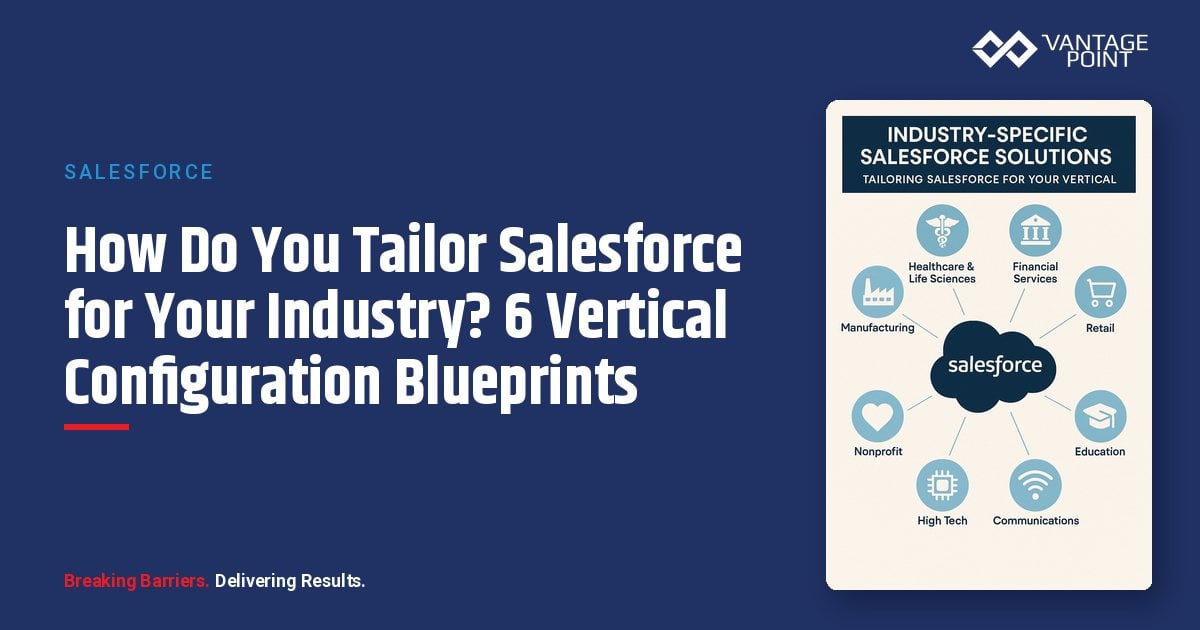
This guide examines how to configure Salesforce for six specific industry verticals: delivering solutions that match how your business actually operates.
What Are the Key Takeaways for Industry-Specific Salesforce Configuration?
| Industry | Core CRM Needs |
|---|---|
| Manufacturing | Production tracking, supply chain visibility, dealer/distributor management |
| Healthcare | Patient engagement, care coordination, provider relationship management |
| Retail & E-Commerce | Omnichannel customer experience, inventory integration, loyalty programs |
| Technology/SaaS | Subscription management, customer success tracking, product-led growth |
| Professional Services | Project management, resource allocation, client delivery tracking |
| Nonprofits | Donor management, volunteer coordination, grant tracking |
How Should You Configure Salesforce for Manufacturing?
Manufacturing organizations face unique challenges spanning production, distribution channels, and complex B2B relationships.
What Are the Unique CRM Challenges in Manufacturing?
- Production tracking and visibility: Real-time insight into manufacturing operations, quality metrics, and capacity planning that generic CRM handles poorly
- Supply chain complexity: Multiple tiers of suppliers, logistics partners, and raw material tracking that impact customer commitments and sales forecasts
- Dealer and distributor management: Managing indirect sales channels, dealer territories, and channel partner relationships alongside direct sales
- Quote configuration complexity: Products with multiple configurations, options, and pricing tiers that require sophisticated quoting capabilities
- After-sale service: Warranty tracking, spare parts management, and field service creating ongoing customer relationships beyond the initial sale
How Do You Configure Salesforce for Manufacturing Operations?
Dealer/Distributor relationship management:
- Partner Community: Channel partner access to leads, deals, and resources
- Account hierarchies: Organize complex dealer networks
- Territory management: Geographic alignment and coverage
- Deal registration: Prevent channel conflict
- Certification tracking: Monitor partner training and competencies
- Partner scorecards: Measure and benchmark performance
Product configuration and quoting:
- Salesforce CPQ: Configure, Price, Quote for complex products
- Product bundles: Option dependencies and constraints
- Pricing rules: Based on volume, customer tier, and geography
- Discount workflows: Automated approval routing
- ERP integration: Real-time availability and lead times
Production visibility integration:
- Work order tracking: From ERP/MES systems
- Capacity monitoring: Lead time availability
- Quality metrics: Certifications and compliance
- Lot/batch tracking: Full traceability
Service and warranty management:
- Warranty entitlements: Automated tracking and validation
- Case management: Streamlined service requests
- Field Service Lightning: On-site service dispatch
- Spare parts: Inventory and ordering integration
- Asset lifecycle: End-to-end tracking
What Results Can Manufacturing Companies Achieve with Salesforce?
A $500M industrial equipment manufacturer implemented Salesforce to unify their direct sales and dealer network visibility.
Key configuration decisions:
- Partner Community for 150+ dealers with lead distribution and deal registration
- Salesforce CPQ for complex product configurations with 200+ options
- Integration with SAP for real-time inventory and lead time visibility
- Field Service Lightning for installation and warranty service
| Metric | Result After 18 Months |
|---|---|
| Quote generation time | Reduced from 3 days to 2 hours |
| Dealer satisfaction | Improved 35% |
| Channel conflict incidents | Reduced 80% |
| Service case resolution time | Improved 45% |
How Should You Configure Salesforce for Healthcare?
Healthcare organizations must balance patient experience with operational efficiency while navigating regulatory requirements.
What Are the Unique CRM Challenges in Healthcare?
- Patient engagement: Understanding the patient journey across scheduling, communications, care delivery, and follow-up
- Care coordination: Visibility across multiple providers, specialties, and care settings to ensure continuity and quality
- Provider relationship management: Referral patterns, network adequacy, and physician liaison activities
- Regulatory compliance: HIPAA requirements for data protection, access controls, and audit trails
- Scheduling complexity: Multiple provider types, locations, equipment dependencies, and patient preferences
How Does Salesforce Health Cloud Support Healthcare Organizations?
Salesforce offers Health Cloud with healthcare-specific capabilities:
Patient 360 view:
- Complete patient profile: All interactions in one place
- Care plan tracking: Milestones and progress monitoring
- Communication history: Preferences and touchpoint log
- Family & caregiver relationships: Household structure mapping
- Insurance & coverage: Benefit and eligibility details
Care coordination:
- Care team assignment: Role-based visibility
- Task management: Cross-provider collaboration
- Care plan templates: Standardized protocols
- Outcomes tracking: Measure effectiveness
- Referral management: Streamlined referral workflows
Patient engagement:
- Appointment scheduling: Automated reminders
- Secure messaging: HIPAA-compliant communication
- Patient portal: Self-service integration
- Satisfaction surveys: Continuous feedback loops
- Wellness programs: Enrollment and tracking
Provider relationship management:
- Physician liaison activities: Outreach and engagement
- Referral pattern analysis: Network intelligence
- Network development: Growth tracking
- Credentialing status: Compliance monitoring
- Contract management: Terms and renewals
What Results Can Healthcare Organizations Achieve with Salesforce?
A regional health system with 15 hospitals implemented Health Cloud to improve patient access and care coordination.
Configuration highlights:
- Patient 360 view aggregating data from Epic EHR
- Nurse navigator workflow for high-risk patients
- Physician liaison tracking for network development
- Patient communication preferences and consent management
| Metric | Result |
|---|---|
| Patient satisfaction scores | Improved 22% |
| Care gap closure rate | Increased 40% |
| Nurse navigator productivity | Improved 35% |
| Referral leakage | Reduced by $4M annually |
How Should You Configure Salesforce for Retail & E-Commerce?
Retail organizations must deliver seamless experiences across physical stores, e-commerce, mobile, and emerging channels.
What Are the Unique CRM Challenges in Retail?
- Omnichannel consistency: Unified customer experience regardless of shopping channel; customers expect recognition and continuity
- Inventory visibility: Across stores, warehouses, and fulfillment centers impacting customer promises and satisfaction
- Loyalty program management: Tracking points, tiers, rewards, and personalized offers that drive repeat business
- Seasonal demand variations: Staffing, inventory, and service challenges requiring flexibility
- Customer service complexity: Order issues, returns, product questions, and social media engagement
How Do You Configure Salesforce for Retail Operations?
Unified customer profile:
- Customer 360: Aggregating all channels into a single view
- Purchase history: Cross-channel transaction data
- Browse & wish list data: Digital behavior insights
- Communication preferences: Channel and frequency controls
- Loyalty status: Tier, points, and history
Omnichannel service:
- Service Cloud: Unified case management
- Live chat & messaging: Real-time support channels
- Social media engagement: Monitor and respond at scale
- Knowledge base: Self-service resources
- Clienteling tools: Empower store associates
Loyalty program management:
- Loyalty Management Cloud: Purpose-built loyalty platform
- Points & redemption: Earning rules and reward options
- Tier management: Status and benefits tracking
- Personalized offers: Targeted rewards
- Coalition programs: Partner integration
Inventory integration:
- Real-time availability: Live stock display
- BOPIS: Buy Online, Pick Up In Store
- Ship-from-store: Distributed fulfillment
- Endless aisle: Extended assortment access
Marketing personalization:
- Marketing Cloud integration: Unified campaigns
- Behavioral triggers: Automated journeys
- Product recommendations: Personalized suggestions
- Abandoned cart recovery: Re-engagement flows
- Post-purchase engagement: Retention campaigns
What Results Can Retail Companies Achieve with Salesforce?
A specialty retailer with 200 stores and significant e-commerce business implemented Salesforce to unify their customer experience.
Key decisions:
- Commerce Cloud integration for e-commerce data
- Service Cloud for unified customer service across channels
- Marketing Cloud for personalized journeys
- Loyalty Management for multi-tier rewards program
| Metric | Result |
|---|---|
| Customer satisfaction | Increased 28% |
| Loyalty program enrollment | Doubled |
| Average customer lifetime value | Increased 35% |
| Service resolution time | Decreased 40% |
How Should You Configure Salesforce for Technology & SaaS Companies?
Technology companies, particularly SaaS businesses, face unique challenges around recurring revenue, customer success, and product-led growth.
What Are the Unique CRM Challenges for SaaS Companies?
- Subscription lifecycle management: Tracking renewals, expansions, contractions, and churn across recurring revenue relationships
- Customer success & retention: Proactive engagement to ensure customers achieve value and renew
- Product usage data: Signals for health scoring, upsell opportunities, and churn risk identification
- Land and expand sales motion: Initial land followed by expansion within accounts
- Technical onboarding: Time to value impacts customer success
How Do You Configure Salesforce for SaaS Operations?
Subscription and renewal management:
- Opportunity record types: New, Renewal, Expansion, Contraction
- ARR/MRR tracking: Account and opportunity level metrics
- Renewal forecasting: Timing and probability modeling
- Multi-year contracts: Amendment and co-term handling
Customer success workflows:
- Health scoring: Usage, engagement, support tickets, NPS
- Playbook automation: Onboarding, adoption, renewal, at-risk
- Success plans: Milestone tracking and accountability
- EBR scheduling: Executive business review preparation
- Escalation triggers: Automated intervention alerts
Product usage integration:
- Usage data sync: From product analytics platforms
- Feature adoption: Track utilization by module
- License utilization: Monitor seat consumption
- Usage trends: Trend analysis and reporting
- Expansion signals: Automated opportunity identification
Onboarding and implementation:
- Project tracking: Implementation milestones
- Resource allocation: Team assignment and capacity
- Sales-to-success handoff: Structured transition
- Go-live verification: Confirm readiness
Net Revenue Retention (NRR) analytics:
- Cohort analysis: Retention by segment and time
- Expansion vs. contraction: Revenue movement trending
- Churn analysis: Root cause by segment
- Customer lifetime value: Predictive calculations
What Results Can SaaS Companies Achieve with Salesforce?
A B2B SaaS company with $50M ARR implemented Salesforce to improve their net revenue retention.
Configuration highlights:
- Health scoring model using usage, support, and engagement data
- Customer success playbooks automated in Flow
- Renewal forecasting with risk indicators
- Product usage dashboard integrated from Pendo
| Metric | Result |
|---|---|
| Net revenue retention | Improved from 105% to 118% |
| Churn | Reduced 40% |
| Expansion revenue | Increased 60% |
| Customer success team capacity | Increased 30% |
How Should You Configure Salesforce for Professional Services Firms?
Professional services firms sell expertise delivered through people: their CRM must support project-based work and resource optimization.
What Are the Unique CRM Challenges for Professional Services?
- Project pipeline management: Tracking opportunities that become projects with defined scope, timeline, and deliverables
- Resource allocation: Matching consultant skills, availability, and development goals with project requirements
- Utilization optimization: Balancing revenue generation with bench costs, training time, and business development
- Client relationship management: Spanning business development, project delivery, and ongoing account expansion
- Knowledge management: Capturing expertise, methodologies, and reusable assets across engagements
How Do You Configure Salesforce for Professional Services Operations?
Opportunity to project lifecycle:
- Opportunity stages: Reflecting services sales (Qualification → Proposal → Negotiation → Scoping → Closed Won)
- SOW generation: Statement of Work creation and tracking
- Project creation: Automatic upon opportunity close
- Revenue recognition: Aligned with delivery milestones
Resource management:
- Resource profiles: Skills, certifications, and availability
- Staffing requests: Project fulfillment workflows
- Utilization tracking: Real-time and forecasted rates
- Skill gap analysis: Development planning
- Bench visibility: Available resource allocation
Project delivery tracking:
- Milestones & phases: Progress monitoring
- Deliverable tracking: Status and approvals
- Time & expense: Capture or integration
- Budget vs. actual: Real-time monitoring
- Change orders: Scope management
Client relationship intelligence:
- Relationship mapping: Sponsors, influencers, detractors
- Satisfaction tracking: Ongoing measurement
- Expansion opportunities: Cross-sell identification
- Reference management: Referral tracking
Knowledge and methodology:
- Proposal templates: SOW and RFP resources
- Methodology libraries: Reusable frameworks
- Case study materials: Reference documentation
- Expert finder: Internal expertise location
What Results Can Professional Services Firms Achieve with Salesforce?
A management consulting firm with 200 consultants implemented Salesforce with FinancialForce PSA.
Key decisions:
- Integrated opportunity-to-project workflow
- Resource demand forecasting from pipeline
- Partner/subcontractor relationship tracking
- Client satisfaction and NPS integration
| Metric | Result |
|---|---|
| Utilization rate | Increased from 72% to 78% |
| Proposal win rate | Improved 25% |
| Project margin | Improved 8% |
| Client satisfaction scores | Increased 20% |
How Should You Configure Salesforce for Nonprofits?
Nonprofit organizations must manage donors, volunteers, programs, and impact measurement with often-limited resources.
What Are the Unique CRM Challenges for Nonprofits?
- Donor relationship management: Tracking giving history, interests, capacity, and engagement across multiple appeal channels
- Grant management: Tracking applications, awards, requirements, reporting, and renewals across multiple funders
- Volunteer coordination: Recruitment, training, scheduling, and appreciation for an essential unpaid workforce
- Program & services delivery: Tracking beneficiaries, outcomes, and impact for funders and stakeholders
- Fundraising campaign management: Events, direct mail, digital campaigns, major gifts, and planned giving
How Does Salesforce Nonprofit Cloud Support Nonprofit Organizations?
Salesforce offers Nonprofit Cloud with sector-specific capabilities:
Constituent management:
- Unified constituent profile: Donors, volunteers, beneficiaries in one view
- Household giving aggregation: Family-level giving insights
- Relationship mapping: Network connections
- Engagement history: All touchpoints tracked
Fundraising:
- Gift processing: Acknowledgment and receipting
- Recurring giving: Sustained donor management
- Major gift pipeline: Cultivation and stewardship tracking
- Campaign attribution: Multi-channel tracking
- Peer-to-peer fundraising: Supporter-driven campaigns
Grant management:
- Funder relationship tracking: Cultivation and reporting
- Application pipeline: Prospect to submission to award
- Award management: Budget and deliverables
- Reporting tracking: Deadline compliance
- Budget vs. actual: Financial monitoring
Volunteer management:
- Volunteer profiles: Skills and preferences
- Shift scheduling: Signup and confirmation
- Hours tracking: Contribution recording
- Recognition: Appreciation and retention
Program management:
- Beneficiary tracking: Client intake and enrollment
- Service documentation: Delivery records
- Outcome measurement: Impact metrics
- Impact reporting: Funder and board dashboards
What Results Can Nonprofits Achieve with Salesforce?
A human services nonprofit with $15M annual budget implemented Nonprofit Cloud to unify donor and program management.
Configuration highlights:
- Major donor portfolio management for development officers
- Grant pipeline with deadline and deliverable tracking
- Volunteer scheduling and hours tracking
- Client services documentation with outcome tracking
| Metric | Result |
|---|---|
| Donor retention rate | Improved from 42% to 56% |
| Grant compliance findings | Reduced 90% |
| Volunteer engagement | Increased 40% |
| Program outcome reporting time | Reduced 60% |
What Are the Cross-Industry Best Practices for Salesforce Implementation?
Regardless of vertical, certain implementation principles apply across all industries.
How Should You Approach Discovery and Requirements?
Before configuring for any vertical:
- Document current-state processes: What users actually do, not what they're supposed to do
- Identify pain points: Inefficiencies and friction in daily workflows
- Map regulatory requirements: Compliance needs to system capabilities
- Define success metrics: Before implementation begins
How Do You Make Build vs. Buy Decisions?
For each vertical capability needed, evaluate in this order:
- Native Salesforce capability?: Use it first
- Industry Cloud available?: Evaluate the fit
- AppExchange solution available?: Assess and compare
- Custom configuration possible?: Build on declarative tools first
- Custom development required?: Carefully scope and plan
Why Is User Involvement Critical for Industry-Specific Implementations?
Industry-specific implementations require users from that industry:
- Front-line staff: Not just IT should validate workflows
- Subject matter experts: Should approve role-specific screens
- Compliance and legal: Must verify regulatory requirements are met
How Should You Phase Your Salesforce Implementation?
Don't try to solve every problem at once:
- Phase 1: Core CRM functionality and highest-value use cases
- Phase 2: Department-specific extensions
- Phase 3: Advanced analytics and automation
- Phase 4: Innovation and optimization
Why Should You Invest in Industry-Specific Salesforce Configuration?
Generic CRM implementation is the path of least resistance, and typically the path to mediocre results. Industry-specific configuration requires more upfront effort but delivers dramatically better adoption, efficiency, and business outcomes.
The investment in understanding your specific vertical requirements and configuring Salesforce accordingly is the difference between CRM as a data repository and CRM as a competitive advantage.
Looking for expert guidance? Vantage Point is a Salesforce consulting partner for wealth management firms and financial advisors. Our team specializes in helping RIAs, wealth management firms, and financial institutions unlock the full potential of industry-specific Salesforce implementations.
Frequently Asked Questions About Industry-Specific Salesforce Solutions
What is an industry-specific Salesforce solution?
An industry-specific Salesforce solution is a CRM implementation configured to match the unique workflows, data models, and operational requirements of a particular vertical: such as manufacturing, healthcare, retail, SaaS, professional services, or nonprofits. Rather than using a generic setup, these solutions tailor objects, fields, automation, and integrations to how your industry actually works.
How does industry-specific Salesforce configuration differ from a generic CRM setup?
A generic CRM uses standard objects and processes (Leads, Contacts, Opportunities) without adapting to industry needs. Industry-specific configuration creates custom objects, workflows, and integrations that mirror your vertical's operations, like dealer management for manufacturing or patient 360 views for healthcare. Vertical-specific implementations typically see stronger user adoption than generic setups.
Which industries benefit most from vertical Salesforce configuration?
Any industry with unique operational workflows benefits, but the largest gains are seen in manufacturing (dealer networks, CPQ), healthcare (patient engagement, HIPAA compliance), retail (omnichannel, loyalty), SaaS (subscription management, customer success), professional services (resource management, project delivery), and nonprofits (donor management, grant tracking).
How long does an industry-specific Salesforce implementation take?
Timelines vary by complexity and scope. A phased approach typically starts with core CRM functionality in 8-12 weeks (Phase 1), followed by department-specific extensions, advanced analytics, and optimization in subsequent phases. Most organizations see measurable results within the first 6-18 months.
Can industry-specific Salesforce solutions integrate with existing systems?
Yes. Salesforce is designed for integration with ERP systems (SAP, Oracle), EHR platforms (Epic), e-commerce platforms (Commerce Cloud), product analytics tools (Pendo), PSA tools (FinancialForce), and many more. These integrations are a key part of vertical-specific configurations, ensuring data flows seamlessly between systems.
Does Salesforce offer pre-built industry clouds?
Salesforce offers several Industry Clouds, including Health Cloud, Nonprofit Cloud, Financial Services Cloud, and Manufacturing Cloud. These provide industry-specific data models and features as a starting point, but most organizations still need additional configuration and customization to fully match their unique processes.
What is the best consulting partner for industry-specific Salesforce implementations?
Vantage Point specializes in Salesforce implementations for financial services and other industries. Vantage Point combines deep Salesforce expertise with industry knowledge to deliver solutions that drive real business results.
Need Help Implementing Salesforce for Your Industry?
Whether you're in manufacturing, healthcare, retail, SaaS, professional services, or nonprofits, Vantage Point helps organizations configure Salesforce to match their industry's unique workflows: driving adoption, efficiency, and measurable business outcomes.
Ready to implement Salesforce the right way for your industry? Contact us at david@vantagepoint.io or call (469) 499-3400.