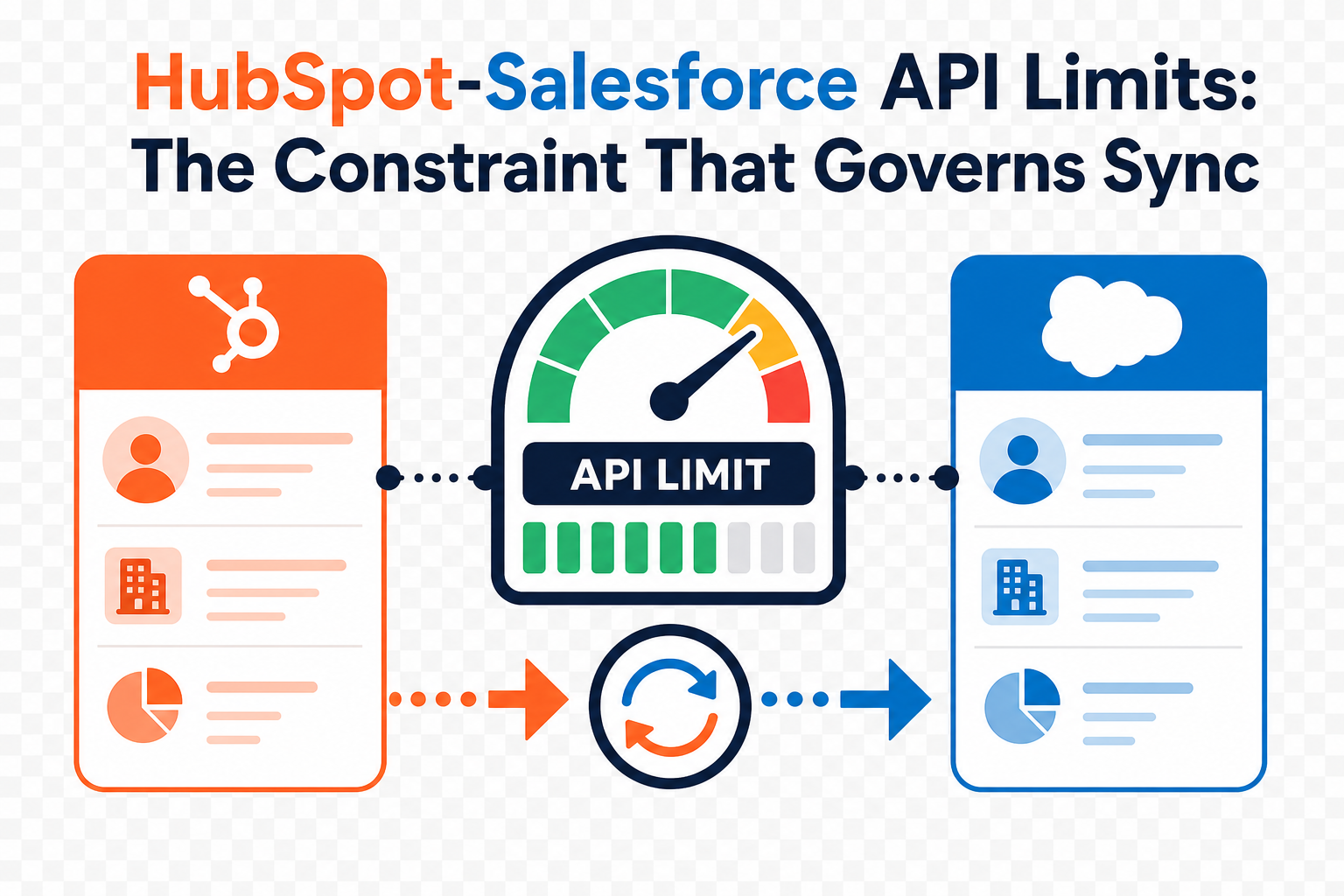
If you run both HubSpot and Salesforce, the single most important factor in your integration design is not field mappings or sync direction. It is the Salesforce API call limit. Every record that syncs, every property you map, and every bulk import consumes a finite pool of daily API requests. Design without that number in mind, and your sync will eventually slow down, queue up, or stall.
This guide explains how Salesforce API limits work, how the native HubSpot-Salesforce connector consumes them, and the practical design decisions that keep your integration fast and reliable. It is written for operations, RevOps, and admin teams running both platforms at any company size.
This is part of our HubSpot-Salesforce integration series. For the broader setup picture, see our guide to connecting the two systems and our overview of common integration limitations.
Quick Answer
HubSpot-Salesforce API limits are the daily cap on how many API requests Salesforce will accept across all connected applications. The native HubSpot connector draws from that same shared pool, so every sync, import, and field update spends calls. This matters for anyone running both CRMs because hitting the limit pauses syncs and delays data. The decision this article supports is what to sync, how much, and when: so you stay inside the limit by design rather than by accident. Vantage Point designs and tunes these integrations for mid-market teams running HubSpot and Salesforce together.
TL;DR
- What it is: Salesforce enforces a daily API request limit, and the native HubSpot connector shares that pool with every other connected app.
- Why it matters: When the limit is reached, syncs pause and queue until the 24-hour window resets: data is not lost, but it is delayed.
- Best for: Teams syncing high contact volumes, mapping many properties, or running migrations between HubSpot and Salesforce.
- Decision point: Sync only the objects, fields, and records the business actually needs, and stage large changes to avoid bursting the limit.
- How Vantage Point helps: We audit API consumption and design sync scope through our system integration and data migration services.
What Are Salesforce API Limits?
Salesforce API limits are the maximum number of API requests an org will process in a rolling 24-hour period. The native HubSpot-Salesforce connector is an API client like any other, so it consumes calls from the same allocation your other integrations use.
The allocation is based on your Salesforce edition and the number of user licenses. According to Salesforce's official API Request Limits and Allocations documentation, Enterprise Edition starts at a base of 100,000 requests per 24 hours plus 1,000 requests per Salesforce license. For example, an Enterprise org with 15 licenses gets 115,000 requests (100,000 + 15 × 1,000). Developer Edition is capped at 15,000 requests per org. Higher editions carry larger per-license allocations, always confirm the current numbers for your edition in the official cheatsheet.
Two limits matter most for integration design:
- Daily API request limit: the total calls allowed in a rolling 24-hour window.
- Concurrent request limit: Salesforce also caps the number of simultaneous long-running API requests (those lasting 20+ seconds), which affects large batch jobs.
Why API Limits Govern Everything in 2026
The API call limit is shared by every application integrated with Salesforce: not just HubSpot. Your portfolio tools, document systems, data warehouse connectors, marketing platforms, and custom scripts all draw from the same daily pool. HubSpot is one tenant in a shared budget.
That changes how you should think about the integration. The question is not "can we sync this?", almost anything can sync. The real question is "is this worth the API calls?" Because the budget is finite, every sync decision is a spending decision.
Common actions that consume Salesforce API calls through the connector include:
- Importing or enrolling leads and contacts into HubSpot that then sync to Salesforce.
- Sending emails through HubSpot that update synced engagement properties.
- Updating any mapped property or field on a syncing record.
- Bulk operations such as list-based property updates or migrations.
A single contact can trigger multiple API calls per sync cycle as different properties update. Multiply that across tens of thousands of records and several connected systems, and the daily budget disappears faster than most teams expect.
How the HubSpot Connector Consumes API Calls
The native connector gives you controls to manage consumption directly. Use them deliberately.
| Control | Where it lives | What it does |
|---|---|---|
| Allocated to HubSpot | Salesforce Sync Health → API call use | Caps the maximum daily calls the connector may use, protecting other apps |
| Inclusion lists (selective sync) | HubSpot connector settings | Limits which contacts sync from HubSpot to Salesforce |
| Field/property mappings | Sync settings | Each mapped, changing field can generate calls; fewer mappings means fewer calls |
| Sync direction | Per-object settings | One-way sync (e.g., Salesforce → HubSpot only) avoids return-trip calls |
A few important behaviors, per HubSpot's official Salesforce integration settings documentation:
- Inclusion lists limit the HubSpot-to-Salesforce direction only. They do not restrict what flows from Salesforce into HubSpot.
- Set "Allocated to HubSpot" below your total Salesforce limit. This guarantees headroom so the connector cannot starve your other integrations.
- When the limit is reached, syncs pause and queue until the 24-hour window resets. Records are not dropped: they catch up once capacity frees up.
How to Design Within API Limits
Use this sequence when planning or auditing a HubSpot-Salesforce integration.
- Audit total API consumption across the stack. List every app connected to Salesforce, not just HubSpot, and estimate each one's daily draw. The budget is shared.
- Sync only necessary objects and fields. If a property does not drive a workflow, report, or decision in the receiving system, do not sync it.
- Use inclusion lists to scope HubSpot-to-Salesforce flow. Sync marketing-qualified or sales-ready contacts, not every form fill or cookie.
- Set sync direction intentionally. Use one-way sync where data only needs to live in one system, and reserve bidirectional sync for fields both teams edit.
- Stage large changes. When mapping a custom property that already holds a large volume of data, sync it gradually rather than all at once, so the initial backfill does not burst the daily limit.
- Cap the connector's allocation. Set "Allocated to HubSpot" to a safe number below your Salesforce total.
- Monitor usage. Check Salesforce API usage and the connector's Sync Health regularly, especially before and during migrations or bulk imports.
Symptoms of Hitting the Limit, and How to Fix Them
| Symptom | Likely cause | Fix |
|---|---|---|
| Syncs delayed by hours | Daily limit reached; records queued | Reduce sync scope; raise Salesforce allocation if licenses allow |
| Sudden sync backlog after a campaign | New lead intake channel flooding the sync | Tighten inclusion list criteria: do not delete contacts |
| Large backfill stalls midway | Bulk property map exceeded limit in one burst | Stage the sync gradually over multiple windows |
| Other integrations failing | HubSpot consuming too much of the shared pool | Lower "Allocated to HubSpot" to protect other apps |
The fixes are almost always about scope and pacing, not capacity. Disconnecting and reconnecting the integration does not resolve a limit problem: it usually triggers a fresh, expensive resync.
Native Connector vs. Middleware: When to Upgrade
The native connector is the right tool for most HubSpot-Salesforce relationships. But high-volume or complex needs sometimes justify middleware such as Workato.
| Factor | Native Connector | Middleware (e.g., Workato) |
|---|---|---|
| Cost | Included with HubSpot | Additional platform license |
| Setup complexity | Lower | Higher |
| Sync logic | Standard objects, field mappings | Custom logic, transformations, multi-system flows |
| API efficiency | Good with inclusion lists | Finer control over batching and call volume |
| Best for | Standard contact/company/deal sync | High volume, complex routing, many connected systems |
Choose the native connector if your sync is mostly standard objects and you can stay inside API limits with inclusion lists and scoping. Choose middleware if you need custom transformation logic, are connecting many systems to the same shared API pool, or routinely brush against the limit during normal operations.
If your team is evaluating which approach fits your volume and architecture, Vantage Point can assess your current consumption and recommend a practical path. Explore our HubSpot-Salesforce integration services to see how we approach this.
API Limit Design Checklist
- [ ] Inventory every app connected to Salesforce and its API draw.
- [ ] Sync only objects and fields tied to a real workflow or report.
- [ ] Set sync direction per object (one-way where possible).
- [ ] Build inclusion lists to scope HubSpot-to-Salesforce sync.
- [ ] Set "Allocated to HubSpot" below your total Salesforce limit.
- [ ] Stage large backfills gradually across multiple windows.
- [ ] Monitor Salesforce API usage and Sync Health, especially during migrations.
- [ ] Document the design so future changes respect the budget.
How Vantage Point Helps
Vantage Point is a mid-market specialist with senior-only consultants and an employee-owned model. As a HubSpot Gold Partner, Salesforce partner, and Workato partner, we design HubSpot-Salesforce integrations around the constraint that matters most: your shared API budget.
We help teams:
- Audit API consumption across the entire Salesforce-connected stack.
- Design sync scope, direction, and inclusion lists that stay inside the limit.
- Plan and stage migrations so bulk loads do not burst the daily allocation.
- Decide between the native connector and middleware for higher-volume needs.
For ongoing tuning and monitoring, see our managed services and ongoing support, and for build and migration work, our system integration and data migration services.
If your team runs both HubSpot and Salesforce and wants an integration architecture or health assessment, Vantage Point can help you map the right next step.
FAQ
Is the Salesforce API call limit shared across all connected applications?
Yes. The daily API request limit is a single pool shared by every application connected to your Salesforce org, including the native HubSpot connector, data warehouse tools, and custom integrations. Because the budget is shared, you should audit total consumption across the whole stack, not just HubSpot.
What happens when the HubSpot integration hits the Salesforce API limit?
Syncs pause and queue until the rolling 24-hour window resets. Data is not lost, queued records catch up once capacity is available, but updates can be delayed by hours, which affects reporting and timely follow-up. Reducing sync scope is the most reliable fix.
Why should you only sync necessary data between HubSpot and Salesforce?
Because every synced object, field update, and import consumes API calls from a finite daily pool. Syncing data that no workflow or report uses wastes that budget and brings you closer to the limit. Sync only what drives a decision in the receiving system.
How do you resolve API limit issues without disconnecting the integration?
Lower the connector's allocated calls, refine or tighten inclusion lists, set sync direction to one-way where possible, and stage large backfills gradually. Disconnecting the integration does not help and usually triggers an expensive full resync. Adjust scope and pacing instead.
What should you do when mapping a custom property that already has a large volume of data?
Sync it gradually rather than all at once. A large initial backfill can consume your entire daily allocation in a single burst, pausing all other syncs. Stage the load across multiple 24-hour windows, or use middleware with finer batching control for very large datasets.
How do I check my Salesforce API usage?
Salesforce reports API usage in Setup under company information and system overview, and the HubSpot connector shows consumption on its Sync Health tab. Monitor both regularly, and especially before and during migrations or bulk imports, so you can catch a spike before it stalls your sync.
When should I use middleware like Workato instead of the native connector?
Use middleware when you need custom transformation logic, are connecting many systems to the same shared API pool, or routinely approach the API limit during normal operations. The native connector is the better choice for standard object sync that fits inside the limit with inclusion lists and scoping.
Does hitting the API limit cause data loss?
No. When the limit is reached, records queue and sync once the 24-hour window resets. The risk is delay, not loss, but delayed data can still disrupt reporting, lead routing, and timely outreach, so designing within the limit remains important.