

What Does the Egnyte-Salesforce Integration Do? (TL;DR)
Egnyte-Salesforce integration revolutionizes financial services content management by combining secure document storage with your CRM. Here's what it delivers:
- Unlimited storage: Seamless file access directly within Salesforce record pages
- Comprehensive compliance: Full support for FINRA, SEC, GDPR, HIPAA, and NAIC regulations
- Measurable ROI: Across IT savings, productivity gains, and risk reduction
- AI-powered workflows: Automated document classification and threat detection via Salesforce Canvas App
- Industry-specific solutions: Tailored for wealth management, banking, and insurance sectors
- Enterprise-grade security: 256-bit encryption, audit trails, and ransomware protection
- Streamlined client onboarding: Automated folder creation and user mapping
📊 Key Insight: Financial services firms use Egnyte for secure, compliant content collaboration that helps reduce operational costs.
Why Do Financial Services Firms Need Better Content Management?
Financial services organizations face unprecedented challenges in managing sensitive client documents while maintaining regulatory compliance. Traditional document management systems struggle with version control, secure external sharing, and the complex permission structures required in regulated industries.
With hybrid work models becoming the norm, 66% of financial services companies now offer hybrid or remote work options according to FlexOS research. The need for secure, compliant content collaboration has never been more critical.
📊 Key Insight: Employees spend a significant share of their time searching for information, creating productivity drains that impact client service and operational efficiency. SEC and CFTC fines can reach millions of dollars for inadequate record-keeping.
How Does Egnyte Integrate with Salesforce?
What Are the Key Integration Capabilities?
Egnyte for Salesforce eliminates friction between content management and customer relationship management by embedding a complete file management interface directly within Salesforce records. This native integration supports standard Salesforce objects (Leads, Cases, Accounts, Contacts, Opportunities, and Campaigns) plus custom objects.
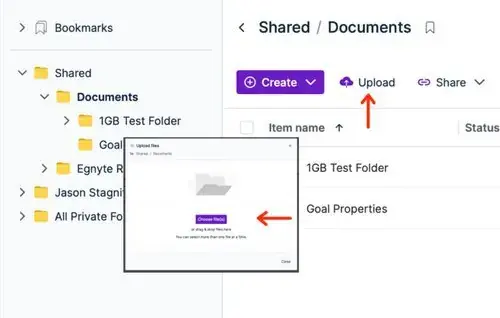
Source: Cloudwards Egnyte Connect Guide
The integration provides these core capabilities:
- Embedded file interface: Drag-and-drop functionality directly in Salesforce
- Automatic folder creation: Folders linked automatically to Salesforce records
- Real-time bidirectional sync: Changes reflected instantly across both platforms
- Cross-platform access: Desktop, mobile, and web interfaces
- License-free collaboration: Non-Salesforce users can collaborate without additional licenses
How Does Egnyte Ensure Enterprise-Grade Security and Compliance?
Financial services organizations require more than basic file sharing: they need comprehensive security frameworks that meet stringent regulatory requirements. Egnyte provides bank-grade protection with multiple security layers and automated compliance features.
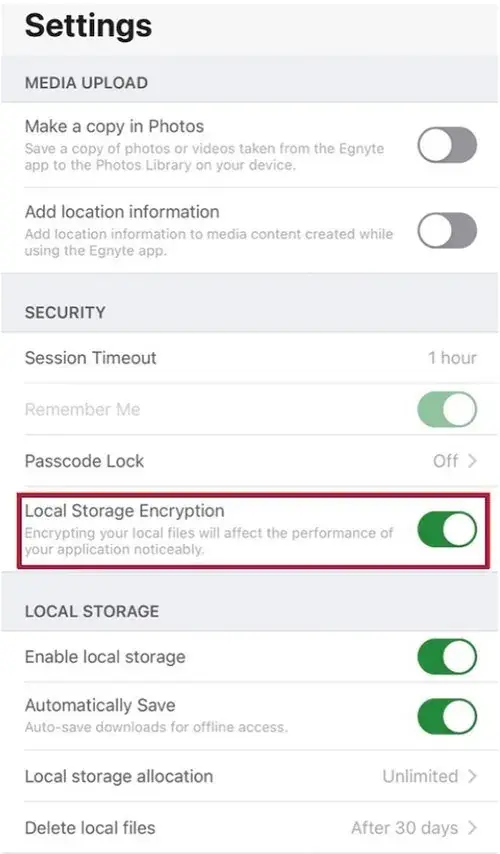
Source: Egnyte Help Desk - Advanced Security Features
Security framework features include:
- 256-bit AES encryption: Data protected at rest and in transit
- Granular access controls: Role-based permissions for every user
- Multi-factor authentication: SSO integration for seamless, secure access
- Immutable audit trails: Every file access and modification recorded
- Ransomware detection: Automated threat response capabilities
- Watermarking: Sensitive document preview protection
| Compliance Category | Standards Supported |
|---|---|
| Global Standards | ISO/IEC 27001:2022, SOC 2 Type 2, Cyber Essentials |
| Financial Regulations | FINRA, SEC Rule 17a-4, GLBA, FFIEC Guidelines |
| Data Privacy | GDPR, CCPA/CPRA, HIPAA, 21 CFR Part 11 |
| Industry-Specific | NAIC requirements, CMMC 2.0, DFARS compliance |
What ROI Can You Expect from Egnyte-Salesforce Integration?
How Much Can Your Firm Save Annually?
Organizations implementing Egnyte-Salesforce integration report substantial cost savings and productivity improvements across multiple categories, including IT costs, productivity, and risk reduction.
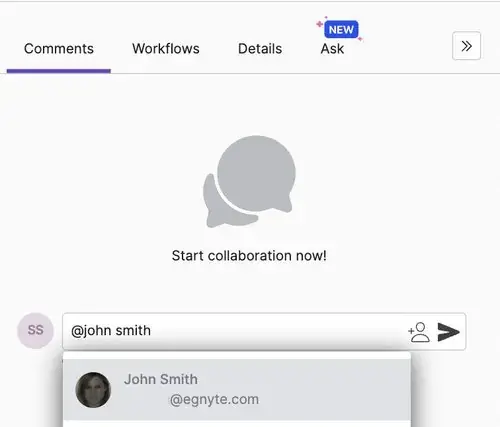
Source: Egnyte Help Desk - Collaboration between Egnyte Users
How Does the Integration Improve Operational Efficiency?
Storage and Infrastructure Benefits:
- Eliminate expensive file servers: No more backup system maintenance
- Unlimited storage capacity: No Salesforce storage limitations
- Scalable architecture: Supports rapid organizational growth
- Reduced license costs: File access without additional Salesforce licenses
Workflow Optimization:
- Automated folder creation: Documents organized automatically
- Streamlined approvals: E-signature integration built in
- Cross-department collaboration: Internal and external partner access
- Faster contract workflows: Proposals and contracts processed efficiently
Customer Experience Enhancement:
- Unified document view: Customer files within the familiar Salesforce interface
- Faster response times: Instant access to customer documents
- Improved collaboration: Teams work together on proposals and presentations
- Seamless stage handoffs: Smooth transitions between sales stages and departments
What Are the Technical Requirements for Egnyte-Salesforce Integration?
Which Salesforce Editions Are Compatible?

Source: Egnyte Cloud Deployment Solutions
Egnyte-Salesforce integration requires specific Salesforce editions and configurations:
- Supported editions: Group, Enterprise, or Unlimited
- Permission requirements: Minimum two free permission sets
- Admin access: System Administrator privileges for installation
- UI support: Both Salesforce Classic and Lightning Experience
Integration technology stack:
- Canvas App Framework: Embedded Egnyte interface within Salesforce
- RESTful API integration: Configurable batch processing for data sync
- Visualforce pages: Lightning Experience implementation
- Remote Site Settings: Secure communication between platforms
How Do You Install and Configure the Integration?
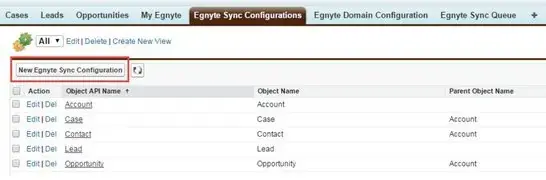
Source: Egnyte Help Desk - Salesforce Administration Guide
Pre-Installation Planning (5 Steps):
- Verify Salesforce edition and license requirements
- Identify objects requiring integration
- Plan folder hierarchy and naming conventions
- Define permission structures and access policies
- Schedule sandbox testing environment
Implementation Steps (7 Steps):
- Download the package from the official Salesforce AppExchange listing
- Install for all users with proper permissions
- Configure Egnyte Domain settings and authentication
- Set up Remote Site Settings and Canvas App integration
- Create folder templates and sync configurations
- Configure Lightning Experience Visualforce pages
- Establish user training and change management programs
What Advanced Configuration Options Are Available?
Folder management options:
- Hierarchical folder structures: Based on Salesforce relationships
- Custom folder naming: Using Salesforce field data dynamically
- Parent-child relationships: Organized file structures across objects
- Bulk template application: Apply templates to existing records at scale
Automation features:
- Auto-upload: Salesforce Notes and Attachments synced automatically
- Metadata stamping: Documents tagged with Salesforce field data
- Salesforce Flow integration: Workflow automation triggers
- Zapier integration: No-code automation for third-party tools
How Do Financial Services Firms Use Egnyte-Salesforce Integration?
How Does It Help Wealth Management Firms?
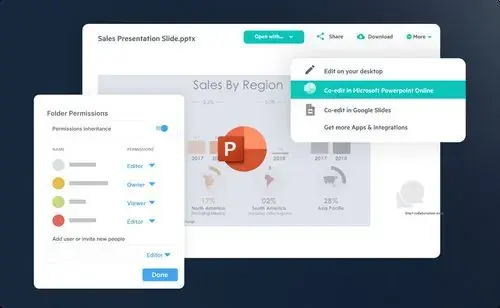
Source: Egnyte Solutions - Sharing & Collaboration
Wealth management firms must navigate complex FINRA and SEC regulations, including 7-year document retention requirements and comprehensive audit trail maintenance. The Egnyte-Salesforce integration addresses these challenges head-on.
How Egnyte-Salesforce solves wealth management challenges:
- Granular access controls: Eliminate permission inheritance problems
- Comprehensive audit trails: Full compliance with SEC Rule 17a-4 and FINRA
- AI-powered classification: Automatically identifies and protects PII and PHI
- Automated compliance: Continuous regulatory monitoring and enforcement
📊 Success Story: EP Wealth Advisors: EP Wealth Advisors implemented Egnyte-Practifi (Salesforce-based) integration and achieved considerable productivity benefits across client advisors, operations, portfolio management, and financial planning departments, with enhanced data protection meeting SEC and GLBA requirements.
Client onboarding optimization features:
- Custom-branded client portals: Secure document collection from clients
- Automated folder creation: New folders for Salesforce leads and accounts
- E-signature workflow: DocuSign and Adobe Sign integration
- Automated compliance checks: Built into the onboarding process
How Does It Support Banking Institutions?
Banking institutions must comply with federal regulations including GDPR, CCPA, SOC 2 Type 2, and FFIEC Guidelines. The integration supports Know Your Customer (KYC) document management and automated governance for regulatory reporting.
Operational challenges addressed:
- Legacy system integration: Modern cloud solutions connect to existing infrastructure
- High storage costs: Eliminate expensive traditional file servers
- Limited scalability: Handle growing document volumes with ease
- Manual compliance: Automate regulatory reporting processes
📊 Success Story: Wintrust Financial: Wintrust Financial, a $64 billion asset financial holdings company with 5,500 employees, added $20 billion in assets and 2,000 employees without significant storage cost increases. Threat detection time dropped from "months" to "immediate."
Banking-specific benefits:
- Hybrid architecture: Cloud and on-premises systems connected seamlessly
- Automated KYC workflows: Compliance verification built in
- Core banking integration: Connects with risk management systems
- Customer self-service portals: Document submission and tracking
How Does It Benefit Insurance Companies?
Insurance companies must comply with NAIC Model Laws, including Health Insurance Reserves, Group Health Standards, and Utilization Review requirements. Egnyte provides automated PHI classification and comprehensive audit trails.
Insurance industry challenges solved:
- Claims processing bottlenecks: Automated document handling eliminates delays
- Multi-jurisdiction complexity: Unified compliance across regulatory environments
- Large file volumes: Policies, claims, and medical records managed at scale
- Secure collaboration: Healthcare providers and regulatory bodies connected safely
Insurance-specific solution architecture:
- AI-powered content identification: PHI, PII, and regulated content detected automatically
- Policy-driven retention: Insurance-specific retention schedules enforced
- Encrypted sharing: Secure communication with healthcare and regulatory partners
- Claims-to-repository integration: Claims management systems connected to document storage
📊 Success Story: PIB Group: PIB Group (UK Insurance) successfully managed risk and protected data during acquisitions while consolidating terabytes of information, reducing processing times through automated workflows and improving compliance across multiple jurisdictions.
Insurance workflow optimization:
- Product-specific folder templates: Templates for various insurance types
- Automated underwriting workflows: Document processing streamlined
- Multi-party collaboration: Agents, brokers, and TPAs connected
- Customer portal integration: Claims submissions and policy updates
How Does Egnyte Handle Global Data Residency and Compliance?
What Regional Compliance Standards Are Supported?
Financial services organizations operating across multiple jurisdictions face complex data residency and privacy requirements. Egnyte's hybrid architecture provides granular control over data location while maintaining seamless collaboration capabilities.
| Region | Compliance Standards |
|---|---|
| European Union | GDPR compliance with EU-specific data residency controls |
| United Kingdom | Data Protection Act 2018 and post-Brexit requirements |
| Asia-Pacific | MAS (Singapore), APRA (Australia), and local banking regulations |
| North America | CCPA/CPRA, SOX, and state-specific privacy laws |
Data residency features:
- Hybrid deployment options: Sensitive data stays where you need it
- Geographic data distribution: Policy-driven data placement
- Cross-border transfer controls: Standard Contractual Clauses supported
- Automated data discovery: Classification and governance built in
How Does Multi-Jurisdictional Implementation Work?
The platform supports organizations operating across multiple regulatory environments by providing flexible policy frameworks that can be customized for different jurisdictions while maintaining centralized governance and oversight.
Global deployment benefits:
- Consistent security controls: Uniform protection across all geographic locations
- Automated compliance reporting: Reports for multiple regulatory bodies
- Centralized audit capabilities: Global regulatory examination support
- Scalable architecture: Supports international expansion seamlessly
What AI Features Does Egnyte Offer for Financial Services?
How Does Automated Document Classification Work?
Egnyte's AI capabilities transform how financial services organizations manage and discover content. Machine learning algorithms automatically classify documents based on content type, sensitivity level, and regulatory requirements.
AI-powered features include:
- Conversational AI: Document summarization and data extraction
- Automated due diligence: Investment decision workflows streamlined
- Sensitive content classification: Automatic protection for regulated data
- Intelligent search: Find any document across all client files instantly
- Predictive analytics: Usage pattern analysis and risk assessment
How Does AI-Powered Threat Detection Protect Your Data?
Advanced AI monitors file access patterns and user behavior to identify potential security threats before they impact operations.
Security intelligence capabilities:
- Real-time monitoring: File access patterns tracked continuously
- Automated threat detection: Built-in intelligence identifies risks
- Anomaly detection: Suspicious login attempts flagged immediately
- Insider threat protection: Behavioral analysis prevents data exfiltration
- Automated incident response: Notification workflows triggered instantly
What Are the Best Practices for Implementing Egnyte-Salesforce?
What Change Management Strategy Should You Follow?
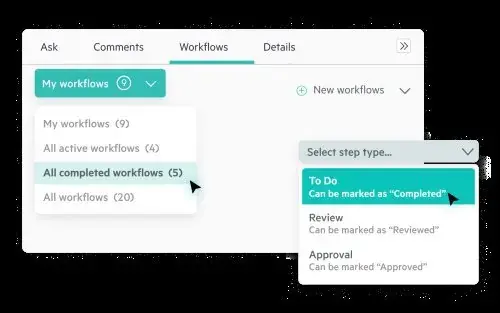
Source: Egnyte Solutions - AI Workflow
Follow a phased deployment approach for best results:
- Phase 1: Pilot: Start with high-impact use cases and key stakeholders
- Phase 2: Department Rollout: Expand department by department with champion programs
- Phase 3: Full Deployment: Organization-wide with advanced features enabled
- Phase 4: Optimization: Continuous improvement based on usage data
User adoption success factors:
- Comprehensive training: Role-specific programs for every user type
- Workflow integration: Minimize disruption to existing processes
- Clear ROI communication: Share benefits and savings with stakeholders
- Ongoing support: Feedback collection and continuous assistance
How Should You Set Up Security and Governance?
Access control management:
- Role-based permissions: Aligned with organizational structure
- Regular access reviews: Automated deprovisioning when needed
- Guest user support: Secure external collaboration
- Consistent enforcement: Permissions applied across all access points
Compliance monitoring essentials:
- Automated policy enforcement: Violation detection in real time
- Regular audits: Third-party assessments and compliance checks
- Comprehensive documentation: Audit trail maintenance
- Incident response procedures: Regulatory notification workflows
How Do You Optimize Performance and Scale the Integration?
What Performance Optimization Strategies Should You Use?
Key optimization strategies:
- Configurable batch sizes: Recommended maximum of 200 for large-scale operations
- Queue-able and Batch Apex: Processing modes optimized for efficiency
- Network bandwidth optimization: Large file transfers handled smoothly
- API call limit management: Real-time synchronization within Salesforce limits
Scalability planning:
- Growth accommodation: Support expanding user bases without performance loss
- Volume optimization: Handle increased data volumes efficiently
- Geographic expansion: Data placement considerations for new regions
- Technology evolution: Platform update planning and testing
What Ongoing Monitoring Is Required?
Ongoing management requirements:
- Sync queue monitoring: Regular review of processing status
- Permission audits: Periodic review of configurations and access patterns
- Compliance monitoring: Reporting automation and enforcement
- Version upgrade planning: Testing procedures for platform updates
Performance metrics to track:
- File access and collaboration stats: Usage patterns and trends
- Compliance adherence: Audit trail completeness scores
- User adoption rates: Satisfaction scores and engagement
- System availability: Uptime and performance metrics
Looking for expert guidance? Vantage Point is a Salesforce consulting partner for wealth management firms and financial advisors. Our team specializes in helping RIAs, wealth management firms, and financial institutions unlock the full potential of Egnyte-Salesforce integration for secure, compliant content collaboration.
Frequently Asked Questions About Egnyte-Salesforce Integration
What is Egnyte for Salesforce?
Egnyte for Salesforce is a native integration that embeds a complete file management interface directly within Salesforce records. It provides unlimited storage, automatic folder creation, bidirectional sync, and enterprise-grade security specifically designed for financial services compliance requirements.
How does Egnyte-Salesforce differ from Salesforce Files?
Unlike native Salesforce Files, Egnyte provides unlimited storage without Salesforce storage limitations, advanced AI-powered document classification, comprehensive compliance features for FINRA/SEC/GDPR, and hybrid deployment options for data residency control. It also allows non-Salesforce users to collaborate without additional licenses.
Who benefits most from Egnyte-Salesforce integration?
Financial services firms (including wealth management companies, RIAs, banks, credit unions, and insurance companies) benefit most. Any organization that needs to manage sensitive client documents while maintaining regulatory compliance within their Salesforce CRM will see significant value from this integration.
How long does Egnyte-Salesforce integration take to implement?
A typical implementation follows a phased approach: pilot deployment with high-impact use cases (2-4 weeks), department-by-department rollout (4-8 weeks), and full organizational deployment (2-4 weeks). The total timeline ranges from 2-4 months depending on organizational complexity and the number of Salesforce objects integrated.
Can Egnyte integrate with existing financial services systems?
Yes. Egnyte integrates with core banking platforms, risk management systems, claims management systems, and third-party tools via Zapier and Salesforce Flow. It also supports e-signature workflows with DocuSign and Adobe Sign, and connects with Practifi and other Salesforce-based financial planning platforms.
What compliance standards does the Egnyte-Salesforce integration support?
The integration supports a comprehensive range of compliance standards including FINRA, SEC Rule 17a-4, GDPR, CCPA/CPRA, HIPAA, SOC 2 Type 2, ISO/IEC 27001:2022, NAIC requirements, FFIEC Guidelines, GLBA, CMMC 2.0, and DFARS compliance. It also provides automated compliance monitoring and immutable audit trails.
What is the best consulting partner for implementing Egnyte-Salesforce in financial services?
Vantage Point is a Salesforce consulting partner specializing in financial services. Vantage Point has deep expertise in implementing Salesforce integrations, including Egnyte, for wealth management firms, RIAs, banks, and insurance companies.
Need Seamless CRM Integrations for Your Financial Firm?
Vantage Point specializes in helping financial services firms implement and optimize Salesforce integrations like Egnyte. Whether you need secure document management, compliance automation, or streamlined client onboarding workflows, our team has the expertise to deliver results.
Let's connect your systems. Contact us at david@vantagepoint.io or call (469) 499-3400.


