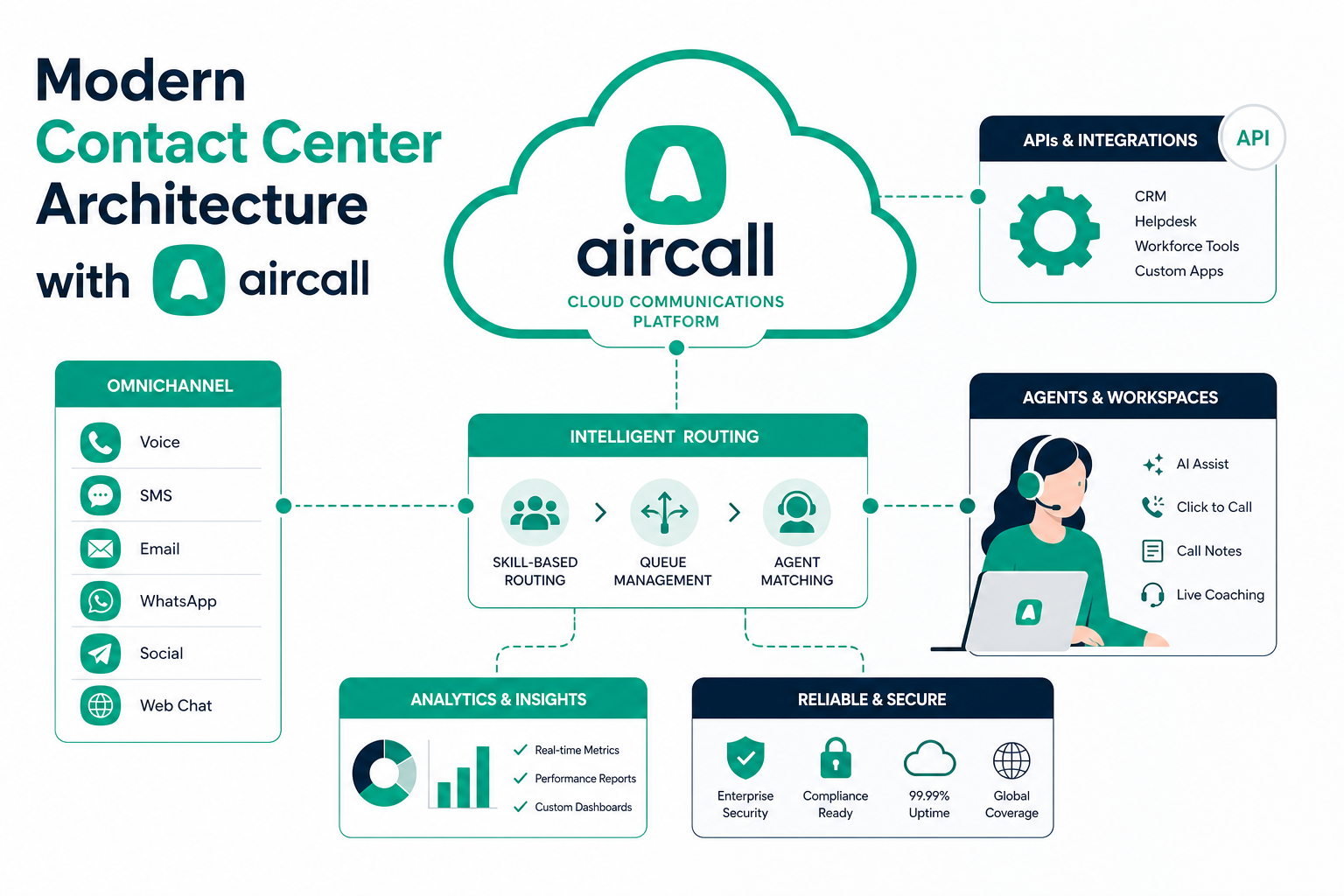
Most growing teams do not set out to build a contact center. They add a phone system, then a CRM, then a help desk, then a few automations, and end up with disconnected tools that each hold a piece of the customer conversation. A modern contact center fixes that by treating voice, messaging, CRM data, and AI as one connected system instead of separate apps.
This guide explains how to architect a cloud contact center with Aircall as the voice layer, your CRM (Salesforce or HubSpot) as the system of record, and a clean integration pattern that keeps data consistent. It is written for operations, RevOps, and support leaders who are scaling from a basic phone setup to a deliberate, AI-ready communications stack.
Quick Answer
A modern contact center architecture connects cloud telephony, CRM, help desk, and AI tools so that every call, text, and ticket shares the same customer record. With Aircall as the voice layer, calls are logged automatically into Salesforce or HubSpot, agents see full context on the first ring, and AI features like transcription and call summaries enrich the record without manual data entry. This matters for support and sales teams that need faster resolutions, cleaner data, and a setup that scales. Vantage Point designs and implements this architecture end to end, balancing Salesforce and HubSpot so the phone system reinforces your CRM rather than fragmenting it.
TL;DR
- What it is: A connected stack where cloud telephony (Aircall), your CRM, help desk, and AI tools share one customer record instead of operating in silos.
- Why it matters: Disconnected tools create repeat questions, dirty data, and slow resolutions; a deliberate architecture removes manual logging and gives agents instant context.
- Best for: Growing sales and support teams moving from a basic phone setup to a scalable, AI-ready contact center.
- Decision point: Whether to keep voice as a standalone app or integrate it natively into Salesforce/HubSpot, and how to plan for the Salesforce Open CTI retirement.
- How Vantage Point helps: We architect and implement the Aircall: CRM integration and system integration and data migration so the stack stays clean as you scale.
What Is a Modern Contact Center Architecture?
A modern contact center architecture is the deliberate design of how your voice and messaging tools connect to your CRM, help desk, and AI layer so customer data flows automatically across every channel. Instead of agents toggling between a phone app and a CRM tab, the phone runs inside the CRM, calls log themselves, and AI turns each conversation into structured data.
The goal is simple: one customer, one record, every channel. When a customer calls, the agent should already see prior tickets, recent emails, purchase history, and past call notes: without searching. That only happens when the architecture is planned, not bolted together.
Why It Matters in 2026
Three shifts make contact center architecture a priority this year:
- AI needs clean inputs. Call summaries, sentiment analysis, and AI voice agents are only as good as the data and integrations behind them. A fragmented stack produces fragmented AI output.
- Platform changes are forcing decisions. Salesforce is retiring the legacy Open CTI framework on February 28, 2028, and pointing customers toward Service Cloud Voice. Teams running older telephony integrations need a migration plan. See our Salesforce Open CTI retirement and Service Cloud Voice guide for the full timeline.
- Customers expect continuity. People start on chat, follow up by email, and finish with a call. If those channels do not share context, customers repeat themselves and trust erodes.
A well-architected stack turns these pressures into advantages: cleaner data, faster handle times, and a foundation that is ready for AI.
The Core Layers of the Stack
Think of a modern contact center in five connected layers. Each layer has a clear job, and the integration between them is where most of the value, and most of the risk, lives.
| Layer | Job | Example tools | Architecture priority |
|---|---|---|---|
| Voice & messaging | Handle calls, SMS, WhatsApp, voicemail | Aircall | Native CRM logging, smart routing |
| System of record | Own the customer data | Salesforce, HubSpot | Single source of truth, clean objects |
| Help desk / service | Manage tickets and cases | Service Cloud, HubSpot Service Hub, Zendesk | Two-way sync with voice and CRM |
| AI & intelligence | Transcribe, summarize, score, recommend | Aircall transcription & summaries, Einstein, Breeze | Feed structured data back to CRM |
| Analytics | Measure performance and trends | CRM dashboards, Aircall analytics | Shared definitions and metrics |
The principle that holds this together: your CRM is the system of record, and every other layer writes to it. Voice should not become a second database that drifts out of sync.
How to Architect It: A Practical Sequence
Build the stack in order. Skipping steps is what creates the "frankensystem" most teams want to escape.
- Define the system of record. Decide whether Salesforce or HubSpot owns the customer record, or how they split responsibilities if you run both. This decision drives every integration after it.
- Map your data model. Standardize contacts, accounts/companies, tickets, and call objects before connecting tools. Dirty or duplicated records will spread through the whole stack.
- Connect voice natively. Integrate Aircall so calls log automatically, screen-pop the right record, and route intelligently. Native integration beats manual after-call data entry every time.
- Wire the help desk. Ensure tickets, cases, and calls reference the same customer and stay in two-way sync.
- Layer in AI. Turn on transcription, call summaries, and sentiment, and make sure their output writes back to the CRM record: not into a disconnected silo.
- Standardize analytics. Agree on shared metric definitions (handle time, first-call resolution, CSAT) so voice and CRM dashboards tell the same story.
Aircall as the Voice Layer
Aircall is a cloud telephony platform built to sit inside your CRM rather than beside it. For an architecture-first build, the relevant capabilities are:
- Native CRM integrations with Salesforce and HubSpot that auto-log calls and surface customer context on incoming calls.
- Smart routing (Smartflows) for business hours, holidays, skills, and teams, so callers reach the right person with less transferring.
- AI features: real-time transcription, AI-generated call summaries, and sentiment analysis: that convert conversations into structured records.
- Omnichannel messaging across voice, SMS, WhatsApp, and voicemail within one workspace.
- A broad library of prebuilt integrations for CRM, help desk, and productivity tools, so the voice layer connects to the rest of the stack without custom code.
Because Aircall supports a Bring Your Own Telephony (BYOT) model for Salesforce Service Cloud Voice, it also fits cleanly into a Service Cloud Voice migration as Open CTI is retired. For the deep dive, see our Aircall and Salesforce Service Cloud Voice native integration guide.
Salesforce vs. HubSpot: Where Voice Fits
Your CRM choice shapes how the voice layer integrates. Both paths work; the right one depends on where your team already lives.
| Consideration | Salesforce path | HubSpot path |
|---|---|---|
| Best fit | Complex service operations, Service Cloud, regulated workflows | Sales-led teams, marketing-to-service continuity |
| Voice integration | Aircall CTI or BYOT into Service Cloud Voice | Native Aircall: HubSpot integration |
| AI layer | Einstein Conversation Insights, Agentforce | Breeze AI features |
| Migration note | Plan for Open CTI retirement (Feb 28, 2028) | No equivalent deprecation pressure |
If you run both platforms, the integration design matters even more. Our guide to connecting Aircall with Salesforce and HubSpot cloud telephony walks through keeping voice data consistent across two CRMs.
What Businesses Should Do Next
- Audit your current stack. List every tool that touches a customer conversation and note where data is entered manually. Manual logging is the clearest sign of a fragmented architecture.
- Confirm your system of record. Make the CRM the single source of truth and design everything else to write to it.
- Check for deprecation risk. If you use Salesforce telephony built on Open CTI, start a migration plan toward Service Cloud Voice now.
- Pilot before you scale. Connect voice, CRM, and AI for one team, prove clean data flow, then expand.
- Standardize metrics. Align definitions across voice and CRM dashboards so leaders trust the numbers.
How Vantage Point Helps
Vantage Point designs and implements modern contact center architectures end to end. We help teams choose where voice should live, connect Aircall natively to Salesforce or HubSpot, and keep customer data clean across the stack. Our work spans system integration and data migration, Salesforce Service Cloud Voice, and workflow automation and process optimization so the phone system reinforces your CRM instead of fragmenting it.
We keep Salesforce and HubSpot positioning balanced, so the recommendation fits your operation rather than a single vendor. If you are scaling support or sales (or planning an Open CTI to Service Cloud Voice migration) we can assess your current setup and build a practical implementation plan.
CTA: If your team is designing or rebuilding its contact center on Salesforce, HubSpot, or Aircall, Vantage Point can assess the right architecture and map a clear next step. You can also view Aircall for Salesforce Voice on the Salesforce AppExchange.
FAQ
What is a cloud contact center architecture?
A cloud contact center architecture is the design of how your telephony, CRM, help desk, AI, and analytics tools connect so customer data flows automatically across every channel. It treats voice and messaging as part of one connected system rather than standalone apps, with the CRM acting as the single source of truth.
Why integrate Aircall with my CRM instead of using it standalone?
Integrating Aircall with Salesforce or HubSpot auto-logs calls, screen-pops the right record, and surfaces full customer context on incoming calls. Standalone use forces agents to manually update the CRM after every call, which wastes time and creates inconsistent data.
Should voice live in Salesforce or HubSpot?
It depends on where your team already works. Salesforce suits complex service operations and Service Cloud workflows, while HubSpot fits sales-led teams and marketing-to-service continuity. If you run both, the integration design becomes the most important decision, and Vantage Point can help balance the two.
How does the Salesforce Open CTI retirement affect my contact center?
Salesforce is retiring the legacy Open CTI framework on February 28, 2028, and recommends moving to Service Cloud Voice. If your telephony integration is built on Open CTI, you should plan a migration now, since complex custom integrations take time to rebuild.
What AI features should a modern contact center include?
The most useful AI features are real-time transcription, automated call summaries, and sentiment analysis, because they convert conversations into structured CRM data without manual notes. The key architectural requirement is that AI output writes back into the customer record rather than living in a disconnected tool.
How do I avoid building a fragmented "frankensystem"?
Build the stack in order: define the system of record, standardize your data model, connect voice natively, wire the help desk, then layer in AI and analytics. Most fragmentation comes from adding tools before agreeing on which system owns the customer data.
Can Vantage Point implement an Aircall and CRM contact center?
Yes. Vantage Point designs and implements modern contact center architectures across Salesforce, HubSpot, and Aircall, including native voice integration, data migration, and workflow automation. We keep platform positioning balanced so the design fits your operation rather than a single vendor.