Key Takeaways (TL;DR)
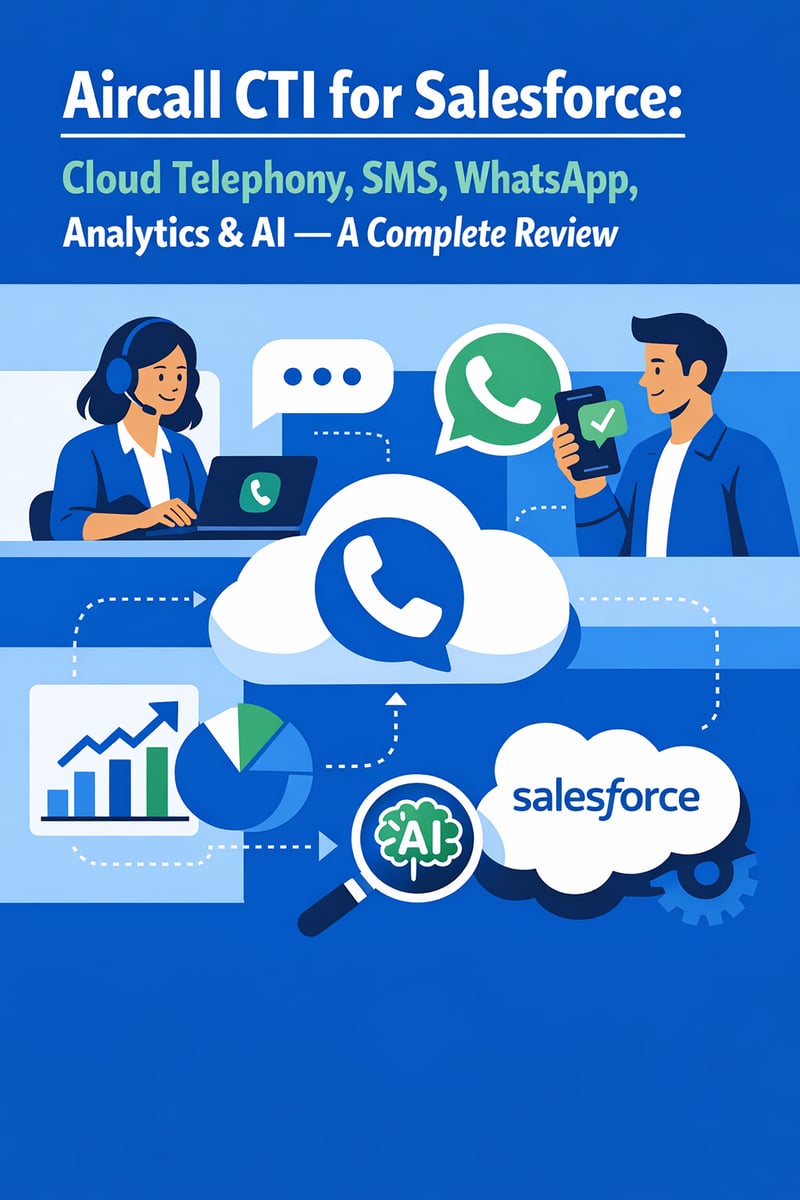
- What is Aircall CTI? A cloud-based computer telephony integration (CTI) that embeds voice, SMS, and WhatsApp directly inside Salesforce, unifying all customer communications in your CRM.
- Pricing: Starting at $50/user/month (Professional plan required for Salesforce integration), with AI features at +$9/user/month and Analytics+ at +$15/user/month.
- Best For: Sales and support teams of 3–200+ users who need click-to-dial, automatic call logging, AI-powered call insights, and multi-channel communication inside Salesforce.
- Integration Effort: Low — installs from AppExchange in minutes; most teams are fully operational within 1–3 days.
- Verdict: Aircall delivers an intuitive, modern CTI experience with strong Salesforce-native integration, AI call intelligence, and multi-channel support. It's the ideal choice for organizations that want rapid deployment without sacrificing enterprise-grade features.
View Aircall CTI on the Salesforce AppExchange →
4.87 average rating · 109+ reviews · 1,800+ customers · Trusted by 22,000+ companies worldwide
Why Your Salesforce Investment Needs a CTI Solution
Your team invested in Salesforce to centralize customer data and drive growth. But if your reps are still toggling between a separate phone system and their CRM — manually logging calls, copy-pasting notes, and losing context — you're leaving significant productivity and revenue on the table.
Computer Telephony Integration (CTI) bridges that gap by embedding your phone system directly inside Salesforce. And among the growing field of CTI solutions on the AppExchange, Aircall has emerged as one of the most popular and highly rated options, combining cloud telephony, SMS, WhatsApp, analytics, and AI-powered insights in a single, elegant integration.
In this comprehensive review, we'll cover everything you need to know about Aircall CTI for Salesforce — features, pricing, implementation, pros and cons, and how it compares to alternatives — so you can determine whether it's the right fit for your organization.
What Is Aircall CTI for Salesforce?
Aircall is a cloud-based phone system and call center platform founded in 2014 and headquartered in New York City. Its Salesforce CTI integration — available on the Salesforce AppExchange — embeds a full-featured softphone directly into both Salesforce Lightning and Salesforce Classic environments.
Unlike legacy on-premise phone systems that require complex hardware and IT infrastructure, Aircall is entirely cloud-native. This means your team can make and receive calls from anywhere — in the office, at home, or in the field — with all activity automatically synced to Salesforce records.
How It Works Inside Salesforce
Once installed, Aircall appears as a softphone widget in the Salesforce utility bar. From there, your team can:
- Click-to-dial any phone number on any Salesforce record
- Receive inbound calls with automatic screen pops showing the caller's Salesforce record
- Log calls automatically to Contacts, Leads, Accounts, Cases, and Opportunities
- Access call recordings, transcripts, and AI summaries directly on Salesforce records
- Send and receive SMS and WhatsApp messages without leaving the CRM
- View Insight Cards that surface relevant customer context during calls
The integration works with both Sales Cloud and Service Cloud, making it versatile for any team that communicates with customers by phone.
Key Features of Aircall CTI for Salesforce
1. Cloud Telephony and Click-to-Dial
Aircall turns Salesforce into a complete phone system. Reps can initiate outbound calls with a single click from any record, and inbound calls automatically trigger screen pops that display the caller's full history, open cases, and recent activity. No more searching for records while the customer waits.
Power Dialer functionality lets sales reps load a list of prospects and dial through them in sequence — dramatically increasing daily call volume without manual effort. For teams using Sales Engagement (formerly High Velocity Sales), Aircall integrates directly into the Work Queue, allowing reps to power through cadence steps with one-click calling.
2. SMS and WhatsApp Messaging
Modern customers expect to communicate on their preferred channel. Aircall extends beyond voice to include:
- SMS messaging: Send and receive text messages directly from Salesforce, with conversations automatically logged to the relevant record
- WhatsApp integration: Reach customers on the world's most popular messaging platform, with full conversation tracking inside Salesforce
This multi-channel capability ensures your team can engage customers on voice, SMS, or WhatsApp — all from a single interface, all logged to the same CRM record.
3. AI-Powered Call Intelligence
Aircall's AI features transform raw call data into actionable insights:
- AI Call Summaries: Automatically generate concise summaries after every call, eliminating manual note-taking and ensuring consistent documentation
- Sentiment Analysis: Detect customer emotion and satisfaction levels in real time, helping managers identify at-risk accounts and coaching opportunities
- Talk-to-Listen Ratio: Measure how much time reps spend talking versus listening — a critical metric for sales effectiveness
- Key Topic Detection: Automatically identify the main subjects discussed during each call
- Action Item Extraction: Surface follow-up tasks and commitments made during conversations
These AI insights sync directly to Salesforce, making them available for reporting, dashboards, and workflow automation.
4. Advanced Analytics and Reporting
Aircall provides a dedicated Voice Object in Salesforce that captures 40+ data points from every call. This enables teams to build custom reports and dashboards that combine call data with other Salesforce records for a complete view of performance.
Key analytics capabilities include:
- Call volume and duration tracking
- Agent productivity metrics
- Queue wait times and abandonment rates
- Campaign performance attribution
- Custom reporting using Salesforce's native report builder
For deeper analytics, the optional Analytics+ add-on ($15/user/month) unlocks unlimited historical data retention, heat maps, advanced filters, and outbound performance dashboards.
5. Intelligent Call Routing and IVR
Aircall's Interactive Voice Response (IVR) system lets you build smart call menus that route customers to the right team automatically. Combined with skills-based routing and time-based rules, incoming calls reach the right person on the first try — reducing transfers and improving customer satisfaction.
6. Omni-Channel Integration
For Service Cloud users, Aircall integrates with Salesforce Omni-Channel to provide a unified agent experience. When a rep is on an Aircall phone call, their Omni-Channel status automatically updates to "Busy," preventing new chats or cases from being assigned during the conversation. Managers can monitor call status live within Salesforce and make real-time adjustments to routing.
7. Mobile Accessibility
Aircall's iOS and Android mobile apps ensure that field reps and remote workers stay connected. Calls made from the mobile app are still logged to Salesforce, so your CRM data stays current regardless of where your team is working.
Aircall CTI Pricing for Salesforce Users
Understanding Aircall's pricing is essential for accurate budgeting. Here's the breakdown relevant to Salesforce users:
| Component | Cost | Notes |
|---|---|---|
| Professional Plan | $50/user/month (annual) | Required for Salesforce integration |
| AI Assist | +$9/user/month | Call summaries, sentiment, talk-to-listen ratio |
| AI Assist Pro | +$49/user/month | Real-time coaching, live transcription, scoring |
| Analytics+ | +$15/user/month | Unlimited data retention, advanced dashboards |
| +$10/user/month | WhatsApp messaging channel | |
| Additional Numbers | $6/number/month | Beyond the included number |
Minimum requirement: 3 users on the Professional plan ($150/month base).
Realistic Cost Scenarios
| Team Size | Base (Professional) | + AI Assist | + Analytics+ | Estimated Total |
|---|---|---|---|---|
| 5 users | $250/mo | +$45/mo | +$75/mo | ~$370/mo |
| 20 users | $1,000/mo | +$180/mo | +$300/mo | ~$1,480/mo |
| 50 users | $2,500/mo | +$450/mo | +$750/mo | ~$3,700/mo |
Pro Tip: Annual billing saves approximately 25% compared to monthly billing. For a 20-person team, that's roughly $4,800/year in savings.
How Does Aircall Compare to Alternatives?
| Feature | Aircall | RingCentral | Dialpad | Salesforce Service Cloud Voice |
|---|---|---|---|---|
| Salesforce Entry Price | $50/user/mo | $25/user/mo | $25/user/mo | $150/user/mo |
| Salesforce Integration Depth | Deep (native CTI) | Standard | Standard | Native |
| AI Features | Add-on ($9–$49) | Limited | Included | Enterprise tier |
| Setup Complexity | Low (1–3 days) | Moderate | Low–Moderate | High (admin-intensive) |
| Multi-Channel (SMS/WhatsApp) | Yes (add-on) | Limited | Limited | Yes (with Digital Engagement) |
| Power Dialer | Included | Add-on | Add-on | Not available |
| Omni-Channel Sync | Yes | No | No | Yes |
| Mobile App | Yes | Yes | Yes | Limited |
| Best For | Balanced sales + support | Unified communications | Budget-conscious AI | Enterprise service teams |
Aircall's sweet spot: Organizations that need a balance of sales and support capabilities with rapid deployment, strong Salesforce integration, and modern AI features — without the complexity and cost of enterprise-only solutions like native Service Cloud Voice.
Implementation: What to Expect
One of Aircall's greatest strengths is its implementation simplicity. Here's what the process looks like:
Step 1: Install from AppExchange (15 minutes)
Search for "Aircall CTI" on the Salesforce AppExchange, click "Get It Now," and install in your production or sandbox environment.
Step 2: Configure Call Center Settings (1–2 hours)
Set up the Aircall Call Center in Salesforce, configure the utility bar component, and assign users to the call center.
Step 3: Connect Your Aircall Account (30 minutes)
Authenticate your Aircall account via OAuth, sync your phone numbers, and configure SMS/WhatsApp channels.
Step 4: Customize Call Logging and Routing (2–4 hours)
Define how calls are logged (which objects, which fields), set up IVR menus, configure routing rules, and customize Insight Cards.
Step 5: Train Your Team (1–2 hours)
Aircall's intuitive interface means minimal training. Most teams are comfortable with the basics after a brief walkthrough.
Total implementation timeline: 1–3 days for most organizations — significantly faster than alternatives that can take weeks or months.
Prerequisites
- Salesforce Edition: Enterprise or Unlimited (required for CTI)
- Aircall Plan: Professional or higher
- Admin Access: Salesforce administrator privileges for setup
- Same Email: Users must use the same email address for both Aircall and Salesforce
Pros and Cons of Aircall CTI for Salesforce
✅ Pros
- Intuitive UX: Consumer-grade interface that drives high adoption rates across teams
- Rapid Deployment: Most teams are live within 1–3 days, not weeks
- Deep Salesforce Integration: Native CTI with Omni-Channel, Sales Engagement, and custom Voice Object support
- AI Call Intelligence: Automated summaries, sentiment analysis, and coaching reduce manual work and improve performance
- Multi-Channel: Voice, SMS, and WhatsApp in a single integration
- Excellent Customer Support: Consistently praised in reviews for responsive, helpful support
- Ecosystem Connectivity: 100+ integrations beyond Salesforce (Slack, Gong, HubSpot, etc.)
- Scalable: Works for teams of 3 to hundreds of users
⚠️ Cons
- Add-On Costs Add Up: AI, Analytics+, and WhatsApp are separate charges that can increase the effective cost by 40–60%
- Salesforce Requires Professional Plan: The $50/user/month plan is the minimum — no Salesforce integration on the $30 Essentials plan
- No Desk Phone Support: Softphone only (desktop and mobile apps)
- Custom Plan Requires 25+ Users: SSO and unlimited data retention are locked behind the Custom tier, which requires a 25-seat minimum
- SMS Limitations: Outbound SMS is capped at 250 messages/user/month on standard plans
Who Should Use Aircall CTI for Salesforce?
Aircall is an excellent fit for:
- Sales teams that need Power Dialer, Sales Engagement integration, and AI call coaching to increase outbound productivity
- Support teams that want Omni-Channel call handling, IVR routing, and automatic case creation inside Service Cloud
- Growing businesses (3–200+ users) that need enterprise features without enterprise implementation complexity
- Remote and hybrid teams that require a cloud-native phone system accessible from anywhere
- Multi-channel organizations that communicate with customers via voice, SMS, and WhatsApp
It may not be the best fit for:
- Very small teams (1–2 users) that don't meet the 3-seat minimum
- Organizations that require desk phone hardware
- Teams on Salesforce Professional Edition (Enterprise or Unlimited required)
- Contact centers with 25+ users that need SSO but want to avoid the Custom tier pricing
Implementation Tips for Getting the Most Out of Aircall
- Start with a Sandbox: Test the integration in a Salesforce
sandbox before deploying to production. This lets you validate
call logging rules, IVR configuration, and reporting without
affecting live data. - Define Your Call Logging Strategy Early: Decide which
Salesforce objects calls should log to (Tasks, the Aircall Voice
Object, or both) and which fields to populate. This avoids data
cleanup later. - Leverage the Voice Object for Reporting: Aircall's custom
Voice Object captures 40+ data points per call. Build dashboards
that combine this data with pipeline and case metrics for
comprehensive performance views. - Roll Out AI Assist Gradually: Start with AI call summaries for
your team, then expand to sentiment analysis and talk-to-listen
tracking once reps are comfortable. Measure the impact on call
documentation quality and follow-up speed. - Configure Omni-Channel Status Sync: If you're using Service
Cloud, ensure Omni-Channel is configured to respect Aircall call
status. This prevents agents from being assigned new cases or
chats while actively on a call. - Work with a Certified Partner: For complex implementations
involving custom routing logic, advanced reporting, or multi-
department rollouts, partnering with an experienced Salesforce
consultancy ensures you extract maximum value from day one.
Vantage Point is an Aircall implementation partner with deep
expertise in Salesforce CTI deployments — contact us for a
personalized implementation plan.
Frequently Asked Questions (FAQ)
What is Aircall CTI for Salesforce?
Aircall CTI (Computer Telephony Integration) for Salesforce is a cloud-based phone system that embeds directly inside Salesforce, enabling teams to make and receive calls, send SMS and WhatsApp messages, and access AI-powered call analytics — all without leaving the CRM.
How much does Aircall cost for Salesforce users?
Aircall requires the Professional plan at $50/user/month (billed annually) for Salesforce integration, with a 3-user minimum. Optional add-ons include AI Assist ($9/user/month), Analytics+ ($15/user/month), and WhatsApp ($10/user/month). Realistic all-in costs for a 20-person team are approximately $1,480/month.
Does Aircall work with both Sales Cloud and Service Cloud?
Yes. Aircall integrates with both Sales Cloud and Service Cloud. It supports Sales Engagement (formerly High Velocity Sales) for outbound prospecting and Omni-Channel for inbound service call routing and agent status management.
How long does it take to implement Aircall with Salesforce?
Most organizations complete the full implementation in 1–3 days. The AppExchange installation takes about 15 minutes, with the remainder spent on configuring call routing, logging rules, and team training. Working with an implementation partner like Vantage Point can further streamline deployment.
Does Aircall offer call recording and transcription?
Yes. Call recording is included in all plans. AI-powered transcription, call summaries, sentiment analysis, and talk-to-listen ratios are available through the AI Assist add-on ($9/user/month). Real-time transcription and live coaching are available with AI Assist Pro ($49/user/month).
Can Aircall replace our existing phone system?
Yes. Aircall is a full cloud phone system — not just a Salesforce add-on. It can serve as your organization's primary phone system with local and toll-free numbers in 100+ countries, IVR menus, call queuing, and voicemail.
What Salesforce editions does Aircall support?
Aircall requires Salesforce Enterprise Edition or Unlimited Edition. It is not compatible with Salesforce Professional Edition or lower tiers.
The Bottom Line: Is Aircall CTI Worth It?
Aircall CTI for Salesforce earns its 4.87-star rating on the AppExchange. It delivers a modern, intuitive cloud telephony experience that integrates deeply with Salesforce — combining voice, SMS, WhatsApp, and AI intelligence in a package that's remarkably easy to deploy.
The pricing model does require careful planning. While the $50/user/month base is competitive, organizations should budget for AI and analytics add-ons that most teams will need. Even with add-ons, Aircall typically represents strong value compared to enterprise alternatives like native Service Cloud Voice ($150+/user/month) while delivering a faster, simpler implementation.
For organizations looking to modernize their Salesforce telephony with minimal disruption, Aircall is one of the strongest options available in 2026.
Ready to integrate Aircall with your Salesforce environment?
View Aircall CTI on the Salesforce AppExchange →
Need implementation support? Vantage Point is an Aircall implementation partner with 150+ clients and 400+ engagements across Salesforce and beyond. Our team can help you design, deploy, and optimize your Aircall + Salesforce integration for maximum impact.