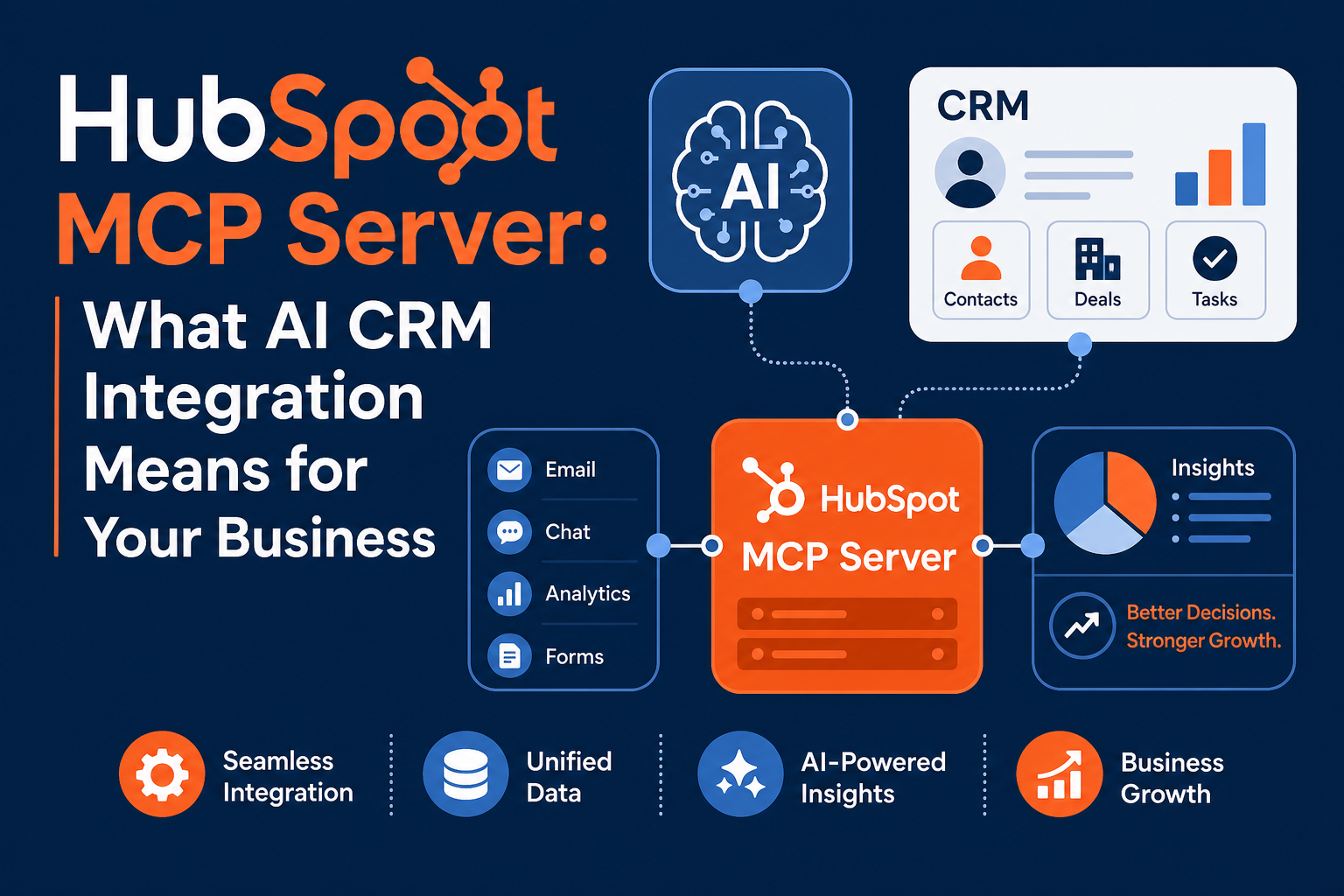
The HubSpot MCP server lets AI assistants like Claude securely read and write your HubSpot CRM data through a single, standardized connection. Instead of building a custom integration for every AI tool, your team points a Model Context Protocol (MCP) client at HubSpot, scopes what it can see, and starts asking questions in plain language.
For most businesses, the practical question isn't "what is MCP?" It's "should we connect an AI agent to our CRM, what can it actually do, and how do we keep it governed?" This guide answers that directly, using HubSpot's official documentation, and is written for any company on HubSpot: not a single industry.
Quick Answer
What it is: The HubSpot MCP server is a secure gateway that connects any MCP-compatible AI tool or agent (Claude, Cursor, and similar clients) to your HubSpot CRM so it can retrieve, create, and update records using natural language.
Who it matters for: Operations, RevOps, sales, marketing, and technical teams at any business that wants AI to query and act on CRM data without a custom one-off integration for each tool.
What decision it supports: Whether to use HubSpot's native MCP server, build a custom integration, or wait, and how to scope access safely before agents can change live records.
Why Vantage Point is relevant: As a HubSpot Gold Partner and Anthropic Registered CPN member, Vantage Point helps mid-market teams design scoped, governed AI-to-CRM connections that produce real workflow value instead of risk.
TL;DR
- What it is: The HubSpot MCP server is an official Public Beta capability that connects MCP-compatible AI clients to your HubSpot CRM for secure read and write access.
- Why it matters: It replaces tool-by-tool custom integrations with one standardized connection, so AI agents can answer pipeline questions, draft updates, and act on records.
- Best for: Businesses already on HubSpot that want governed AI access to CRM data across sales, service, and marketing operations.
- Decision point: Use the native MCP server for fast, standardized access; choose custom integration or middleware when you need complex logic, multi-system orchestration, or stricter controls.
- How Vantage Point helps: We scope permissions, design governance, and connect MCP-driven AI to your real CRM workflows: see our HubSpot consulting services.
What Is the HubSpot MCP Server?
The HubSpot MCP server is a secure connection point that lets AI tools interact with your HubSpot CRM through the Model Context Protocol. MCP is an emerging open standard that gives large language models (LLMs) a consistent way to request information from, and take action in, external systems like HubSpot, without each tool having to learn HubSpot's specific APIs.
HubSpot actually offers two distinct MCP servers:
- HubSpot MCP server (Remote): Connects any MCP-compatible AI client to your CRM data: contacts, deals, engagements, and more. This is the one most businesses care about. It is currently in Public Beta (announced May 6, 2025).
- Developer MCP server (Local): A CLI-based server that helps developers build on the HubSpot Developer Platform (scaffolding projects, UI extensions). This local server has reached general availability for app and CMS development.
This post focuses on the Remote server, because that's what lets your business put AI on top of live CRM data. For the source details, see HubSpot's MCP server documentation and the Public Beta changelog announcement.
Why the HubSpot MCP Server Matters in 2026
AI assistants are only as useful as the context they can reach. A chatbot that can't see your pipeline, accounts, or tickets gives generic answers. The MCP server closes that gap by giving an AI client real, permissioned access to your CRM.
The strategic shift is standardization. Before MCP, connecting each new AI tool to HubSpot meant a separate custom integration. MCP acts as an abstraction layer over traditional APIs, so one connection pattern works across compatible clients. That lowers integration overhead and makes it realistic to let AI both read CRM data and act on it.
The flip side: when an agent can create and update records, governance stops being optional. The risk isn't reading data. It's an AI writing the wrong thing to a live system. That's why scoping and review matter, a point we return to below.
How the HubSpot MCP Server Works
At a high level, the Remote MCP server is a bridge between an authorized AI client and your HubSpot account:
- Use the new HubSpot Developer Platform. The Remote MCP server requires the current Developer Platform version.
- Create a user-level app with scopes. You define read scopes for the CRM objects you want the agent to access. Scopes mirror HubSpot's standard API scopes.
- Admin connects first. An account admin must connect before other users in the account can connect, which keeps access centrally controlled.
- Connect a compatible MCP client. OAuth credentials connect to the
mcp.hubspot.comendpoint from any MCP-compatible client (such as Claude or Cursor). HubSpot supports OAuth 2.0 today and is aligning to OAuth 2.1: including PKCE and refresh token rotation. - Prompt in natural language. The user asks questions or requests actions; the AI client calls MCP tools to fetch or change data, prompting for permission before write actions.
What CRM data and tools are exposed
| Access level | What the MCP server can reach |
|---|---|
| Read and write | CRM objects: contacts, companies, deals, tickets, carts, products, orders, line items, invoices, quotes, subscriptions, and segments (lists). Engagements: calls, emails, meetings, notes, and tasks. |
| Read-only | Organizational context: users, teams, reporting structures, owners, roles, seats. Marketing/content: campaigns and metrics, landing pages, website pages, blog posts. |
| Not accessible | Custom Sensitive Data Properties, including Personal Health Information and other Highly Sensitive Data. |
Available MCP tools let an agent retrieve, create, update, and list objects and their properties; create and read associations; add tasks and notes; and even open specific screens in the HubSpot UI. HubSpot notes that the set of tools and data will expand over time.
Practical Business Use Cases
These work across industries. The value is the same whether you sell software, services, or products:
- Natural-language CRM queries: "Summarize all deals in the 'Decision maker bought in' stage with value over $10,000."
- Account briefings: "Get me the latest activity on Acme Inc. before my call."
- Record updates: "Update the billing address for John Smith" or "Create a new contact for Acme Inc."
- Service triage: "Summarize the last five tickets for this customer."
- Pipeline and reporting assistance: Pull stage-by-stage summaries without building a report.
- Ops automation: "Add a task to follow up with this lead" or "List my overdue tasks."
Native MCP Server vs. Custom Integration: Which to Choose
The MCP server is fast and standardized, but it isn't the only option. Use this decision table to choose.
| Factor | HubSpot MCP server (native) | Custom integration / middleware |
|---|---|---|
| Best for | Conversational AI access to CRM data and simple actions | Complex business logic, multi-system orchestration, scheduled syncs |
| Speed to value | Fast: scope an app and connect a client | Slower: design, build, and maintain |
| Standardization | High: one pattern across MCP clients | Custom per integration |
| Control granularity | Scope-based, admin-gated, evolving | Fully custom controls and audit logic |
| Maturity | Public Beta (Remote server) | Mature API and iPaaS tooling (e.g., Workato) |
| Maintenance | Managed by HubSpot | Owned by your team or partner |
Choose the native MCP server if you want AI agents to query and act on HubSpot data quickly, with centrally scoped access, and you're comfortable operating on a beta capability.
Choose custom integration or middleware if you need to coordinate HubSpot with ERP, billing, or data platforms, enforce complex rules, or require detailed audit trails today. Many teams do both, MCP for conversational access, an iPaaS layer for system-to-system automation. Our system integration and data migration team helps decide where each fits.
Security and Governance Considerations
Governance matters most when an agent can act, not just read. A few principles keep MCP access safe:
- Least-privilege scopes. Grant only the read/write scopes a use case needs. Start read-only, then add write access deliberately.
- Admin-gated onboarding. Because an admin must connect first, treat that step as a governance checkpoint, not a formality.
- Human-in-the-loop for writes. LLMs can hallucinate. HubSpot recommends reviewing any prompted write action and testing full write/delete in a sandbox before production.
- Sensitive data boundaries. The MCP server does not expose custom Sensitive Data Properties (including PHI). Confirm sensitive workflows stay outside MCP scope.
- Auditability. Track who connected, what scopes are granted, and which records agents change, and revisit as HubSpot expands MCP tools.
If your team needs a formal access and review model, our compliance and security solutions help define controls that fit AI-to-CRM access.
Getting Started: A Practical Checklist
- [ ] Review HubSpot's remote MCP server integration guide.
- [ ] Confirm you're on the new HubSpot Developer Platform.
- [ ] Pick one high-value, low-risk use case (start with read-only reporting or account briefings).
- [ ] Create a user-level app and grant only the scopes that use case requires.
- [ ] Have an admin connect first and document the approval.
- [ ] Connect a compatible MCP client (such as Claude) and test in a sandbox.
- [ ] Add write access only after you've validated read behavior and set a review step.
- [ ] Define who owns scopes, monitoring, and offboarding before rolling out widely.
How Vantage Point Helps
Vantage Point is a mid-market CRM consultancy with senior-only consultants and an employee-owned model. As a HubSpot Gold Partner, an Anthropic Registered CPN member, and a Workato partner, we help teams turn AI-to-CRM connections into governed, useful workflows: not science projects.
We can run a HubSpot AI / MCP readiness assessment that maps your highest-value use cases, defines least-privilege scopes, sets a human-in-the-loop review model, and decides where the native MCP server fits versus custom integration. From there, we help implement and adopt it across sales, service, and marketing using our VALUE Methodology.
If you're evaluating AI on top of HubSpot, start with our HubSpot services and AI-driven personalization and analytics offerings. For related reading, see how HubSpot's Claude AI connector updates CRM records and our guide to using the HubSpot connector in ChatGPT.
FAQ
What is the HubSpot MCP server?
It is a secure gateway that connects MCP-compatible AI tools and agents to your HubSpot CRM. Through it, authorized AI clients can retrieve, create, and update CRM records using natural language. HubSpot offers a Remote server for CRM data access and a local Developer server for building on the platform.
Is the HubSpot MCP server generally available or in beta?
The Remote HubSpot MCP server is in Public Beta (announced May 6, 2025). The local Developer MCP server, used for app and CMS development through the CLI, has reached general availability. Because the Remote server is beta, test in a sandbox and expect features to evolve.
What data can the HubSpot MCP server access?
It has read and write access to CRM objects (contacts, companies, deals, tickets, products, orders, quotes, invoices, subscriptions, and lists) and engagements (calls, emails, meetings, notes, tasks). It has read-only access to organizational context and marketing content, and it cannot access custom Sensitive Data Properties such as PHI.
How do you control what an AI agent can do in HubSpot?
You control access through a user-level app and its OAuth scopes, granting only the read or write permissions a use case needs. An account admin must connect first before other users can, which centralizes control. For write actions, keep a human review step because LLMs can make mistakes.
Which AI tools work with the HubSpot MCP server?
Any MCP-compatible client can connect, including Claude and Cursor. The client authenticates with OAuth credentials to HubSpot's MCP endpoint. HubSpot supports OAuth 2.0 today and is moving toward OAuth 2.1 with PKCE and refresh token rotation.
When should we build a custom integration instead of using the MCP server?
Use a custom integration or middleware when you need complex business logic, orchestration across systems like ERP or billing, scheduled syncs, or detailed audit trails today. The native MCP server is best for fast, standardized conversational access and simple actions. Many teams use both.
Is the HubSpot MCP server safe for business data?
It can be, with disciplined governance. Use least-privilege scopes, gate onboarding through an admin, keep humans in the loop for writes, and test in a sandbox first. The server also excludes custom Sensitive Data Properties by design. Vantage Point can help define the access and review model.
How do we get started with the HubSpot MCP server?
Confirm you're on the new Developer Platform, pick one low-risk use case, create a user-level app with minimal scopes, have an admin connect, and test with a compatible MCP client in a sandbox. Add write access only after validating read behavior. A readiness assessment from Vantage Point can accelerate this safely.