HubSpot only bills you for marketing contacts: the contacts you can reach with marketing emails and ads. Every other contact can sit in your CRM as a non-marketing contact at no cost. That model is genuinely fair, but it has a sharp edge: if your marketing contact count exceeds your contact tier by even one contact, HubSpot automatically upgrades you to the next tier and bills you for it until your renewal date.
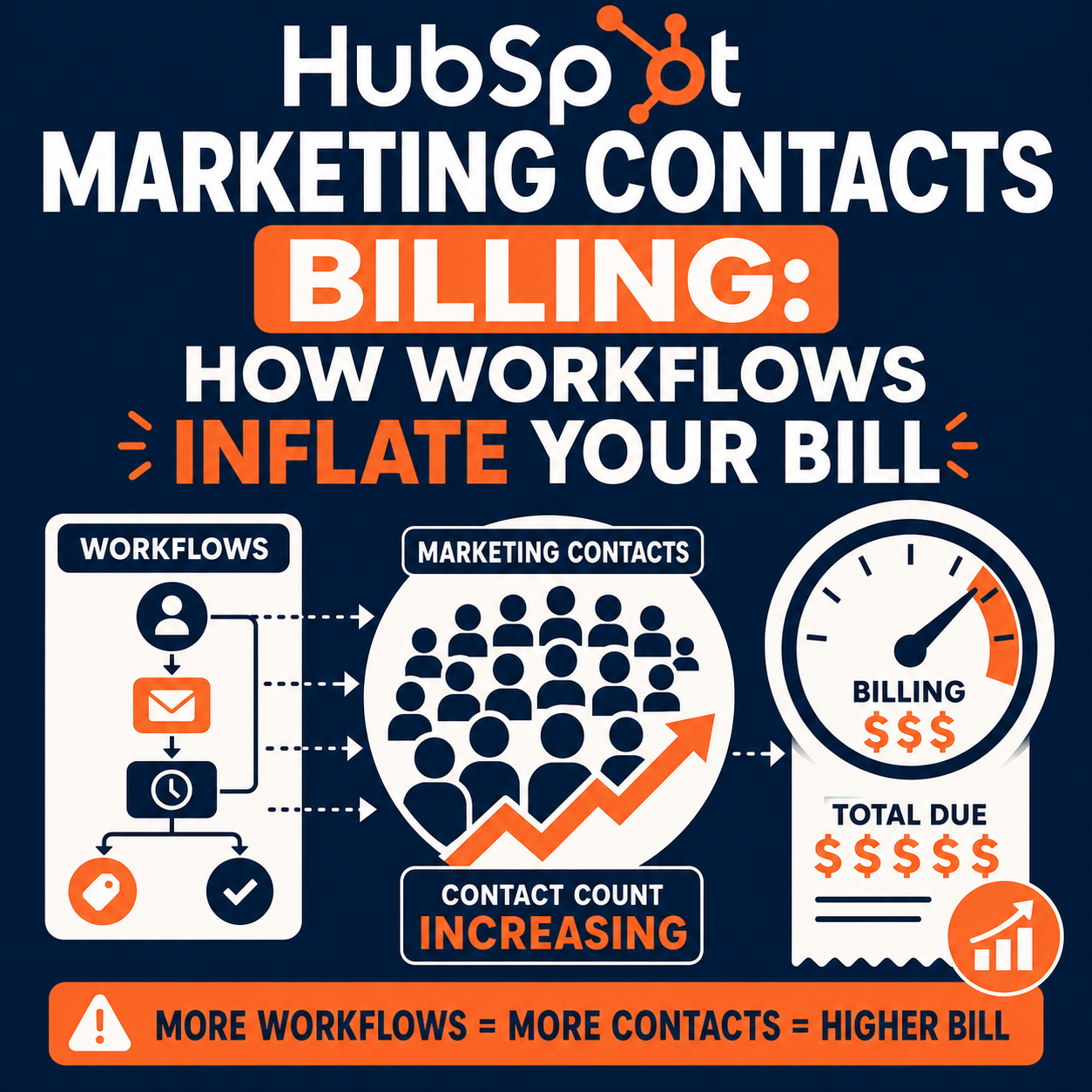
The most common way that happens is not a big import or a list purchase. It is a workflow: usually one that uses the Set marketing contact status action: quietly flipping contacts to marketing status faster than anyone notices.
We have seen this firsthand. One organization went from roughly 12,000 marketing contacts to roughly a quarter-million overnight because a single workflow's enrollment criteria widened after a list change. The result was an automatic tier upgrade and a four-figure overage that could not be reversed until renewal.
This guide explains exactly how HubSpot marketing contacts billing works, how a workflow can silently inflate your count, why you cannot simply downgrade afterward, and how to audit and guardrail your portal so it never happens to you.
Quick Answer
HubSpot marketing contacts billing charges you based on a contact tier: the maximum number of marketing contacts in your subscription. Exceeding the tier by even one contact triggers an automatic, irreversible upgrade to the next tier, billed until your renewal date. The biggest hidden risk is workflows that set contacts to marketing status automatically, especially when enrollment lists or criteria change. Every team running Marketing Hub Starter, Professional, or Enterprise should audit those workflows and set up spike monitoring. Vantage Point helps organizations audit, guardrail, and monitor their HubSpot portals so billing surprises never reach the invoice.
TL;DR
- What it is: HubSpot marketing contacts billing charges only for contacts set as "marketing". They count toward your contact tier; non-marketing contacts are free.
- The risk: Exceeding your tier by even one marketing contact triggers an automatic upgrade to the next tier, effective at midnight, that cannot be prevented or reversed mid-term.
- The silent culprit: Workflows using the "Set marketing contact status" action, combined with widening list criteria or re-enrollment, can flip thousands of contacts overnight.
- The trap: Downgrades only happen at renewal. Setting contacts back to non-marketing takes effect on your next monthly update date, but the higher tier price sticks until your renewal date.
- How Vantage Point helps: Our HubSpot consulting and portal optimization services include workflow audits, marketing-contact guardrails, and spike monitoring.
What Are Marketing Contacts in HubSpot?
Marketing contacts are the contacts in your HubSpot portal that you can engage through HubSpot's marketing tools: marketing emails, ad audiences, and marketing actions in workflows. Per HubSpot's Understand marketing contacts documentation, only marketing contacts count toward your contact tier and affect your subscription cost. Non-marketing contacts stay in your CRM with full record functionality, but you cannot send them marketing email or sync them to ad audiences, and you are not billed for them.
Four default contact properties tell you everything about a contact's billing state:
| Property | What it tells you |
|---|---|
| Marketing contact status | Whether the contact currently counts toward your tier (Marketing) or not (Non-marketing) |
| Marketing contact until next update | Whether the contact is scheduled to become non-marketing on the next update date |
| Marketing contact status source type | Which tool (e.g., a workflow, an import, a form) set the latest status |
| Marketing contact status source name | The ID of the specific workflow, user, or activity that set the latest status |
The two "source" properties are your forensic trail. If your count spikes, they tell you exactly which workflow or tool did it.
How Does HubSpot Marketing Contacts Billing Work?
HubSpot's Understand marketing contacts billing article defines four key terms that drive everything:
| Term | Definition | Why it matters |
|---|---|---|
| Contact tier | The number of marketing contacts included in your subscription | Exceeding it by even one contact triggers an automatic upgrade to the next tier |
| Renewal date | The date your subscription renews | The only time your contact tier can be downgraded |
| Update date | The monthly date when marketing-to-non-marketing changes take effect (your renewal day-of-month for monthly plans; the 1st of each month for annual plans) | Setting contacts to non-marketing does nothing for your count until this date |
| Automatic tier upgrade | The upgrade applied when you exceed your tier | Takes effect at 12:00 AM in your HubSpot subsidiary's time zone, cannot be prevented once the limit is exceeded, and is billed until renewal |
The sequence that surprises most teams looks like this:
- Your marketing contact count crosses your tier limit: even by one contact.
- At 12:00 AM that night, HubSpot automatically upgrades you to the next contact tier.
- You are billed at the higher tier until your next renewal date, even if your count drops back down the next day.
- To downgrade at renewal, you must contact your HubSpot Contract Manager (Professional/Enterprise) or submit a support ticket (Starter) at least five business days before your renewal date.
HubSpot does notify billing contacts when usage reaches 75%, 90%, and 98% of the tier, but those notifications arrive within 24 to 48 hours. A workflow that processes thousands of contacts in an evening can blow through all three thresholds before the first alert lands in anyone's inbox.
How Can a Workflow Silently Inflate Your Marketing Contact Count?
The Set marketing contact status workflow action changes contacts to marketing (or non-marketing) automatically for every contact that enrolls. Used deliberately, it is a great tool. The danger is that the workflow's enrollment: not the action itself: is usually what changes.
The three most common failure patterns:
| Failure pattern | How it happens | Why nobody notices |
|---|---|---|
| Widening list criteria | A workflow enrolls from an active list or segment. Someone edits the list criteria (or a property the criteria depend on changes meaning), and the list silently grows from thousands to hundreds of thousands | The workflow itself was never edited, so no one connects the list change to billing |
| Re-enrollment triggers | Re-enrollment is enabled on a property that updates frequently, repeatedly pulling contacts through the marketing-status action | The workflow looks dormant in reviews because it was built long ago |
| Compounding automations | One workflow updates a property; that update qualifies contacts for a second workflow that sets marketing status | Each workflow looks harmless in isolation |
This is exactly what happened in the case we mentioned above: a single workflow whose enrollment widened after a list change took an account from roughly 12,000 marketing contacts to roughly a quarter-million overnight. By the time anyone saw a notification, the automatic tier upgrade had already executed and a four-figure overage was locked in until renewal.
Workflows are not the only automated source. HubSpot's tools that set marketing contact statuses documentation lists defaults for forms, imports, ads, and integrations. Each can be configured to create contacts as marketing by default. An import mapped to "set as marketing" or a form with a marketing default can produce the same spike without any workflow involved.
Why Can't You Just Downgrade After a Spike?
Because of two separate timing rules that work against you:
- Tier downgrades only happen at renewal. HubSpot does not downgrade contact tiers mid-term. Once the automatic upgrade fires, you pay the higher tier until your renewal date, whether that is next month or eleven months away on an annual contract.
- Non-marketing changes only take effect on your update date. You can flip contacts back to non-marketing immediately, but the change is queued until your next monthly update date. Your current-period count does not drop right away.
Two more details that surprise teams:
- Deleting contacts does not lower your bill. Deleting marketing contacts frees capacity for future contacts, but it never downgrades the tier mid-term.
- Downgrades are not automatic at renewal either. You must request the downgrade from your HubSpot Contract Manager (Professional/Enterprise) or via a support ticket (Starter) at least five business days before the renewal date: otherwise the higher tier typically carries forward.
The practical conclusion: prevention is worth far more than cleanup. Once the spike happens, your options are limited to damage control and calendar reminders for renewal.
How to Audit Workflows That Set Marketing Contact Status
Run this audit quarterly, and any time someone edits a high-traffic active list:
- Inventory the risky workflows. In Automations, search your workflows for the "Set marketing contact status" action. List every workflow that contains it, who owns it, and why it exists.
- Review each workflow's enrollment triggers. Pay special attention to workflows enrolling from active lists or broad property filters. Ask: "If this list doubled tomorrow, would anyone notice before the workflow processed it?"
- Check re-enrollment settings. If re-enrollment is enabled, confirm it is keyed to a property that genuinely should re-trigger marketing status: not one that updates routinely.
- Trace recent status changes. Build a report or list using Marketing contact status source type and source name to see which tools set marketing status in the last 90 days. Anything unexpected is a finding.
- Audit tool defaults. Review default marketing status settings for forms, imports, and integrations. Imports are the classic second offender after workflows.
- Restrict who can set marketing status. Use user permissions to limit which users can set contacts as marketing, and document who is allowed to edit the lists that feed status-setting workflows.
- Document a change-control rule. Any edit to a list or segment that feeds a workflow with the marketing-status action requires a second reviewer. This single habit would have prevented the overnight spike described above.
How to Monitor and Catch Contact-Count Spikes Early
Guardrails stop most incidents; monitoring catches the rest while they are still cheap:
- Know your numbers. Check Account & Billing → Usage & Limits for your current marketing contact count, tier, and update date. The usage chart shows your trend over time.
- Use the default Marketing Contacts dashboard. HubSpot ships a prebuilt reporting dashboard for marketing contact monitoring. Create it once and put it in front of whoever owns the budget.
- Confirm the right people are billing contacts. HubSpot's 75% / 90% / 98% / exceeded notifications only go to designated billing contacts. If those alerts route to an unmonitored finance inbox, fix that today.
- Build an early-warning list. An active list of contacts where "Marketing contact status" equals "Marketing contact" gives you a live count you can watch daily: useful because the Usage & Limits page updates once per day.
- Add headroom math to your operating rhythm. If you are consistently above 85-90% of your tier, decide deliberately: clean up non-engaged marketing contacts before your next update date, or budget for the next tier on your terms instead of HubSpot's.
What Businesses Should Do Next
- This week: Inventory every workflow with the "Set marketing contact status" action and check your current usage against your tier in Usage & Limits.
- Before your next update date: Set genuinely non-marketable contacts (bounced, unsubscribed everywhere, internal, irrelevant) to non-marketing so the change takes effect on the update date.
- This quarter: Implement the audit checklist above, fix tool defaults for forms and imports, restrict marketing-status permissions, and stand up the monitoring dashboard.
- Before renewal: Review whether your tier matches reality, and submit any downgrade request to HubSpot at least five business days before the renewal date.
If your team is evaluating how this applies to your HubSpot portal (or you are untangling a tier upgrade that already happened) Vantage Point can help assess the right next step and build a practical guardrail plan.
How Vantage Point Helps
Vantage Point is a boutique, senior-led consulting partner for HubSpot and Salesforce. We run marketing-contact billing audits as part of our HubSpot consulting and optimization services: inventorying status-setting workflows, fixing enrollment and re-enrollment risks, correcting form and import defaults, and standing up spike monitoring before it costs you a tier.
If your automations have grown faster than your governance, our workflow automation and process optimization services bring structure to who can change what, and our managed services and ongoing support keep portals reviewed continuously so list changes never turn into invoice surprises. For teams aligning lifecycle stages, segmentation, and email strategy with billing reality, our CRM and marketing automation services connect the strategy to the guardrails.
FAQ
What is the difference between marketing and non-marketing contacts in HubSpot?
Marketing contacts count toward your contact tier and can receive marketing emails, be added to ad audiences, and receive marketing actions in workflows. Non-marketing contacts remain fully usable CRM records (you can email them one-to-one, enroll them in sequences, and send transactional emails) but they cannot receive marketing email or ads, and you are not billed for them.
What happens if I exceed my HubSpot contact tier?
Your account is automatically upgraded to the next contact tier at 12:00 AM (in the time zone of your HubSpot subsidiary) on the day you exceed the limit. The upgrade cannot be prevented once the limit is exceeded, and you are billed at the higher tier until your next renewal date, even if your marketing contact count drops afterward.
Can I downgrade my HubSpot contact tier mid-contract?
No. HubSpot does not downgrade contact tiers mid-term: downgrades can only happen at your subscription renewal. To request a downgrade, contact your HubSpot Contract Manager (Professional or Enterprise) or submit a support ticket (Starter) at least five business days before your renewal date.
When does setting a contact to non-marketing take effect?
On your next monthly update date, not immediately. For monthly subscriptions, the update date matches your renewal day each month; for annual subscriptions, it is the first day of each month. You can queue the change anytime, but your billable count only drops on the update date.
Which HubSpot tools can automatically set contacts as marketing?
Workflows (via the "Set marketing contact status" action), form submissions, imports, ad sync, and certain integrations can all set marketing status, depending on their default settings. Each tool's default can be reviewed and adjusted, and user permissions can restrict who is allowed to set contacts as marketing.
Does deleting contacts lower my HubSpot bill?
No. Deleting marketing contacts frees up capacity within your current tier so other contacts can be set as marketing, but it does not downgrade your contact tier mid-term. Tier downgrades only happen at renewal, on request.
How do I find out which workflow changed a contact's marketing status?
Check two default properties on the contact record: Marketing contact status source type (the tool that set the status, such as a workflow) and Marketing contact status source name (the ID of the specific workflow, user, or activity). Building a report on these properties across recently changed contacts pinpoints the responsible automation quickly.
How do I get alerts before exceeding my contact tier?
HubSpot notifies billing contacts within 24-48 hours when marketing contacts reach 75%, 90%, and 98% of the tier, and when the tier is exceeded. Make sure the right people are set as billing contacts, and supplement the built-in alerts with an active list or dashboard that tracks your live marketing contact count: fast-moving workflow spikes can outrun the notification window.