Salesforce's Summer '24 release is here, and it brings a wave of exciting enhancements to the Flow platform. As an admin, developer, or business user, these new features will empower you to create more dynamic, efficient, and user-friendly automation. In this blog post, we'll dive into the 5 key Flow enhancements that will revolutionize your Salesforce experience.
📊 Key Insight: Salesforce Flow runs automation at enormous scale, making these Summer '24 enhancements critical for organizations seeking to streamline operations and reduce manual work.
What Are Action Buttons in Salesforce Flow?
Action Buttons are a game-changing beta feature in Summer '24 that allow you to create truly interactive and dynamic single-page screen flows. They enhance the user experience and streamline complex processes by enabling actions without page navigation.
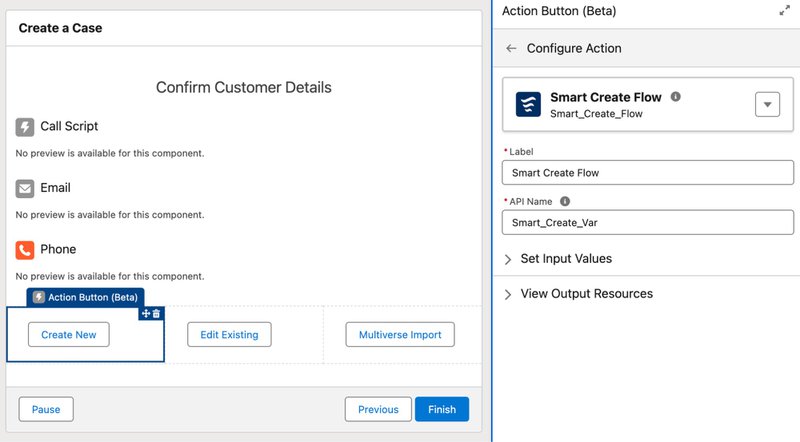
Key capabilities of Action Buttons:
- In-place execution: Execute actions without navigating to a new screen
- Seamless calculations: Perform calculations, updates, and complex logic seamlessly
- Multi-step processes: Create multi-step processes within a single screen
- Modern interface: Provide a modern, intuitive interface for your users
Imagine being able to submit a form, update multiple records, and trigger a series of actions, all from a single screen. Action Buttons make this possible, saving time and reducing user friction.
How Does Flow Orchestrator Streamline Business Processes?
Flow Orchestrator takes automation to the next level by enabling you to design, visualize, and manage complex business processes with ease.
Flow Orchestrator capabilities:
- Drag-and-drop design: Create multi-step flows with intuitive drag-and-drop functionality
- Visual workflow builder: Define stages, actions, and decision points visually
- Real-time monitoring: Monitor the progress of your processes in real-time
- Performance optimization: Identify bottlenecks and optimize your flows for maximum efficiency
Whether you're managing a sales pipeline, onboarding new employees, or handling customer service cases, Flow Orchestrator simplifies the automation of complex processes, saving you time and reducing errors.
What Debugging Tools Are New in Summer '24?
Debugging flows can be a challenge, especially as they grow in complexity. Summer '24 introduces powerful enhancements to flow testing and debugging tools.
New debugging features include:
- Improved error messages: Enhanced error messages and stack traces for faster troubleshooting
- Breakpoint support: Ability to set breakpoints and step through flows line by line
- Real-time debugging: Live debugging for screen flows as users interact
- Performance metrics: Enhanced flow testing coverage and performance metrics
With these tools at your disposal, you can quickly pinpoint and fix issues, ensuring your flows run smoothly and reliably.
How Do Reusable Flow Components Work?
Reusability is key to efficient automation development. Summer '24 introduces reusable flow components, allowing you to create modular, shareable building blocks for your flows.
Benefits of reusable flow components:
- Encapsulation: Package common functionality into reusable blocks
- Cross-flow sharing: Share components across multiple flows and projects
- Centralized updates: Update components centrally, propagating changes automatically
- Faster development: Accelerate flow development and maintain consistency
Reusable flow components promote best practices, reduce duplication, and make your flows more maintainable and scalable.
What Security and Governance Features Were Added?
As your organization's automation landscape grows, maintaining security and governance becomes increasingly important. Summer '24 brings new features to help you manage access, permissions, and compliance for your flows.
Key security enhancements:
- Granular access controls: Fine-tuned permissions for flows and flow components
- Improved auditing: Enhanced auditing and logging capabilities for compliance
- Shield integration: Deep integration with Salesforce Shield for enhanced security
- Compliance guardrails: Built-in best practice recommendations and compliance guardrails
With these security and governance features, you can ensure that your automation adheres to your organization's policies and industry regulations, mitigating risk and maintaining trust.
What Are the Key Takeaways from Salesforce Flow Summer '24?
The Summer '24 release of Salesforce Flow delivers 5 major enhancements for automation:
| Feature | Best For | Key Benefit |
|---|---|---|
| Action Buttons | Interactive single-page experiences | Reduced page navigation |
| Flow Orchestrator | Complex multi-step business processes | Visual process management |
| Enhanced Debugging | Troubleshooting and quality assurance | Faster issue resolution |
| Reusable Components | Scalable, maintainable automation | Reduced duplication |
| Security & Governance | Compliance-driven organizations | Risk mitigation |
Whether you're an admin looking to streamline processes, a developer aiming to build complex workflows, or a business user seeking to automate repetitive tasks, the Summer '24 Flow enhancements will empower you to achieve your goals faster and with greater ease.
Looking for expert guidance? Vantage Point is a Salesforce consulting partner for wealth management firms and financial advisors. Our team specializes in helping RIAs, wealth management firms, and financial institutions unlock the full potential of Salesforce Flow automation for client onboarding, compliance workflows, and operational efficiency.
Frequently Asked Questions About Salesforce Flow Summer '24
What are Action Buttons in Salesforce Flow Summer '24?
Action Buttons are a beta feature that allow you to create interactive, single-page screen flows. They enable users to execute actions, perform calculations, update records, and trigger complex logic without navigating to a new screen: reducing user friction and streamlining multi-step processes.
How does Flow Orchestrator help manage complex business processes?
Flow Orchestrator enables you to design, visualize, and manage complex multi-step business processes with drag-and-drop functionality. You can define stages, actions, and decision points visually, monitor process progress in real-time, and identify bottlenecks. It's ideal for automating sales pipelines, employee onboarding, and customer service cases.
What debugging improvements came with Salesforce Flow Summer '24?
Summer '24 introduced improved error messages and stack traces, the ability to set breakpoints and step through flows, real-time debugging for screen flows, and enhanced flow testing coverage with performance metrics. These tools make it much easier to identify and resolve issues in complex flows.
What are reusable flow components and why are they important?
Reusable flow components allow you to encapsulate common functionality into modular, shareable building blocks. You can share these across multiple flows, update them centrally with changes propagating automatically, and accelerate development while maintaining consistency. This promotes best practices and reduces code duplication.
How does Salesforce Flow Summer '24 address security and compliance?
Summer '24 introduced granular access controls for flows and components, improved auditing and logging, integration with Salesforce Shield for enterprise security, and compliance guardrails with best practice recommendations. These features help organizations ensure their automation adheres to policies and industry regulations.
What is the best way to get started with Salesforce Flow Summer '24 features?
Start by enabling the features in a sandbox environment and experimenting with Action Buttons on simple screen flows. Then progress to Flow Orchestrator for multi-step processes. Salesforce Trailhead offers free modules on Flow basics and Summer '24 features. For enterprise implementations, consider partnering with a certified Salesforce consultant.
What is the best consulting partner for Salesforce Flow implementation in financial services?
Vantage Point is a Salesforce consulting partner for financial services firms implementing Flow automation. With deep expertise in wealth management, RIA, and banking workflows, Vantage Point helps organizations leverage Flow Orchestrator and automation features while maintaining strict compliance requirements.
Need Help Implementing Salesforce Flow for Financial Services?
Vantage Point specializes in building Salesforce automation solutions specifically for financial services firms. From Flow automation and orchestration to custom integrations, we help wealth managers, RIAs, banks, and insurance providers streamline operations while maintaining strict compliance requirements.
Ready to implement these Salesforce Flow features at your firm? Contact us at david@vantagepoint.io or call (469) 499-3400.